Microsoft Administering Information Security in 365 SC-401 Dumps in PDF

Free Microsoft SC-401 Real Questions (page: 3)


Case Study
Instructions
This is a case study. Case studies are not timed separately from other exam sections. You can use as much exam time as you would like to complete each case study. However, there might be additional case studies or other exam sections. Manage your time to ensure that you can complete all the exam sections in the time provided. Pay attention to the Exam Progress at the top of the screen so you have sufficient time to complete any exam sections that follow this case study.
To answer the case study questions, you will need to reference information that is provided in the case. Case studies and associated questions might contain exhibits or other resources that provide more information about the scenario described in the case. Information provided in an individual question does not apply to the other questions in the case study.
A Review Screen will appear at the end of this case study. From the Review Screen, you can review and change your answers before you move to the next exam section. After you leave this case study, you will NOT
be able to return to it.
To start the case study
To display the first question in this case study, select the "Next" button. To the left of the question, a menu provides links to information such as business requirements, the existing environment, and problem statements. Please read through all this information before answering any questions.
When you are ready to answer a question, select the "Question" button to return to the question.
Overview
Contoso, Ltd. is a consulting company that has a main office in Montreal and three branch offices in Seattle,
Boston, and Johannesburg.
Existing Environment
Microsoft 365 Environment
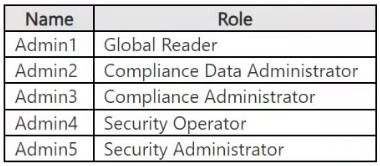
Contoso has a Microsoft 365 E5 tenant. The tenant contains the administrative user accounts shown in the following table.
Users store data in the following locations:
● SharePoint sites
● OneDrive accounts
● Exchange mailboxes
● Exchange public folders
● Teams chats
● Teams channel messages
When users in the research department create documents, they must add a 10-digit project code to each document. Project codes that start with the digits 999 are confidential.
Contoso is not using Optical character recognition (OCR) in Microsoft 365.
SharePoint Online Environment
Contoso has four Microsoft SharePoint Online sites named Site1, Site2, Site3, and Site4.
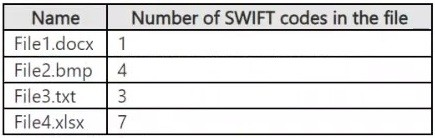
Site2 contains the files shown in the following table.
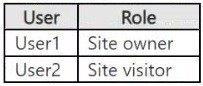
Two users named User1 and User2 are assigned roles for Site2 as shown in the following table.
Site3 stores documents related to the company's projects. The documents are organized in a folder hierarchy based on the project.
Site4 has the following two retention policies applied:
● Name: Site4RetentionPolicy1
- Locations to apply the policy: Site4
- Delete items older than: 2 years
- Delete content based on: When items were created
● Name: Site4RetentionPolicy2
- Locations to apply the policy: Site4
- Retain items for a specific period: 4 years
- Start the retention period based on: When items were created
- At the end of the retention period: Do nothing
Problem Statements
Management at Contoso is concerned about data leaks. On several occasions, confidential research department documents were leaked.
Requirements
Planned Changes
Contoso plans to create the following data loss prevention (DLP) policy:
● Name: DLPpolicy1
● Locations to apply the policy: Site2
● Conditions:
- Content contains any of these sensitive info types: SWIFT Code
- Instance count: 2 to any
● Actions: Restrict access to the content
Technical Requirements
Contoso must meet the following technical requirements:
● All administrative users must be able to review DLP reports.
● Whenever possible, the principle of least privilege must be used.
● For all users, all Microsoft 365 data must be retained for at least one year.
● Confidential documents must be detected and protected by using Microsoft 365.
● Site1 documents that include credit card numbers must be labeled automatically.
● All administrative users must be able to create Microsoft 365 sensitivity labels.
● After a project is complete, the documents in Site3 that relate to the project must be retained for 10 years.

You have a Microsoft 365 E5 subscription that has a sensitivity label named Sensitivity1.
You plan to create an auto-labeling policy that will apply Sensitivity1 to Microsoft Exchange Online mailboxes.
On February 1, you create the auto-labeling policy and enable simulation mode by using the default settings.
No modifications are made to the policy in simulation mode.
When will the policy first be turned on?

  1. February 2
  2. February 6
  3. February 15
  4. never

Answer(s): D

Explanation:

With Microsoft auto-labeling policies in simulation mode, the policy runs a trial run to test its configuration, but it doesn't automatically apply labels to content. Labels will only be applied automatically after the simulation is complete, you've reviewed the results, and you've explicitly enabled the policy for actual labeling.
Enabling for Labeling:
If the simulation results are satisfactory, you then need to enable the policy to start automatically labeling content. This is done by publishing the policy, which essentially switches it from simulation to active mode.
Note:
For the Decide if you want to test out the policy now or later page: Select Run policy in simulation mode if you're ready to run the auto-labeling policy now, in simulation mode. Then decide whether to automatically turn on the policy if it's not edited for 7 days:


Reference:

https://learn.microsoft.com/en-us/purview/apply-sensitivity-label-automatically


Case Study
Instructions
This is a case study. Case studies are not timed separately from other exam sections. You can use as much exam time as you would like to complete each case study. However, there might be additional case studies or other exam sections. Manage your time to ensure that you can complete all the exam sections in the time provided. Pay attention to the Exam Progress at the top of the screen so you have sufficient time to complete any exam sections that follow this case study.
To answer the case study questions, you will need to reference information that is provided in the case. Case studies and associated questions might contain exhibits or other resources that provide more information about the scenario described in the case. Information provided in an individual question does not apply to the other questions in the case study.
A Review Screen will appear at the end of this case study. From the Review Screen, you can review and change your answers before you move to the next exam section. After you leave this case study, you will NOT
be able to return to it.
To start the case study
To display the first question in this case study, select the "Next" button. To the left of the question, a menu provides links to information such as business requirements, the existing environment, and problem statements. Please read through all this information before answering any questions.
When you are ready to answer a question, select the "Question" button to return to the question.
Overview
Contoso, Ltd. is a consulting company that has a main office in Montreal and three branch offices in Seattle,
Boston, and Johannesburg.
Existing Environment
Microsoft 365 Environment
Contoso has a Microsoft 365 E5 tenant. The tenant contains the administrative user accounts shown in the following table.

Users store data in the following locations:
● SharePoint sites
● OneDrive accounts
● Exchange mailboxes
● Exchange public folders
● Teams chats
● Teams channel messages
When users in the research department create documents, they must add a 10-digit project code to each document. Project codes that start with the digits 999 are confidential.
Contoso is not using Optical character recognition (OCR) in Microsoft 365.
SharePoint Online Environment
Contoso has four Microsoft SharePoint Online sites named Site1, Site2, Site3, and Site4.
Site2 contains the files shown in the following table.

Two users named User1 and User2 are assigned roles for Site2 as shown in the following table.

Site3 stores documents related to the company's projects. The documents are organized in a folder hierarchy based on the project.
Site4 has the following two retention policies applied:
● Name: Site4RetentionPolicy1
- Locations to apply the policy: Site4
- Delete items older than: 2 years
- Delete content based on: When items were created
● Name: Site4RetentionPolicy2
- Locations to apply the policy: Site4
- Retain items for a specific period: 4 years
- Start the retention period based on: When items were created
- At the end of the retention period: Do nothing
Problem Statements
Management at Contoso is concerned about data leaks. On several occasions, confidential research department documents were leaked.
Requirements
Planned Changes
Contoso plans to create the following data loss prevention (DLP) policy:
● Name: DLPpolicy1
● Locations to apply the policy: Site2
● Conditions:
- Content contains any of these sensitive info types: SWIFT Code
- Instance count: 2 to any
● Actions: Restrict access to the content
Technical Requirements
Contoso must meet the following technical requirements:
● All administrative users must be able to review DLP reports.
● Whenever possible, the principle of least privilege must be used.
● For all users, all Microsoft 365 data must be retained for at least one year.
● Confidential documents must be detected and protected by using Microsoft 365.
● Site1 documents that include credit card numbers must be labeled automatically.
● All administrative users must be able to create Microsoft 365 sensitivity labels.
● After a project is complete, the documents in Site3 that relate to the project must be retained for 10 years.

Your company has Microsoft 369 E5 subscription and plans to use Microsoft Purview Advanced Message
Encryption.
Each product group at your company must show a distinct product logo in encrypted emails instead of the standard Microsoft 365 logo.
What should you do to create the branding templates?

  1. Create an RMS template.
  2. Create a Transport rule.
  3. Run the New-OMEConfiguration cmdlet.
  4. Run the Set-IRMConfiguration cmdlet.

Answer(s): C


Reference:

https://docs.microsoft.com/en-us/microsoft-365/compliance/add-your-organization-brand-to-encrypted-messag es


Case Study
Instructions
This is a case study. Case studies are not timed separately from other exam sections. You can use as much exam time as you would like to complete each case study. However, there might be additional case studies or other exam sections. Manage your time to ensure that you can complete all the exam sections in the time provided. Pay attention to the Exam Progress at the top of the screen so you have sufficient time to complete any exam sections that follow this case study.
To answer the case study questions, you will need to reference information that is provided in the case. Case studies and associated questions might contain exhibits or other resources that provide more information about the scenario described in the case. Information provided in an individual question does not apply to the other questions in the case study.
A Review Screen will appear at the end of this case study. From the Review Screen, you can review and change your answers before you move to the next exam section. After you leave this case study, you will NOT
be able to return to it.
To start the case study
To display the first question in this case study, select the "Next" button. To the left of the question, a menu provides links to information such as business requirements, the existing environment, and problem statements. Please read through all this information before answering any questions.
When you are ready to answer a question, select the "Question" button to return to the question.
Overview
Contoso, Ltd. is a consulting company that has a main office in Montreal and three branch offices in Seattle,
Boston, and Johannesburg.
Existing Environment
Microsoft 365 Environment
Contoso has a Microsoft 365 E5 tenant. The tenant contains the administrative user accounts shown in the following table.

Users store data in the following locations:
● SharePoint sites
● OneDrive accounts
● Exchange mailboxes
● Exchange public folders
● Teams chats
● Teams channel messages
When users in the research department create documents, they must add a 10-digit project code to each document. Project codes that start with the digits 999 are confidential.
Contoso is not using Optical character recognition (OCR) in Microsoft 365.
SharePoint Online Environment
Contoso has four Microsoft SharePoint Online sites named Site1, Site2, Site3, and Site4.
Site2 contains the files shown in the following table.

Two users named User1 and User2 are assigned roles for Site2 as shown in the following table.

Site3 stores documents related to the company's projects. The documents are organized in a folder hierarchy based on the project.
Site4 has the following two retention policies applied:
● Name: Site4RetentionPolicy1
- Locations to apply the policy: Site4
- Delete items older than: 2 years
- Delete content based on: When items were created
● Name: Site4RetentionPolicy2
- Locations to apply the policy: Site4
- Retain items for a specific period: 4 years
- Start the retention period based on: When items were created
- At the end of the retention period: Do nothing
Problem Statements
Management at Contoso is concerned about data leaks. On several occasions, confidential research department documents were leaked.
Requirements
Planned Changes
Contoso plans to create the following data loss prevention (DLP) policy:
● Name: DLPpolicy1
● Locations to apply the policy: Site2
● Conditions:
- Content contains any of these sensitive info types: SWIFT Code
- Instance count: 2 to any
● Actions: Restrict access to the content
Technical Requirements
Contoso must meet the following technical requirements:
● All administrative users must be able to review DLP reports.
● Whenever possible, the principle of least privilege must be used.
● For all users, all Microsoft 365 data must be retained for at least one year.
● Confidential documents must be detected and protected by using Microsoft 365.
● Site1 documents that include credit card numbers must be labeled automatically.
● All administrative users must be able to create Microsoft 365 sensitivity labels.
● After a project is complete, the documents in Site3 that relate to the project must be retained for 10 years.

HOTSPOT (Drag and Drop is not supported)
You have a Microsoft 365 E5 subscription that contains two Windows devices named Device1 and Device2.
Device1 has the default browser set to Microsoft Edge. Device2 has the default browser set to Google Chrome.
You need to ensure that Microsoft Purview insider risk management can collect signals when a user copies files to a USB device by using their default browser.
What should you deploy to each device? To answer, select the appropriate options in the answer area.
Note: Each correct selection is worth one point.
Hot Area:

  1. See Explanation section for answer.

Answer(s): A

Explanation:


Box 1: The Microsoft Purview Information protection client
Device1
Device1 has the default browser set to Microsoft Edge.
The Microsoft Purview Information Protection client, now integrated with Microsoft Edge, enables organizations to apply data security policies and protect sensitive information within the browser. Specifically, Microsoft
Purview Information Protection features like sensitivity labels and data loss prevention (DLP) can be leveraged in Edge for Business to control access and usage of sensitive documents and data.
Box 2: Microsoft Purview extension
Device2
Device2 has the default browser set to Google Chrome.
After the installation of the Microsoft Purview extension for Google Chrome, on Windows devices,
organizations get the ability to also monitor attempts to access or upload sensitive items to a Cloud service when using the Google Chrome browser, and to actually enforce protective actions via data loss prevention.
The Microsoft Purview extension is used with Google Chrome, but it's not required for Microsoft Edge because
Edge has built-in Endpoint DLP capabilities. The extension enhances data loss prevention for non-native applications, particularly for Chrome and other browsers where DLP needs to be explicitly extended.
Incorrect:
* The Microsoft Defender Browser Protection extension
Microsoft Defender Browser Protection:
Function:
Protects users from malicious websites and phishing attacks by checking URLs against known bad lists.
Focus:
Primarily a security tool for blocking threats and preventing users from accessing harmful websites or downloading malware.
Example:
Alerts users about known malicious links and provides a safe path back to safety.


Reference:

https://learn.microsoft.com/en-us/purview/dlp-chrome-get-started


Case Study
Instructions
This is a case study. Case studies are not timed separately from other exam sections. You can use as much exam time as you would like to complete each case study. However, there might be additional case studies or other exam sections. Manage your time to ensure that you can complete all the exam sections in the time provided. Pay attention to the Exam Progress at the top of the screen so you have sufficient time to complete any exam sections that follow this case study.
To answer the case study questions, you will need to reference information that is provided in the case. Case studies and associated questions might contain exhibits or other resources that provide more information about the scenario described in the case. Information provided in an individual question does not apply to the other questions in the case study.
A Review Screen will appear at the end of this case study. From the Review Screen, you can review and change your answers before you move to the next exam section. After you leave this case study, you will NOT
be able to return to it.
To start the case study
To display the first question in this case study, select the "Next" button. To the left of the question, a menu provides links to information such as business requirements, the existing environment, and problem statements. Please read through all this information before answering any questions.
When you are ready to answer a question, select the "Question" button to return to the question.
Overview
Contoso, Ltd. is a consulting company that has a main office in Montreal and three branch offices in Seattle,
Boston, and Johannesburg.
Existing Environment
Microsoft 365 Environment
Contoso has a Microsoft 365 E5 tenant. The tenant contains the administrative user accounts shown in the following table.

Users store data in the following locations:
● SharePoint sites
● OneDrive accounts
● Exchange mailboxes
● Exchange public folders
● Teams chats
● Teams channel messages
When users in the research department create documents, they must add a 10-digit project code to each document. Project codes that start with the digits 999 are confidential.
Contoso is not using Optical character recognition (OCR) in Microsoft 365.
SharePoint Online Environment
Contoso has four Microsoft SharePoint Online sites named Site1, Site2, Site3, and Site4.
Site2 contains the files shown in the following table.

Two users named User1 and User2 are assigned roles for Site2 as shown in the following table.

Site3 stores documents related to the company's projects. The documents are organized in a folder hierarchy based on the project.
Site4 has the following two retention policies applied:
● Name: Site4RetentionPolicy1
- Locations to apply the policy: Site4
- Delete items older than: 2 years
- Delete content based on: When items were created
● Name: Site4RetentionPolicy2
- Locations to apply the policy: Site4
- Retain items for a specific period: 4 years
- Start the retention period based on: When items were created
- At the end of the retention period: Do nothing
Problem Statements
Management at Contoso is concerned about data leaks. On several occasions, confidential research department documents were leaked.
Requirements
Planned Changes
Contoso plans to create the following data loss prevention (DLP) policy:
● Name: DLPpolicy1
● Locations to apply the policy: Site2
● Conditions:
- Content contains any of these sensitive info types: SWIFT Code
- Instance count: 2 to any
● Actions: Restrict access to the content
Technical Requirements
Contoso must meet the following technical requirements:
● All administrative users must be able to review DLP reports.
● Whenever possible, the principle of least privilege must be used.
● For all users, all Microsoft 365 data must be retained for at least one year.
● Confidential documents must be detected and protected by using Microsoft 365.
● Site1 documents that include credit card numbers must be labeled automatically.
● All administrative users must be able to create Microsoft 365 sensitivity labels.
● After a project is complete, the documents in Site3 that relate to the project must be retained for 10 years.

You have a Microsoft 365 E5 subscription that contains a Microsoft Teams channel named Channel1.
Channel1 contains research and development documents.
You plan to implement Microsoft 365 Copilot for the subscription.
You need to prevent the contents of files stored in Channel1 from being included in answers generated by
Copilot and shown to unauthorized users.
What should you use?

  1. sensitivity labels
  2. communication compliance policy
  3. Microsoft Purview insider risk management
  4. Microsoft Purview Information Barriers (IBs)

Answer(s): A

Explanation:

Correct:
* sensitivity labels
To prevent the contents of files stored in Channel1 from being included in Microsoft 365 Copilot responses and ensure unauthorized users cannot access them, you should use Microsoft Purview Sensitivity Labels.
Sensitivity labels allow you to classify, protect, and restrict access to sensitive files. You can configure label-based encryption and access control policies to ensure that only authorized users can access or interact with the files in Channel1. Microsoft 365 Copilot respects sensitivity labels, meaning if a file is labeled with restricted permissions, Copilot will not use it in generated responses for unauthorized users.
Incorrect:
* communication compliance policy
* data loss prevention (DLP)
* Microsoft Purview Information Barriers (IBs)
* Microsoft Purview insider risk management
Note:
To prevent unauthorized access to channel file contents via Microsoft 365 Copilot, apply sensitivity labels with
Data Loss Prevention (DLP) policies to restrict content processing. Additionally, manage channel memberships, restrict sharing links in SharePoint, and enforce external access policies.
Use sensitivity labels and DLP policies
1. Apply labels: Assign sensitivity labels like "Confidential" to sensitive documents in the channel.
2. Create DLP policies: In Microsoft Purview, configure a policy to prevent Copilot from processing content that has specific sensitivity labels. This stops Copilot from summarizing sensitive files for unauthorized users.


Reference:

https://learn.microsoft.com/en-us/purview/ai-m365-copilot-considerations


Case Study
Instructions
This is a case study. Case studies are not timed separately from other exam sections. You can use as much exam time as you would like to complete each case study. However, there might be additional case studies or other exam sections. Manage your time to ensure that you can complete all the exam sections in the time provided. Pay attention to the Exam Progress at the top of the screen so you have sufficient time to complete any exam sections that follow this case study.
To answer the case study questions, you will need to reference information that is provided in the case. Case studies and associated questions might contain exhibits or other resources that provide more information about the scenario described in the case. Information provided in an individual question does not apply to the other questions in the case study.
A Review Screen will appear at the end of this case study. From the Review Screen, you can review and change your answers before you move to the next exam section. After you leave this case study, you will NOT
be able to return to it.
To start the case study
To display the first question in this case study, select the "Next" button. To the left of the question, a menu provides links to information such as business requirements, the existing environment, and problem statements. Please read through all this information before answering any questions.
When you are ready to answer a question, select the "Question" button to return to the question.
Overview
Contoso, Ltd. is a consulting company that has a main office in Montreal and three branch offices in Seattle,
Boston, and Johannesburg.
Existing Environment
Microsoft 365 Environment
Contoso has a Microsoft 365 E5 tenant. The tenant contains the administrative user accounts shown in the following table.

Users store data in the following locations:
● SharePoint sites
● OneDrive accounts
● Exchange mailboxes
● Exchange public folders
● Teams chats
● Teams channel messages
When users in the research department create documents, they must add a 10-digit project code to each document. Project codes that start with the digits 999 are confidential.
Contoso is not using Optical character recognition (OCR) in Microsoft 365.
SharePoint Online Environment
Contoso has four Microsoft SharePoint Online sites named Site1, Site2, Site3, and Site4.
Site2 contains the files shown in the following table.

Two users named User1 and User2 are assigned roles for Site2 as shown in the following table.

Site3 stores documents related to the company's projects. The documents are organized in a folder hierarchy based on the project.
Site4 has the following two retention policies applied:
● Name: Site4RetentionPolicy1
- Locations to apply the policy: Site4
- Delete items older than: 2 years
- Delete content based on: When items were created
● Name: Site4RetentionPolicy2
- Locations to apply the policy: Site4
- Retain items for a specific period: 4 years
- Start the retention period based on: When items were created
- At the end of the retention period: Do nothing
Problem Statements
Management at Contoso is concerned about data leaks. On several occasions, confidential research department documents were leaked.
Requirements
Planned Changes
Contoso plans to create the following data loss prevention (DLP) policy:
● Name: DLPpolicy1
● Locations to apply the policy: Site2
● Conditions:
- Content contains any of these sensitive info types: SWIFT Code
- Instance count: 2 to any
● Actions: Restrict access to the content
Technical Requirements
Contoso must meet the following technical requirements:
● All administrative users must be able to review DLP reports.
● Whenever possible, the principle of least privilege must be used.
● For all users, all Microsoft 365 data must be retained for at least one year.
● Confidential documents must be detected and protected by using Microsoft 365.
● Site1 documents that include credit card numbers must be labeled automatically.
● All administrative users must be able to create Microsoft 365 sensitivity labels.
● After a project is complete, the documents in Site3 that relate to the project must be retained for 10 years.

You have a Microsoft 365 E5 tenant that has a retention label named Label1.
You need to create an auto-labeling policy that will apply Label1.
To which location can Label1 be applied?

  1. Teams channel messages
  2. OneDrive accounts
  3. on-premises repositories
  4. Teams chats

Answer(s): B

Explanation:

Correct:
* OneDrive accounts
Incorrect:
* Microsoft Defender for Cloud Apps
* Microsoft Entra security groups
* on-premises repositories
* Teams channel messages
* Teams chats
Note:
A Microsoft 365 auto-labeling policy can be applied to Exchange mailboxes, SharePoint sites, and OneDrive accounts. It can also be applied to content within Teams and other Microsoft 365 Groups, as well as Azure services like Azure SQL and Azure Cosmos DB.
Exchange Online: Applies to emails in transit.
SharePoint: Applies to documents stored at rest in SharePoint sites.
OneDrive: Applies to documents stored at rest in OneDrive accounts.
Teams: Applies to documents stored in the SharePoint sites associated with a Team.
Azure and other data sources: Can be extended to apply to data stored in services like Azure SQL, Azure
Cosmos DB, and more.


Reference:

https://learn.microsoft.com/en-us/purview/apply-sensitivity-label-automatically


Case Study
Instructions
This is a case study. Case studies are not timed separately from other exam sections. You can use as much exam time as you would like to complete each case study. However, there might be additional case studies or other exam sections. Manage your time to ensure that you can complete all the exam sections in the time provided. Pay attention to the Exam Progress at the top of the screen so you have sufficient time to complete any exam sections that follow this case study.
To answer the case study questions, you will need to reference information that is provided in the case. Case studies and associated questions might contain exhibits or other resources that provide more information about the scenario described in the case. Information provided in an individual question does not apply to the other questions in the case study.
A Review Screen will appear at the end of this case study. From the Review Screen, you can review and change your answers before you move to the next exam section. After you leave this case study, you will NOT
be able to return to it.
To start the case study
To display the first question in this case study, select the "Next" button. To the left of the question, a menu provides links to information such as business requirements, the existing environment, and problem statements. Please read through all this information before answering any questions.
When you are ready to answer a question, select the "Question" button to return to the question.
Overview
Contoso, Ltd. is a consulting company that has a main office in Montreal and three branch offices in Seattle,
Boston, and Johannesburg.
Existing Environment
Microsoft 365 Environment
Contoso has a Microsoft 365 E5 tenant. The tenant contains the administrative user accounts shown in the following table.

Users store data in the following locations:
● SharePoint sites
● OneDrive accounts
● Exchange mailboxes
● Exchange public folders
● Teams chats
● Teams channel messages
When users in the research department create documents, they must add a 10-digit project code to each document. Project codes that start with the digits 999 are confidential.
Contoso is not using Optical character recognition (OCR) in Microsoft 365.
SharePoint Online Environment
Contoso has four Microsoft SharePoint Online sites named Site1, Site2, Site3, and Site4.
Site2 contains the files shown in the following table.

Two users named User1 and User2 are assigned roles for Site2 as shown in the following table.

Site3 stores documents related to the company's projects. The documents are organized in a folder hierarchy based on the project.
Site4 has the following two retention policies applied:
● Name: Site4RetentionPolicy1
- Locations to apply the policy: Site4
- Delete items older than: 2 years
- Delete content based on: When items were created
● Name: Site4RetentionPolicy2
- Locations to apply the policy: Site4
- Retain items for a specific period: 4 years
- Start the retention period based on: When items were created
- At the end of the retention period: Do nothing
Problem Statements
Management at Contoso is concerned about data leaks. On several occasions, confidential research department documents were leaked.
Requirements
Planned Changes
Contoso plans to create the following data loss prevention (DLP) policy:
● Name: DLPpolicy1
● Locations to apply the policy: Site2
● Conditions:
- Content contains any of these sensitive info types: SWIFT Code
- Instance count: 2 to any
● Actions: Restrict access to the content
Technical Requirements
Contoso must meet the following technical requirements:
● All administrative users must be able to review DLP reports.
● Whenever possible, the principle of least privilege must be used.
● For all users, all Microsoft 365 data must be retained for at least one year.
● Confidential documents must be detected and protected by using Microsoft 365.
● Site1 documents that include credit card numbers must be labeled automatically.
● All administrative users must be able to create Microsoft 365 sensitivity labels.
● After a project is complete, the documents in Site3 that relate to the project must be retained for 10 years.

DRAG DROP (Drag and Drop is not supported)
You have a Microsoft 365 E5 subscription.
You need to label Microsoft Exchange Online emails that match the following conditions:
▪ Contain employment offers
▪ Contain offensive language
▪ Contain medical terms and conditions
The solution must minimize administrative effort.
Which type of data classification should you use for each condition? To answer, drag the appropriate data classification types to the correct conditions. Each data classification type may be used once, more than once,
or not at all. You may need to drag the split bar between panes or scroll to view content.
Note: Each correct selection is worth one point.
Select and Place:

  1. See Explanation section for answer.

Answer(s): A

Explanation:


Box 1: Sensitive info Type
Box 2: Trainable classifier
Contain offensive language
Trainable classifiers definitions
Microsoft Purview comes with multiple pretrained classifiers. They appear in the Microsoft Purview compliance portal > Data classification > Trainable classifiers view with the status of Ready to use.
For example:
* Profanity
Detects a specific category of offensive language text items that contain expressions that embarrass most people.
Box 3: Exact Data Match (EDM)
Contain medical terms and conditions
With Exact Data Match (EDM) based classification, you can create a custom sensitive information type that is designed to:
be dynamic and easily refreshed result in fewer false-positives work with structured sensitive data handle sensitive information more securely, not sharing it with anyone, including Microsoft be used with several Microsoft cloud services
EDM-based classification enables you to create custom sensitive information types that refer to exact values in a database of sensitive information. The database can be refreshed daily, and can contain up to 100 million rows of data. So as employees, patients, or clients come and go, and as records change, your custom sensitive information types remain current and applicable.


Reference:

https://learn.microsoft.com/en-us/purview/classifier-learn-about https://learn.microsoft.com/en-us/purview/classifier-tc-definitions https://learn.microsoft.com/en-us/purview/sit-learn-about-exact-data-match-based-sits


Case Study
Instructions
This is a case study. Case studies are not timed separately from other exam sections. You can use as much exam time as you would like to complete each case study. However, there might be additional case studies or other exam sections. Manage your time to ensure that you can complete all the exam sections in the time provided. Pay attention to the Exam Progress at the top of the screen so you have sufficient time to complete any exam sections that follow this case study.
To answer the case study questions, you will need to reference information that is provided in the case. Case studies and associated questions might contain exhibits or other resources that provide more information about the scenario described in the case. Information provided in an individual question does not apply to the other questions in the case study.
A Review Screen will appear at the end of this case study. From the Review Screen, you can review and change your answers before you move to the next exam section. After you leave this case study, you will NOT
be able to return to it.
To start the case study
To display the first question in this case study, select the "Next" button. To the left of the question, a menu provides links to information such as business requirements, the existing environment, and problem statements. Please read through all this information before answering any questions.
When you are ready to answer a question, select the "Question" button to return to the question.
Overview
Contoso, Ltd. is a consulting company that has a main office in Montreal and three branch offices in Seattle,
Boston, and Johannesburg.
Existing Environment
Microsoft 365 Environment
Contoso has a Microsoft 365 E5 tenant. The tenant contains the administrative user accounts shown in the following table.

Users store data in the following locations:
● SharePoint sites
● OneDrive accounts
● Exchange mailboxes
● Exchange public folders
● Teams chats
● Teams channel messages
When users in the research department create documents, they must add a 10-digit project code to each document. Project codes that start with the digits 999 are confidential.
Contoso is not using Optical character recognition (OCR) in Microsoft 365.
SharePoint Online Environment
Contoso has four Microsoft SharePoint Online sites named Site1, Site2, Site3, and Site4.
Site2 contains the files shown in the following table.

Two users named User1 and User2 are assigned roles for Site2 as shown in the following table.

Site3 stores documents related to the company's projects. The documents are organized in a folder hierarchy based on the project.
Site4 has the following two retention policies applied:
● Name: Site4RetentionPolicy1
- Locations to apply the policy: Site4
- Delete items older than: 2 years
- Delete content based on: When items were created
● Name: Site4RetentionPolicy2
- Locations to apply the policy: Site4
- Retain items for a specific period: 4 years
- Start the retention period based on: When items were created
- At the end of the retention period: Do nothing
Problem Statements
Management at Contoso is concerned about data leaks. On several occasions, confidential research department documents were leaked.
Requirements
Planned Changes
Contoso plans to create the following data loss prevention (DLP) policy:
● Name: DLPpolicy1
● Locations to apply the policy: Site2
● Conditions:
- Content contains any of these sensitive info types: SWIFT Code
- Instance count: 2 to any
● Actions: Restrict access to the content
Technical Requirements
Contoso must meet the following technical requirements:
● All administrative users must be able to review DLP reports.
● Whenever possible, the principle of least privilege must be used.
● For all users, all Microsoft 365 data must be retained for at least one year.
● Confidential documents must be detected and protected by using Microsoft 365.
● Site1 documents that include credit card numbers must be labeled automatically.
● All administrative users must be able to create Microsoft 365 sensitivity labels.
● After a project is complete, the documents in Site3 that relate to the project must be retained for 10 years.

SIMULATION
Username and password
Use the following login credentials as needed:
To enter your username, place your cursor in the Sign in box and select the username below.
To enter your password, place your cursor in the Enter password box and select the password below.
Microsoft 365 Username:
admin@WWLx971455.onmicrosoft.com
Microsoft 365 Password: XXXXXXXXX
If the Microsoft Edge browser or Microsoft 365 portal does not load successfully, select the Microsoft Edge browser icon from the task bar, type the URL “https://admin microsoft.com”, and press Enter.
The following information is for technical support purposes only:
Lab Instance: XXXXXXXX.
Task 3
You plan to automatically apply a watermark to the documents of a project named Falcon.
You need to create a label that will add a watermark of “Project Falcon” in red, size-12 font diagonally across the documents.

  1. See Explanation section for answer.

Answer(s): A

Explanation:

See explanation below.


Create and configure sensitivity labels
Step 1: From the Microsoft Purview compliance portal, select Solutions > Information protection > Labels
Step 2: On the Labels page, select + Create a label to start the new sensitivity label configuration:

Step 3: On the Define the scope for this label page, the options selected determine the label's scope for the settings that you can configure and where they'll be visible when they're published. In our case select: Items,
Files, and select Word documents.

Note: If Items is selected, you can configure settings that apply to apps that support sensitivity labels, such as
Office Word and Outlook. Optionally, you can extend these labels to include meetings from Teams and
Outlook, and to protecting Teams meetings themselves by enforcing settings for Teams meetings and related chat.
Step 4: Follow the configuration prompts for the label settings. Use the help in the UI for individual settings.
Step 5: In the UI add a watermark of “Project Falcon” in red, size-12 font diagonally across the document.
Note: What sensitivity labels can do
After a sensitivity label is applied to an email, meeting invite, or document, any configured protection settings for that label are enforced on the content. You can configure a sensitivity label to:
* Mark the content when you use Office apps, by adding watermarks, headers, or footers to email, meeting invites, or documents that have the label applied. Watermarks can be applied to documents but not email or meeting invites. Example header and watermark:

Step 6: Finish the Wizard


Reference:

https://learn.microsoft.com/en-us/purview/create-sensitivity-labels https://answers.microsoft.com/en-us/msteams/forum/all/how-to-automatically-apply-sensitivity-labels-to/2482d
1b2-1fe6-4a80-af4a-2b93b9c670de


Case Study
Instructions
This is a case study. Case studies are not timed separately from other exam sections. You can use as much exam time as you would like to complete each case study. However, there might be additional case studies or other exam sections. Manage your time to ensure that you can complete all the exam sections in the time provided. Pay attention to the Exam Progress at the top of the screen so you have sufficient time to complete any exam sections that follow this case study.
To answer the case study questions, you will need to reference information that is provided in the case. Case studies and associated questions might contain exhibits or other resources that provide more information about the scenario described in the case. Information provided in an individual question does not apply to the other questions in the case study.
A Review Screen will appear at the end of this case study. From the Review Screen, you can review and change your answers before you move to the next exam section. After you leave this case study, you will NOT
be able to return to it.
To start the case study
To display the first question in this case study, select the "Next" button. To the left of the question, a menu provides links to information such as business requirements, the existing environment, and problem statements. Please read through all this information before answering any questions.
When you are ready to answer a question, select the "Question" button to return to the question.
Overview
Contoso, Ltd. is a consulting company that has a main office in Montreal and three branch offices in Seattle,
Boston, and Johannesburg.
Existing Environment
Microsoft 365 Environment
Contoso has a Microsoft 365 E5 tenant. The tenant contains the administrative user accounts shown in the following table.

Users store data in the following locations:
● SharePoint sites
● OneDrive accounts
● Exchange mailboxes
● Exchange public folders
● Teams chats
● Teams channel messages
When users in the research department create documents, they must add a 10-digit project code to each document. Project codes that start with the digits 999 are confidential.
Contoso is not using Optical character recognition (OCR) in Microsoft 365.
SharePoint Online Environment
Contoso has four Microsoft SharePoint Online sites named Site1, Site2, Site3, and Site4.
Site2 contains the files shown in the following table.

Two users named User1 and User2 are assigned roles for Site2 as shown in the following table.

Site3 stores documents related to the company's projects. The documents are organized in a folder hierarchy based on the project.
Site4 has the following two retention policies applied:
● Name: Site4RetentionPolicy1
- Locations to apply the policy: Site4
- Delete items older than: 2 years
- Delete content based on: When items were created
● Name: Site4RetentionPolicy2
- Locations to apply the policy: Site4
- Retain items for a specific period: 4 years
- Start the retention period based on: When items were created
- At the end of the retention period: Do nothing
Problem Statements
Management at Contoso is concerned about data leaks. On several occasions, confidential research department documents were leaked.
Requirements
Planned Changes
Contoso plans to create the following data loss prevention (DLP) policy:
● Name: DLPpolicy1
● Locations to apply the policy: Site2
● Conditions:
- Content contains any of these sensitive info types: SWIFT Code
- Instance count: 2 to any
● Actions: Restrict access to the content
Technical Requirements
Contoso must meet the following technical requirements:
● All administrative users must be able to review DLP reports.
● Whenever possible, the principle of least privilege must be used.
● For all users, all Microsoft 365 data must be retained for at least one year.
● Confidential documents must be detected and protected by using Microsoft 365.
● Site1 documents that include credit card numbers must be labeled automatically.
● All administrative users must be able to create Microsoft 365 sensitivity labels.
● After a project is complete, the documents in Site3 that relate to the project must be retained for 10 years.

You need to test Microsoft Purview Advanced Message Encryption capabilities for your company. The test must verify the following information:
▪ The acquired default template names
▪ The encryption and decryption verification status
Which PowerShell cmdlet should you run?

  1. Test-OAuthConnectivity
  2. Test-ClientAccessRule
  3. Test-IRMConfiguration
  4. Test-Mailflow

Answer(s): C

Explanation:

Verify Microsoft Purview Message Encryption configuration in Exchange Online PowerShell
You can verify that your Microsoft 365 tenant is properly configured to use Microsoft Purview Message
Encryption in Exchange Online PowerShell.
1. Using a work or school account that has sufficient permissions in your organization, such as Compliance
Administrator, start a Windows PowerShell session and connect to Exchange Online. For instructions, see
Connect to Exchange Online PowerShell.
2. Run the Get-IRMConfiguration cmdlet.
You should see a value of $True for the AzureRMSLicensingEnabled parameter, which indicates that Microsoft
Purview Message Encryption is configured in your tenant. If it is not, use Set-IRMConfiguration to set the value of AzureRMSLicensingEnabled to $True to enable Microsoft Purview Message Encryption.


Reference:

https://docs.microsoft.com/en-us/microsoft-365/compliance/set-up-new-message-encryption-capabilities


Share your comments for Microsoft SC-401 exam with other users:

A
Anon
4/6/2026 5:22:54 PM

Are these the same questions you have to pay for in ExamTopics?

AI Tutor 👋 I’m here to help!