Microsoft Administering Information Security in 365 SC-401 Dumps in PDF

Free Microsoft SC-401 Real Questions (page: 4)


Case Study
Instructions
This is a case study. Case studies are not timed separately from other exam sections. You can use as much exam time as you would like to complete each case study. However, there might be additional case studies or other exam sections. Manage your time to ensure that you can complete all the exam sections in the time provided. Pay attention to the Exam Progress at the top of the screen so you have sufficient time to complete any exam sections that follow this case study.
To answer the case study questions, you will need to reference information that is provided in the case. Case studies and associated questions might contain exhibits or other resources that provide more information about the scenario described in the case. Information provided in an individual question does not apply to the other questions in the case study.
A Review Screen will appear at the end of this case study. From the Review Screen, you can review and change your answers before you move to the next exam section. After you leave this case study, you will NOT
be able to return to it.
To start the case study
To display the first question in this case study, select the "Next" button. To the left of the question, a menu provides links to information such as business requirements, the existing environment, and problem statements. Please read through all this information before answering any questions.
When you are ready to answer a question, select the "Question" button to return to the question.
Overview
Contoso, Ltd. is a consulting company that has a main office in Montreal and three branch offices in Seattle,
Boston, and Johannesburg.
Existing Environment
Microsoft 365 Environment
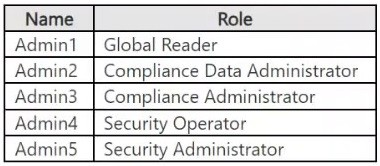
Contoso has a Microsoft 365 E5 tenant. The tenant contains the administrative user accounts shown in the following table.
Users store data in the following locations:
● SharePoint sites
● OneDrive accounts
● Exchange mailboxes
● Exchange public folders
● Teams chats
● Teams channel messages
When users in the research department create documents, they must add a 10-digit project code to each document. Project codes that start with the digits 999 are confidential.
Contoso is not using Optical character recognition (OCR) in Microsoft 365.
SharePoint Online Environment
Contoso has four Microsoft SharePoint Online sites named Site1, Site2, Site3, and Site4.
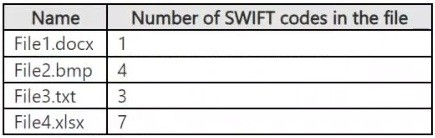
Site2 contains the files shown in the following table.
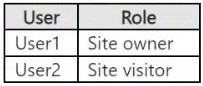
Two users named User1 and User2 are assigned roles for Site2 as shown in the following table.
Site3 stores documents related to the company's projects. The documents are organized in a folder hierarchy based on the project.
Site4 has the following two retention policies applied:
● Name: Site4RetentionPolicy1
- Locations to apply the policy: Site4
- Delete items older than: 2 years
- Delete content based on: When items were created
● Name: Site4RetentionPolicy2
- Locations to apply the policy: Site4
- Retain items for a specific period: 4 years
- Start the retention period based on: When items were created
- At the end of the retention period: Do nothing
Problem Statements
Management at Contoso is concerned about data leaks. On several occasions, confidential research department documents were leaked.
Requirements
Planned Changes
Contoso plans to create the following data loss prevention (DLP) policy:
● Name: DLPpolicy1
● Locations to apply the policy: Site2
● Conditions:
- Content contains any of these sensitive info types: SWIFT Code
- Instance count: 2 to any
● Actions: Restrict access to the content
Technical Requirements
Contoso must meet the following technical requirements:
● All administrative users must be able to review DLP reports.
● Whenever possible, the principle of least privilege must be used.
● For all users, all Microsoft 365 data must be retained for at least one year.
● Confidential documents must be detected and protected by using Microsoft 365.
● Site1 documents that include credit card numbers must be labeled automatically.
● All administrative users must be able to create Microsoft 365 sensitivity labels.
● After a project is complete, the documents in Site3 that relate to the project must be retained for 10 years.

You have a Microsoft 365 E5 subscription that contains a Windows 11 device named Device1 and three users named User1, User2, and User3.
You plan to deploy Azure Information Protection (AIP) and the Microsoft Purview information Protection client to Device1.
You need to ensure that the users can perform the following actions on Device1 as part of the planned deployment:
▪ User1 will test the functionality of the client.
▪ User2 will install and configure the Microsoft Rights Management connector.
▪ User3 will be configured as the service account for the information protection scanner.
The solution must maximize the security of the sign-in process for the users.
What should you do?

  1. Exclude User1 and User2 from multifactor authentication (MFA).
  2. Enable User2 and User3 for passwordless authentication.
  3. Exclude User2 and User3 from multifactor authentication (MFA).
  4. Enable User1, User2, and User3 for passkey (FIDO2) authentication.

Answer(s): C

Explanation:

Multi-factor authentication (MFA) and Azure Information Protection
Rights Management connector requirements
The Rights Management connector and the Microsoft Purview Information Protection scanner do not support
MFA.
If you deploy the connector or scanner, the following accounts must not require MFA:
The account that installs and configures the connector. [User2]
The service principal account in Microsoft Entra ID, Aadrm_S-1-7-0, that the connector creates.
The service account that runs the scanner. [User3]


Reference:

https://learn.microsoft.com/en-us/azure/information-protection/requirements-azure-ad


Case Study
Instructions
This is a case study. Case studies are not timed separately from other exam sections. You can use as much exam time as you would like to complete each case study. However, there might be additional case studies or other exam sections. Manage your time to ensure that you can complete all the exam sections in the time provided. Pay attention to the Exam Progress at the top of the screen so you have sufficient time to complete any exam sections that follow this case study.
To answer the case study questions, you will need to reference information that is provided in the case. Case studies and associated questions might contain exhibits or other resources that provide more information about the scenario described in the case. Information provided in an individual question does not apply to the other questions in the case study.
A Review Screen will appear at the end of this case study. From the Review Screen, you can review and change your answers before you move to the next exam section. After you leave this case study, you will NOT
be able to return to it.
To start the case study
To display the first question in this case study, select the "Next" button. To the left of the question, a menu provides links to information such as business requirements, the existing environment, and problem statements. Please read through all this information before answering any questions.
When you are ready to answer a question, select the "Question" button to return to the question.
Overview
Contoso, Ltd. is a consulting company that has a main office in Montreal and three branch offices in Seattle,
Boston, and Johannesburg.
Existing Environment
Microsoft 365 Environment
Contoso has a Microsoft 365 E5 tenant. The tenant contains the administrative user accounts shown in the following table.

Users store data in the following locations:
● SharePoint sites
● OneDrive accounts
● Exchange mailboxes
● Exchange public folders
● Teams chats
● Teams channel messages
When users in the research department create documents, they must add a 10-digit project code to each document. Project codes that start with the digits 999 are confidential.
Contoso is not using Optical character recognition (OCR) in Microsoft 365.
SharePoint Online Environment
Contoso has four Microsoft SharePoint Online sites named Site1, Site2, Site3, and Site4.
Site2 contains the files shown in the following table.

Two users named User1 and User2 are assigned roles for Site2 as shown in the following table.

Site3 stores documents related to the company's projects. The documents are organized in a folder hierarchy based on the project.
Site4 has the following two retention policies applied:
● Name: Site4RetentionPolicy1
- Locations to apply the policy: Site4
- Delete items older than: 2 years
- Delete content based on: When items were created
● Name: Site4RetentionPolicy2
- Locations to apply the policy: Site4
- Retain items for a specific period: 4 years
- Start the retention period based on: When items were created
- At the end of the retention period: Do nothing
Problem Statements
Management at Contoso is concerned about data leaks. On several occasions, confidential research department documents were leaked.
Requirements
Planned Changes
Contoso plans to create the following data loss prevention (DLP) policy:
● Name: DLPpolicy1
● Locations to apply the policy: Site2
● Conditions:
- Content contains any of these sensitive info types: SWIFT Code
- Instance count: 2 to any
● Actions: Restrict access to the content
Technical Requirements
Contoso must meet the following technical requirements:
● All administrative users must be able to review DLP reports.
● Whenever possible, the principle of least privilege must be used.
● For all users, all Microsoft 365 data must be retained for at least one year.
● Confidential documents must be detected and protected by using Microsoft 365.
● Site1 documents that include credit card numbers must be labeled automatically.
● All administrative users must be able to create Microsoft 365 sensitivity labels.
● After a project is complete, the documents in Site3 that relate to the project must be retained for 10 years.

You have a Microsoft 365 E5 subscription.
You have a Microsoft SharePoint Online document library that contains Microsoft Word and Excel documents.
The documents contain the following types of information:
● Credit card numbers
● Physical addresses in the UK
● National health service numbers from the UK
● Sensitive projects that contain the following words: Project Tailspin, Project Contoso, and Project Falcon
You have email messages in Microsoft Exchange Online that contain the following information types:
● Credit card numbers
● User sign-in credentials
● National health service numbers from the UK
You plan to use sensitive information types (SITs) for compliance policies.
What is the minimum number of SITs required to classify all the information types?

  1. 2
  2. 5
  3. 7
  4. 10

Answer(s): B

Explanation:

* In Documents: Sensitive projects that contain the following words: Project Tailspin, Project Contoso, and
Project Falcon - One SIT
* In documents: Physical addresses in the UK - one SIT
* Credit card numbers in documents and emails - one SIT
a single sensitive information type for credit card numbers can be applied to both documents and emails, often as part of a data loss prevention (DLP) or sensitivity labeling system in Microsoft 365 and other platforms.
These systems can automatically detect credit card numbers within documents and emails and then apply predefined sensitivity labels that enforce security policies, such as encryption or access restrictions, for both types of content.
* User sign-in credentials in emails - one SIT
* National health service numbers from the UK in documents and emails - one SIT
A single sensitive information type classification, such as for UK National Health Service (NHS) numbers, can be applied to both documents and emails, typically by using a data loss prevention (DLP) or sensitivity labelling system within Microsoft 365 or NHSmail. This allows a uniform policy to detect and protect NHS numbers whether they appear in a Word document or an email, ensuring consistent security protocols across different data formats within the NHS environment.


Reference:

https://learn.microsoft.com/en-us/purview/sit-sensitive-information-type-learn-about


Case Study
Instructions
This is a case study. Case studies are not timed separately from other exam sections. You can use as much exam time as you would like to complete each case study. However, there might be additional case studies or other exam sections. Manage your time to ensure that you can complete all the exam sections in the time provided. Pay attention to the Exam Progress at the top of the screen so you have sufficient time to complete any exam sections that follow this case study.
To answer the case study questions, you will need to reference information that is provided in the case. Case studies and associated questions might contain exhibits or other resources that provide more information about the scenario described in the case. Information provided in an individual question does not apply to the other questions in the case study.
A Review Screen will appear at the end of this case study. From the Review Screen, you can review and change your answers before you move to the next exam section. After you leave this case study, you will NOT
be able to return to it.
To start the case study
To display the first question in this case study, select the "Next" button. To the left of the question, a menu provides links to information such as business requirements, the existing environment, and problem statements. Please read through all this information before answering any questions.
When you are ready to answer a question, select the "Question" button to return to the question.
Overview
Contoso, Ltd. is a consulting company that has a main office in Montreal and three branch offices in Seattle,
Boston, and Johannesburg.
Existing Environment
Microsoft 365 Environment
Contoso has a Microsoft 365 E5 tenant. The tenant contains the administrative user accounts shown in the following table.

Users store data in the following locations:
● SharePoint sites
● OneDrive accounts
● Exchange mailboxes
● Exchange public folders
● Teams chats
● Teams channel messages
When users in the research department create documents, they must add a 10-digit project code to each document. Project codes that start with the digits 999 are confidential.
Contoso is not using Optical character recognition (OCR) in Microsoft 365.
SharePoint Online Environment
Contoso has four Microsoft SharePoint Online sites named Site1, Site2, Site3, and Site4.
Site2 contains the files shown in the following table.

Two users named User1 and User2 are assigned roles for Site2 as shown in the following table.

Site3 stores documents related to the company's projects. The documents are organized in a folder hierarchy based on the project.
Site4 has the following two retention policies applied:
● Name: Site4RetentionPolicy1
- Locations to apply the policy: Site4
- Delete items older than: 2 years
- Delete content based on: When items were created
● Name: Site4RetentionPolicy2
- Locations to apply the policy: Site4
- Retain items for a specific period: 4 years
- Start the retention period based on: When items were created
- At the end of the retention period: Do nothing
Problem Statements
Management at Contoso is concerned about data leaks. On several occasions, confidential research department documents were leaked.
Requirements
Planned Changes
Contoso plans to create the following data loss prevention (DLP) policy:
● Name: DLPpolicy1
● Locations to apply the policy: Site2
● Conditions:
- Content contains any of these sensitive info types: SWIFT Code
- Instance count: 2 to any
● Actions: Restrict access to the content
Technical Requirements
Contoso must meet the following technical requirements:
● All administrative users must be able to review DLP reports.
● Whenever possible, the principle of least privilege must be used.
● For all users, all Microsoft 365 data must be retained for at least one year.
● Confidential documents must be detected and protected by using Microsoft 365.
● Site1 documents that include credit card numbers must be labeled automatically.
● All administrative users must be able to create Microsoft 365 sensitivity labels.
● After a project is complete, the documents in Site3 that relate to the project must be retained for 10 years.

You have a Microsoft 365 subscription.
You need to customize encrypted email for the subscription. The solution must meet the following requirements.
● Ensure that when an encrypted email is sent, the email includes the company logo.
● Minimize administrative effort.
Which PowerShell cmdlet should you run?

  1. Set-IRMConfiguration
  2. Set-OMEConfiguration
  3. Set-RMSTemplate
  4. New-OMEConfiguration

Answer(s): B

Explanation:

To customize encrypted email in Microsoft 365, including adding a company logo, you need to modify the
Office Message Encryption (OME) branding settings. The Set-OMEConfiguration PowerShell cmdlet allows you to configure branding elements such as:
● Company logo
● Custom text
● Background color
This cmdlet is used to update existing OME branding settings, ensuring that encrypted emails sent from your organization include the required customizations.


Case Study
Instructions
This is a case study. Case studies are not timed separately from other exam sections. You can use as much exam time as you would like to complete each case study. However, there might be additional case studies or other exam sections. Manage your time to ensure that you can complete all the exam sections in the time provided. Pay attention to the Exam Progress at the top of the screen so you have sufficient time to complete any exam sections that follow this case study.
To answer the case study questions, you will need to reference information that is provided in the case. Case studies and associated questions might contain exhibits or other resources that provide more information about the scenario described in the case. Information provided in an individual question does not apply to the other questions in the case study.
A Review Screen will appear at the end of this case study. From the Review Screen, you can review and change your answers before you move to the next exam section. After you leave this case study, you will NOT
be able to return to it.
To start the case study
To display the first question in this case study, select the "Next" button. To the left of the question, a menu provides links to information such as business requirements, the existing environment, and problem statements. Please read through all this information before answering any questions.
When you are ready to answer a question, select the "Question" button to return to the question.
Overview
Contoso, Ltd. is a consulting company that has a main office in Montreal and three branch offices in Seattle,
Boston, and Johannesburg.
Existing Environment
Microsoft 365 Environment
Contoso has a Microsoft 365 E5 tenant. The tenant contains the administrative user accounts shown in the following table.

Users store data in the following locations:
● SharePoint sites
● OneDrive accounts
● Exchange mailboxes
● Exchange public folders
● Teams chats
● Teams channel messages
When users in the research department create documents, they must add a 10-digit project code to each document. Project codes that start with the digits 999 are confidential.
Contoso is not using Optical character recognition (OCR) in Microsoft 365.
SharePoint Online Environment
Contoso has four Microsoft SharePoint Online sites named Site1, Site2, Site3, and Site4.
Site2 contains the files shown in the following table.

Two users named User1 and User2 are assigned roles for Site2 as shown in the following table.

Site3 stores documents related to the company's projects. The documents are organized in a folder hierarchy based on the project.
Site4 has the following two retention policies applied:
● Name: Site4RetentionPolicy1
- Locations to apply the policy: Site4
- Delete items older than: 2 years
- Delete content based on: When items were created
● Name: Site4RetentionPolicy2
- Locations to apply the policy: Site4
- Retain items for a specific period: 4 years
- Start the retention period based on: When items were created
- At the end of the retention period: Do nothing
Problem Statements
Management at Contoso is concerned about data leaks. On several occasions, confidential research department documents were leaked.
Requirements
Planned Changes
Contoso plans to create the following data loss prevention (DLP) policy:
● Name: DLPpolicy1
● Locations to apply the policy: Site2
● Conditions:
- Content contains any of these sensitive info types: SWIFT Code
- Instance count: 2 to any
● Actions: Restrict access to the content
Technical Requirements
Contoso must meet the following technical requirements:
● All administrative users must be able to review DLP reports.
● Whenever possible, the principle of least privilege must be used.
● For all users, all Microsoft 365 data must be retained for at least one year.
● Confidential documents must be detected and protected by using Microsoft 365.
● Site1 documents that include credit card numbers must be labeled automatically.
● All administrative users must be able to create Microsoft 365 sensitivity labels.
● After a project is complete, the documents in Site3 that relate to the project must be retained for 10 years.

HOTSPOT (Drag and Drop is not supported)
You have a Microsoft 365 E5 subscription that uses Microsoft Purview Audit (Premium) with the 10-Year Audit
Log Retention add-on license.
The subscription contains the audit retention policies shown in the following table.

From the SharePoint Online admin center, User1 performs the actions shown in the following table.

For each of the following statements, select Yes if the statement is true. Otherwise, select No.
Note: Each correct selection is worth one point.
Hot Area:

  1. See Explanation section for answer.

Answer(s): A

Explanation:


Box 1: No
No - Action1 will be retained for one year.
Action1 archives a site.
The archive site activity is not specified in any audit retention policy.
RP2 applies as it has no specified activities.
RP2 has the duration of 3 years.
Box 2: No
No - Action2 will be retained for three years.
Action2 creates a site collection.
RP1 and RP3 applies to creates a site collection activities.
RP1 has priority 30, and RP3 has priority 40.
RP1 has higher priority (lower value).
RP1 has a duration of 1 year.
Box 3: Yes
Yes - Action3 will be retained for six months.
Action3 renames a site.
RP4 applies to renamed site activities.
RP4 has duration of 6 months.
Note:
You can create policies based on the following criteria:
* All activities in one or more Microsoft services
* Specific activities in a Microsoft service performed by all users or by specific users
* A priority level that specifies which policy takes precedence in you have multiple policies in your organization
--
Priority: This value determines the order in which audit log retention policies in your organization are processed. A lower value indicates a higher priority. Valid priorities are numerical values between 1 and 10000.
A value of 1 is the highest priority, and a value of 10000 is the lowest priority. For example, a policy with a value of 5 takes priority over a policy with a value of 10. Any custom audit log retention policy takes priority over the default policy for your organization.


Reference:

https://learn.microsoft.com/en-us/purview/audit-log-retention-policies


Case Study
Instructions
This is a case study. Case studies are not timed separately from other exam sections. You can use as much exam time as you would like to complete each case study. However, there might be additional case studies or other exam sections. Manage your time to ensure that you can complete all the exam sections in the time provided. Pay attention to the Exam Progress at the top of the screen so you have sufficient time to complete any exam sections that follow this case study.
To answer the case study questions, you will need to reference information that is provided in the case. Case studies and associated questions might contain exhibits or other resources that provide more information about the scenario described in the case. Information provided in an individual question does not apply to the other questions in the case study.
A Review Screen will appear at the end of this case study. From the Review Screen, you can review and change your answers before you move to the next exam section. After you leave this case study, you will NOT
be able to return to it.
To start the case study
To display the first question in this case study, select the "Next" button. To the left of the question, a menu provides links to information such as business requirements, the existing environment, and problem statements. Please read through all this information before answering any questions.
When you are ready to answer a question, select the "Question" button to return to the question.
Overview
Contoso, Ltd. is a consulting company that has a main office in Montreal and three branch offices in Seattle,
Boston, and Johannesburg.
Existing Environment
Microsoft 365 Environment
Contoso has a Microsoft 365 E5 tenant. The tenant contains the administrative user accounts shown in the following table.

Users store data in the following locations:
● SharePoint sites
● OneDrive accounts
● Exchange mailboxes
● Exchange public folders
● Teams chats
● Teams channel messages
When users in the research department create documents, they must add a 10-digit project code to each document. Project codes that start with the digits 999 are confidential.
Contoso is not using Optical character recognition (OCR) in Microsoft 365.
SharePoint Online Environment
Contoso has four Microsoft SharePoint Online sites named Site1, Site2, Site3, and Site4.
Site2 contains the files shown in the following table.

Two users named User1 and User2 are assigned roles for Site2 as shown in the following table.

Site3 stores documents related to the company's projects. The documents are organized in a folder hierarchy based on the project.
Site4 has the following two retention policies applied:
● Name: Site4RetentionPolicy1
- Locations to apply the policy: Site4
- Delete items older than: 2 years
- Delete content based on: When items were created
● Name: Site4RetentionPolicy2
- Locations to apply the policy: Site4
- Retain items for a specific period: 4 years
- Start the retention period based on: When items were created
- At the end of the retention period: Do nothing
Problem Statements
Management at Contoso is concerned about data leaks. On several occasions, confidential research department documents were leaked.
Requirements
Planned Changes
Contoso plans to create the following data loss prevention (DLP) policy:
● Name: DLPpolicy1
● Locations to apply the policy: Site2
● Conditions:
- Content contains any of these sensitive info types: SWIFT Code
- Instance count: 2 to any
● Actions: Restrict access to the content
Technical Requirements
Contoso must meet the following technical requirements:
● All administrative users must be able to review DLP reports.
● Whenever possible, the principle of least privilege must be used.
● For all users, all Microsoft 365 data must be retained for at least one year.
● Confidential documents must be detected and protected by using Microsoft 365.
● Site1 documents that include credit card numbers must be labeled automatically.
● All administrative users must be able to create Microsoft 365 sensitivity labels.
● After a project is complete, the documents in Site3 that relate to the project must be retained for 10 years.

SIMULATION
Username and password
Use the following login credentials as needed:
To enter your username, place your cursor in the Sign in box and select the username below.
To enter your password, place your cursor in the Enter password box and select the password below.
Microsoft 365 Username:
admin@WWLx971455.onmicrosoft.com
Microsoft 365 Password: XXXXXXXXX
If the Microsoft Edge browser or Microsoft 365 portal does not load successfully, select the Microsoft Edge browser icon from the task bar, type the URL “https://admin microsoft.com”, and press Enter.
The following information is for technical support purposes only:
Lab Instance: XXXXXXXX.
Task 9
You plan to create a data loss prevention (DLP) policy that will apply to content containing the following keywords:
▪ Tailspin
▪ Litware
▪ Falcon
You need to create a keyword list that can be used in the DLP policy.

  1. See Explanation section for answer.

Answer(s): A

Explanation:

See explanation below.


To create a sensitive information type that matches all words in a keyword list, you can use the "All" condition instead of the default "Any" condition. Here are the steps to create such a sensitive information type:
Step 1: Go to the Microsoft 365 compliance center and navigate to the "Sensitive information types" page.
Step 2: Click on "Create a sensitive information type".
Step 3: Choose "Keyword dictionary" as the type of sensitive information you want to create.
Step 4: Enter a name and description for the sensitive information type.
Step 5: In the "Keywords" section, enter all the words you want to match separated by com-mas. Here we enter: Tailspin, Litware, Falcon
Step 6: Click on "Add condition" and choose "Any" as the condition type.
Step 7: Click on "Create" to create the sensitive information type.
Step 8: Click on "Create" to create the sensitive information type.
With this configuration, the DLP policy will only detect the sensitive information if any the words in the keyword list are present in the content being scanned.


Reference:

https://learn.microsoft.com/en-us/answers/questions/1419105/how-to-create-sensitive-information-types-to-ma tch


Case Study
Instructions
This is a case study. Case studies are not timed separately from other exam sections. You can use as much exam time as you would like to complete each case study. However, there might be additional case studies or other exam sections. Manage your time to ensure that you can complete all the exam sections in the time provided. Pay attention to the Exam Progress at the top of the screen so you have sufficient time to complete any exam sections that follow this case study.
To answer the case study questions, you will need to reference information that is provided in the case. Case studies and associated questions might contain exhibits or other resources that provide more information about the scenario described in the case. Information provided in an individual question does not apply to the other questions in the case study.
A Review Screen will appear at the end of this case study. From the Review Screen, you can review and change your answers before you move to the next exam section. After you leave this case study, you will NOT
be able to return to it.
To start the case study
To display the first question in this case study, select the "Next" button. To the left of the question, a menu provides links to information such as business requirements, the existing environment, and problem statements. Please read through all this information before answering any questions.
When you are ready to answer a question, select the "Question" button to return to the question.
Overview
Contoso, Ltd. is a consulting company that has a main office in Montreal and three branch offices in Seattle,
Boston, and Johannesburg.
Existing Environment
Microsoft 365 Environment
Contoso has a Microsoft 365 E5 tenant. The tenant contains the administrative user accounts shown in the following table.

Users store data in the following locations:
● SharePoint sites
● OneDrive accounts
● Exchange mailboxes
● Exchange public folders
● Teams chats
● Teams channel messages
When users in the research department create documents, they must add a 10-digit project code to each document. Project codes that start with the digits 999 are confidential.
Contoso is not using Optical character recognition (OCR) in Microsoft 365.
SharePoint Online Environment
Contoso has four Microsoft SharePoint Online sites named Site1, Site2, Site3, and Site4.
Site2 contains the files shown in the following table.

Two users named User1 and User2 are assigned roles for Site2 as shown in the following table.

Site3 stores documents related to the company's projects. The documents are organized in a folder hierarchy based on the project.
Site4 has the following two retention policies applied:
● Name: Site4RetentionPolicy1
- Locations to apply the policy: Site4
- Delete items older than: 2 years
- Delete content based on: When items were created
● Name: Site4RetentionPolicy2
- Locations to apply the policy: Site4
- Retain items for a specific period: 4 years
- Start the retention period based on: When items were created
- At the end of the retention period: Do nothing
Problem Statements
Management at Contoso is concerned about data leaks. On several occasions, confidential research department documents were leaked.
Requirements
Planned Changes
Contoso plans to create the following data loss prevention (DLP) policy:
● Name: DLPpolicy1
● Locations to apply the policy: Site2
● Conditions:
- Content contains any of these sensitive info types: SWIFT Code
- Instance count: 2 to any
● Actions: Restrict access to the content
Technical Requirements
Contoso must meet the following technical requirements:
● All administrative users must be able to review DLP reports.
● Whenever possible, the principle of least privilege must be used.
● For all users, all Microsoft 365 data must be retained for at least one year.
● Confidential documents must be detected and protected by using Microsoft 365.
● Site1 documents that include credit card numbers must be labeled automatically.
● All administrative users must be able to create Microsoft 365 sensitivity labels.
● After a project is complete, the documents in Site3 that relate to the project must be retained for 10 years.

You have a Microsoft 365 E5 subscription.
You need to ensure that any message or document containing a credit card number is deleted automatically 12
months after it was created. The solution must minimize administrative effort.
Which two components should you create? Each correct answer presents part of the solution.
Note: Each correct selection is worth one point.

  1. an auto-labeling policy for a sensitivity label
  2. a sensitivity label
  3. an auto-labeling policy for a retention label
  4. a retention label
  5. a sensitive information type (SIT)

Answer(s): C,D


Case Study
Instructions
This is a case study. Case studies are not timed separately from other exam sections. You can use as much exam time as you would like to complete each case study. However, there might be additional case studies or other exam sections. Manage your time to ensure that you can complete all the exam sections in the time provided. Pay attention to the Exam Progress at the top of the screen so you have sufficient time to complete any exam sections that follow this case study.
To answer the case study questions, you will need to reference information that is provided in the case. Case studies and associated questions might contain exhibits or other resources that provide more information about the scenario described in the case. Information provided in an individual question does not apply to the other questions in the case study.
A Review Screen will appear at the end of this case study. From the Review Screen, you can review and change your answers before you move to the next exam section. After you leave this case study, you will NOT
be able to return to it.
To start the case study
To display the first question in this case study, select the "Next" button. To the left of the question, a menu provides links to information such as business requirements, the existing environment, and problem statements. Please read through all this information before answering any questions.
When you are ready to answer a question, select the "Question" button to return to the question.
Overview
Contoso, Ltd. is a consulting company that has a main office in Montreal and three branch offices in Seattle,
Boston, and Johannesburg.
Existing Environment
Microsoft 365 Environment
Contoso has a Microsoft 365 E5 tenant. The tenant contains the administrative user accounts shown in the following table.

Users store data in the following locations:
● SharePoint sites
● OneDrive accounts
● Exchange mailboxes
● Exchange public folders
● Teams chats
● Teams channel messages
When users in the research department create documents, they must add a 10-digit project code to each document. Project codes that start with the digits 999 are confidential.
Contoso is not using Optical character recognition (OCR) in Microsoft 365.
SharePoint Online Environment
Contoso has four Microsoft SharePoint Online sites named Site1, Site2, Site3, and Site4.
Site2 contains the files shown in the following table.

Two users named User1 and User2 are assigned roles for Site2 as shown in the following table.

Site3 stores documents related to the company's projects. The documents are organized in a folder hierarchy based on the project.
Site4 has the following two retention policies applied:
● Name: Site4RetentionPolicy1
- Locations to apply the policy: Site4
- Delete items older than: 2 years
- Delete content based on: When items were created
● Name: Site4RetentionPolicy2
- Locations to apply the policy: Site4
- Retain items for a specific period: 4 years
- Start the retention period based on: When items were created
- At the end of the retention period: Do nothing
Problem Statements
Management at Contoso is concerned about data leaks. On several occasions, confidential research department documents were leaked.
Requirements
Planned Changes
Contoso plans to create the following data loss prevention (DLP) policy:
● Name: DLPpolicy1
● Locations to apply the policy: Site2
● Conditions:
- Content contains any of these sensitive info types: SWIFT Code
- Instance count: 2 to any
● Actions: Restrict access to the content
Technical Requirements
Contoso must meet the following technical requirements:
● All administrative users must be able to review DLP reports.
● Whenever possible, the principle of least privilege must be used.
● For all users, all Microsoft 365 data must be retained for at least one year.
● Confidential documents must be detected and protected by using Microsoft 365.
● Site1 documents that include credit card numbers must be labeled automatically.
● All administrative users must be able to create Microsoft 365 sensitivity labels.
● After a project is complete, the documents in Site3 that relate to the project must be retained for 10 years.

HOTSPOT (Drag and Drop is not supported)
You have two Microsoft 365 subscriptions named Contoso and Fabrikam. The subscriptions contain the users shown in the following table.

You have a sensitivity label named Sensitivity1 as shown in the exhibit. (Click the Exhibit tab)

You have the files shown in the following table.

For each of the following statements, select Yes if the statement is true. Otherwise, select No.
Note: Each correct selection is worth one point.
Hot Area:

  1. See Explanation section for answer.

Answer(s): A

Explanation:


Box 1: Yes
Yes - User1 can remove the encryption from File1.
User1 is in the Contoso subscription, and has the email address user1@contoso.com
Sensitivity label Sensitiviy1 has assigned contoso.com users Co-owner permissions.
For File1 has Sensitiviy1 been automaticallyapplied by using an auto-labeling policy.
Box 2: Yes
Yes - User2 can remove the encryption from File3.
User2 is in the Contoso subscription, and has the email address user2@contoso.com
Sensitivity label Sensitiviy1 has assigned contoso.com users Co-owner permissions.
For File3 has Sensitiviy1 been applied by User1.
Box 3: No
No - User3 can print File2.
User3 is in the Fabrikam subscription, and has the email address user3@fabrikam.com
Sensitivity label Sensitiviy1 has assigned fabrikam.com users reviewer permissions.
For File2 has Sensitiviy1 been applied by User2.


Reference:

https://learn.microsoft.com/en-us/purview/encryption-sensitivity-labels


Case Study
Instructions
This is a case study. Case studies are not timed separately from other exam sections. You can use as much exam time as you would like to complete each case study. However, there might be additional case studies or other exam sections. Manage your time to ensure that you can complete all the exam sections in the time provided. Pay attention to the Exam Progress at the top of the screen so you have sufficient time to complete any exam sections that follow this case study.
To answer the case study questions, you will need to reference information that is provided in the case. Case studies and associated questions might contain exhibits or other resources that provide more information about the scenario described in the case. Information provided in an individual question does not apply to the other questions in the case study.
A Review Screen will appear at the end of this case study. From the Review Screen, you can review and change your answers before you move to the next exam section. After you leave this case study, you will NOT
be able to return to it.
To start the case study
To display the first question in this case study, select the "Next" button. To the left of the question, a menu provides links to information such as business requirements, the existing environment, and problem statements. Please read through all this information before answering any questions.
When you are ready to answer a question, select the "Question" button to return to the question.
Overview
Contoso, Ltd. is a consulting company that has a main office in Montreal and three branch offices in Seattle,
Boston, and Johannesburg.
Existing Environment
Microsoft 365 Environment
Contoso has a Microsoft 365 E5 tenant. The tenant contains the administrative user accounts shown in the following table.

Users store data in the following locations:
● SharePoint sites
● OneDrive accounts
● Exchange mailboxes
● Exchange public folders
● Teams chats
● Teams channel messages
When users in the research department create documents, they must add a 10-digit project code to each document. Project codes that start with the digits 999 are confidential.
Contoso is not using Optical character recognition (OCR) in Microsoft 365.
SharePoint Online Environment
Contoso has four Microsoft SharePoint Online sites named Site1, Site2, Site3, and Site4.
Site2 contains the files shown in the following table.

Two users named User1 and User2 are assigned roles for Site2 as shown in the following table.

Site3 stores documents related to the company's projects. The documents are organized in a folder hierarchy based on the project.
Site4 has the following two retention policies applied:
● Name: Site4RetentionPolicy1
- Locations to apply the policy: Site4
- Delete items older than: 2 years
- Delete content based on: When items were created
● Name: Site4RetentionPolicy2
- Locations to apply the policy: Site4
- Retain items for a specific period: 4 years
- Start the retention period based on: When items were created
- At the end of the retention period: Do nothing
Problem Statements
Management at Contoso is concerned about data leaks. On several occasions, confidential research department documents were leaked.
Requirements
Planned Changes
Contoso plans to create the following data loss prevention (DLP) policy:
● Name: DLPpolicy1
● Locations to apply the policy: Site2
● Conditions:
- Content contains any of these sensitive info types: SWIFT Code
- Instance count: 2 to any
● Actions: Restrict access to the content
Technical Requirements
Contoso must meet the following technical requirements:
● All administrative users must be able to review DLP reports.
● Whenever possible, the principle of least privilege must be used.
● For all users, all Microsoft 365 data must be retained for at least one year.
● Confidential documents must be detected and protected by using Microsoft 365.
● Site1 documents that include credit card numbers must be labeled automatically.
● All administrative users must be able to create Microsoft 365 sensitivity labels.
● After a project is complete, the documents in Site3 that relate to the project must be retained for 10 years.

HOTSPOT (Drag and Drop is not supported)
You have a Microsoft 365 E5 tenant.
You have sensitivity labels as shown in the Sensitivity Labels exhibit. (Click the Sensitivity Labels tab.)

The Confidential/External sensitivity label is configured to encrypt files and emails when applied to content.
The sensitivity labels are published as shown in the Published exhibit. (Click the Published tab.)

For each of the following statements, select Yes if the statement is true. Otherwise, select No.
Note: Each correct selection is worth one point.
Hot Area:

  1. See Explanation section for answer.

Answer(s): A

Explanation:


Reference:

https://docs.microsoft.com/en-us/microsoft-365/compliance/sensitivity-labels


Share your comments for Microsoft SC-401 exam with other users:

A
Anon
4/6/2026 5:22:54 PM

Are these the same questions you have to pay for in ExamTopics?

AI Tutor 👋 I’m here to help!