Microsoft Administering Information Security in 365 SC-401 Dumps in PDF

Free Microsoft SC-401 Real Questions (page: 2)


Case Study
Instructions
This is a case study. Case studies are not timed separately from other exam sections. You can use as much exam time as you would like to complete each case study. However, there might be additional case studies or other exam sections. Manage your time to ensure that you can complete all the exam sections in the time provided. Pay attention to the Exam Progress at the top of the screen so you have sufficient time to complete any exam sections that follow this case study.
To answer the case study questions, you will need to reference information that is provided in the case. Case studies and associated questions might contain exhibits or other resources that provide more information about the scenario described in the case. Information provided in an individual question does not apply to the other questions in the case study.
A Review Screen will appear at the end of this case study. From the Review Screen, you can review and change your answers before you move to the next exam section. After you leave this case study, you will NOT
be able to return to it.
To start the case study
To display the first question in this case study, select the "Next" button. To the left of the question, a menu provides links to information such as business requirements, the existing environment, and problem statements. Please read through all this information before answering any questions.
When you are ready to answer a question, select the "Question" button to return to the question.
Overview
Contoso, Ltd. is a consulting company that has a main office in Montreal and three branch offices in Seattle,
Boston, and Johannesburg.
Existing Environment
Microsoft 365 Environment
Contoso has a Microsoft 365 E5 tenant. The tenant contains the administrative user accounts shown in the following table.
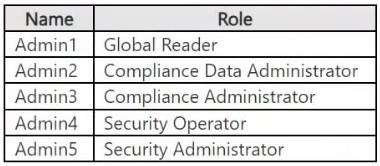
Users store data in the following locations:
● SharePoint sites
● OneDrive accounts
● Exchange mailboxes
● Exchange public folders
● Teams chats
● Teams channel messages
When users in the research department create documents, they must add a 10-digit project code to each document. Project codes that start with the digits 999 are confidential.
Contoso is not using Optical character recognition (OCR) in Microsoft 365.
SharePoint Online Environment
Contoso has four Microsoft SharePoint Online sites named Site1, Site2, Site3, and Site4.
Site2 contains the files shown in the following table.
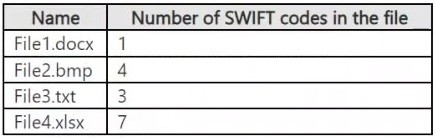
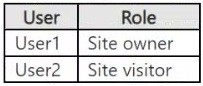
Two users named User1 and User2 are assigned roles for Site2 as shown in the following table.
Site3 stores documents related to the company's projects. The documents are organized in a folder hierarchy based on the project.
Site4 has the following two retention policies applied:
● Name: Site4RetentionPolicy1
- Locations to apply the policy: Site4
- Delete items older than: 2 years
- Delete content based on: When items were created
● Name: Site4RetentionPolicy2
- Locations to apply the policy: Site4
- Retain items for a specific period: 4 years
- Start the retention period based on: When items were created
- At the end of the retention period: Do nothing
Problem Statements
Management at Contoso is concerned about data leaks. On several occasions, confidential research department documents were leaked.
Requirements
Planned Changes
Contoso plans to create the following data loss prevention (DLP) policy:
● Name: DLPpolicy1
● Locations to apply the policy: Site2
● Conditions:
- Content contains any of these sensitive info types: SWIFT Code
- Instance count: 2 to any
● Actions: Restrict access to the content
Technical Requirements
Contoso must meet the following technical requirements:
● All administrative users must be able to review DLP reports.
● Whenever possible, the principle of least privilege must be used.
● For all users, all Microsoft 365 data must be retained for at least one year.
● Confidential documents must be detected and protected by using Microsoft 365.
● Site1 documents that include credit card numbers must be labeled automatically.
● All administrative users must be able to create Microsoft 365 sensitivity labels.
● After a project is complete, the documents in Site3 that relate to the project must be retained for 10 years.

HOTSPOT (Drag and Drop is not supported)
You have a new Microsoft 365 E5 tenant.
You need to create a custom trainable classifier that will detect product order forms. The solution must use the principle of least privilege.
What should you do first? To answer, select the appropriate options in the answer area.
Note: Each correct selection is worth one point.
Hot Area:

  1. See Explanation section for answer.

Answer(s): A

Explanation:


To create a custom trainable classifier in Microsoft Purview (formerly Microsoft Compliance Center), you must first opt into the trainable classifier feature.
Before using custom trainable classifiers, Microsoft requires manual opt-in through the Microsoft Purview compliance portal. Without this step, you cannot create a new classifier.
The Compliance Administrator role has the necessary permissions to configure data classification, DLP
policies, and trainable classifiers. Global Administrator has higher privileges but is not required for this task,
violating the principle of least privilege. Security Administrator is focused on security-related settings but does not manage compliance features like classifiers.


Case Study
Instructions
This is a case study. Case studies are not timed separately from other exam sections. You can use as much exam time as you would like to complete each case study. However, there might be additional case studies or other exam sections. Manage your time to ensure that you can complete all the exam sections in the time provided. Pay attention to the Exam Progress at the top of the screen so you have sufficient time to complete any exam sections that follow this case study.
To answer the case study questions, you will need to reference information that is provided in the case. Case studies and associated questions might contain exhibits or other resources that provide more information about the scenario described in the case. Information provided in an individual question does not apply to the other questions in the case study.
A Review Screen will appear at the end of this case study. From the Review Screen, you can review and change your answers before you move to the next exam section. After you leave this case study, you will NOT
be able to return to it.
To start the case study
To display the first question in this case study, select the "Next" button. To the left of the question, a menu provides links to information such as business requirements, the existing environment, and problem statements. Please read through all this information before answering any questions.
When you are ready to answer a question, select the "Question" button to return to the question.
Overview
Contoso, Ltd. is a consulting company that has a main office in Montreal and three branch offices in Seattle,
Boston, and Johannesburg.
Existing Environment
Microsoft 365 Environment
Contoso has a Microsoft 365 E5 tenant. The tenant contains the administrative user accounts shown in the following table.

Users store data in the following locations:
● SharePoint sites
● OneDrive accounts
● Exchange mailboxes
● Exchange public folders
● Teams chats
● Teams channel messages
When users in the research department create documents, they must add a 10-digit project code to each document. Project codes that start with the digits 999 are confidential.
Contoso is not using Optical character recognition (OCR) in Microsoft 365.
SharePoint Online Environment
Contoso has four Microsoft SharePoint Online sites named Site1, Site2, Site3, and Site4.
Site2 contains the files shown in the following table.

Two users named User1 and User2 are assigned roles for Site2 as shown in the following table.

Site3 stores documents related to the company's projects. The documents are organized in a folder hierarchy based on the project.
Site4 has the following two retention policies applied:
● Name: Site4RetentionPolicy1
- Locations to apply the policy: Site4
- Delete items older than: 2 years
- Delete content based on: When items were created
● Name: Site4RetentionPolicy2
- Locations to apply the policy: Site4
- Retain items for a specific period: 4 years
- Start the retention period based on: When items were created
- At the end of the retention period: Do nothing
Problem Statements
Management at Contoso is concerned about data leaks. On several occasions, confidential research department documents were leaked.
Requirements
Planned Changes
Contoso plans to create the following data loss prevention (DLP) policy:
● Name: DLPpolicy1
● Locations to apply the policy: Site2
● Conditions:
- Content contains any of these sensitive info types: SWIFT Code
- Instance count: 2 to any
● Actions: Restrict access to the content
Technical Requirements
Contoso must meet the following technical requirements:
● All administrative users must be able to review DLP reports.
● Whenever possible, the principle of least privilege must be used.
● For all users, all Microsoft 365 data must be retained for at least one year.
● Confidential documents must be detected and protected by using Microsoft 365.
● Site1 documents that include credit card numbers must be labeled automatically.
● All administrative users must be able to create Microsoft 365 sensitivity labels.
● After a project is complete, the documents in Site3 that relate to the project must be retained for 10 years.

You have a Microsoft 365 tenant.
You create the following:
▪ A sensitivity label
▪ An auto-labeling policy
You need to ensure that the sensitivity label is applied to all the data discovered by the auto-labeling policy.
What should you do first?

  1. Run the Enable-TransportRule cmdlet.
  2. Enable insider risk management.
  3. Create a trainable classifier
  4. Run the policy in simulation mode.

Answer(s): D


Reference:

https://docs.microsoft.com/en-us/microsoft-365/compliance/apply-sensitivity-label-automatically


Case Study
Instructions
This is a case study. Case studies are not timed separately from other exam sections. You can use as much exam time as you would like to complete each case study. However, there might be additional case studies or other exam sections. Manage your time to ensure that you can complete all the exam sections in the time provided. Pay attention to the Exam Progress at the top of the screen so you have sufficient time to complete any exam sections that follow this case study.
To answer the case study questions, you will need to reference information that is provided in the case. Case studies and associated questions might contain exhibits or other resources that provide more information about the scenario described in the case. Information provided in an individual question does not apply to the other questions in the case study.
A Review Screen will appear at the end of this case study. From the Review Screen, you can review and change your answers before you move to the next exam section. After you leave this case study, you will NOT
be able to return to it.
To start the case study
To display the first question in this case study, select the "Next" button. To the left of the question, a menu provides links to information such as business requirements, the existing environment, and problem statements. Please read through all this information before answering any questions.
When you are ready to answer a question, select the "Question" button to return to the question.
Overview
Contoso, Ltd. is a consulting company that has a main office in Montreal and three branch offices in Seattle,
Boston, and Johannesburg.
Existing Environment
Microsoft 365 Environment
Contoso has a Microsoft 365 E5 tenant. The tenant contains the administrative user accounts shown in the following table.

Users store data in the following locations:
● SharePoint sites
● OneDrive accounts
● Exchange mailboxes
● Exchange public folders
● Teams chats
● Teams channel messages
When users in the research department create documents, they must add a 10-digit project code to each document. Project codes that start with the digits 999 are confidential.
Contoso is not using Optical character recognition (OCR) in Microsoft 365.
SharePoint Online Environment
Contoso has four Microsoft SharePoint Online sites named Site1, Site2, Site3, and Site4.
Site2 contains the files shown in the following table.

Two users named User1 and User2 are assigned roles for Site2 as shown in the following table.

Site3 stores documents related to the company's projects. The documents are organized in a folder hierarchy based on the project.
Site4 has the following two retention policies applied:
● Name: Site4RetentionPolicy1
- Locations to apply the policy: Site4
- Delete items older than: 2 years
- Delete content based on: When items were created
● Name: Site4RetentionPolicy2
- Locations to apply the policy: Site4
- Retain items for a specific period: 4 years
- Start the retention period based on: When items were created
- At the end of the retention period: Do nothing
Problem Statements
Management at Contoso is concerned about data leaks. On several occasions, confidential research department documents were leaked.
Requirements
Planned Changes
Contoso plans to create the following data loss prevention (DLP) policy:
● Name: DLPpolicy1
● Locations to apply the policy: Site2
● Conditions:
- Content contains any of these sensitive info types: SWIFT Code
- Instance count: 2 to any
● Actions: Restrict access to the content
Technical Requirements
Contoso must meet the following technical requirements:
● All administrative users must be able to review DLP reports.
● Whenever possible, the principle of least privilege must be used.
● For all users, all Microsoft 365 data must be retained for at least one year.
● Confidential documents must be detected and protected by using Microsoft 365.
● Site1 documents that include credit card numbers must be labeled automatically.
● All administrative users must be able to create Microsoft 365 sensitivity labels.
● After a project is complete, the documents in Site3 that relate to the project must be retained for 10 years.

You have a Microsoft 365 alert named Alert2 as shown in the following exhibit.

You need to manage the status of Alert2.
To which status can you change Alert2?

  1. The status cannot be changed.
  2. Dismissed only
  3. Investigating only
  4. Active or Investigating only
  5. Investigating, Active, or Dismissed

Answer(s): E

Explanation:

Despite status showing resolved it still can be changed. Select alert > Under Alert status > Actions > select
"Edit comments" > choose new status: Active, Investigating, Dismissed or Resolved. Alert status will change
Note: Alert status
When an alert is created, its status is Active. As you review the details of each alert, you can update its status to any of the states listed below:
Active: default state of the alert until its status is changed
Investigating: alert is under investigation
Resolved: the alert doesn't require further investigation or follow-up
Dismissed: the alert isn't relevant or doesn't need investigation


Reference:

https://learn.microsoft.com/en-us/purview/compliance-manager-alert-policies https://docs.microsoft.com/en-us/microsoft-365/compliance/dlp-configure-view-alerts-policies


Case Study
Instructions
This is a case study. Case studies are not timed separately from other exam sections. You can use as much exam time as you would like to complete each case study. However, there might be additional case studies or other exam sections. Manage your time to ensure that you can complete all the exam sections in the time provided. Pay attention to the Exam Progress at the top of the screen so you have sufficient time to complete any exam sections that follow this case study.
To answer the case study questions, you will need to reference information that is provided in the case. Case studies and associated questions might contain exhibits or other resources that provide more information about the scenario described in the case. Information provided in an individual question does not apply to the other questions in the case study.
A Review Screen will appear at the end of this case study. From the Review Screen, you can review and change your answers before you move to the next exam section. After you leave this case study, you will NOT
be able to return to it.
To start the case study
To display the first question in this case study, select the "Next" button. To the left of the question, a menu provides links to information such as business requirements, the existing environment, and problem statements. Please read through all this information before answering any questions.
When you are ready to answer a question, select the "Question" button to return to the question.
Overview
Contoso, Ltd. is a consulting company that has a main office in Montreal and three branch offices in Seattle,
Boston, and Johannesburg.
Existing Environment
Microsoft 365 Environment
Contoso has a Microsoft 365 E5 tenant. The tenant contains the administrative user accounts shown in the following table.

Users store data in the following locations:
● SharePoint sites
● OneDrive accounts
● Exchange mailboxes
● Exchange public folders
● Teams chats
● Teams channel messages
When users in the research department create documents, they must add a 10-digit project code to each document. Project codes that start with the digits 999 are confidential.
Contoso is not using Optical character recognition (OCR) in Microsoft 365.
SharePoint Online Environment
Contoso has four Microsoft SharePoint Online sites named Site1, Site2, Site3, and Site4.
Site2 contains the files shown in the following table.

Two users named User1 and User2 are assigned roles for Site2 as shown in the following table.

Site3 stores documents related to the company's projects. The documents are organized in a folder hierarchy based on the project.
Site4 has the following two retention policies applied:
● Name: Site4RetentionPolicy1
- Locations to apply the policy: Site4
- Delete items older than: 2 years
- Delete content based on: When items were created
● Name: Site4RetentionPolicy2
- Locations to apply the policy: Site4
- Retain items for a specific period: 4 years
- Start the retention period based on: When items were created
- At the end of the retention period: Do nothing
Problem Statements
Management at Contoso is concerned about data leaks. On several occasions, confidential research department documents were leaked.
Requirements
Planned Changes
Contoso plans to create the following data loss prevention (DLP) policy:
● Name: DLPpolicy1
● Locations to apply the policy: Site2
● Conditions:
- Content contains any of these sensitive info types: SWIFT Code
- Instance count: 2 to any
● Actions: Restrict access to the content
Technical Requirements
Contoso must meet the following technical requirements:
● All administrative users must be able to review DLP reports.
● Whenever possible, the principle of least privilege must be used.
● For all users, all Microsoft 365 data must be retained for at least one year.
● Confidential documents must be detected and protected by using Microsoft 365.
● Site1 documents that include credit card numbers must be labeled automatically.
● All administrative users must be able to create Microsoft 365 sensitivity labels.
● After a project is complete, the documents in Site3 that relate to the project must be retained for 10 years.

HOTSPOT (Drag and Drop is not supported)
You have a Microsoft 365 E5 subscription that contains the groups shown in the following table.

The subscription contains the users shown in the following table.

You create the mail flow rules shown in the following table.

For each of the following statements, select Yes if the statement is true. Otherwise, select No.
Note: Each correct selection is worth one point.
Hot Area:

  1. See Explanation section for answer.

Answer(s): A

Explanation:


Box 1: Yes
Yes - If User2 sends an email to User3, the message is encrypted automatically.
User2 is member of Dist1.
Dist1 is a distribution group with the primary email address Dist1@contoso.com.
Rule2 applies if the sender is Dist1@contoso.com.
Rule2 applies Office 365 Message encryption and rights protection.
Box 2: Yes
Yes - If User2 sends an email to User1, the message is encrypted automatically.
With the same logic as for Box 1 above.
Box 3: No
No - If User1 sends an email to Group1, the message is encrypted automatically.
User1 is a member of Group1.
Group1 is a Microsoft group with the primary email address Group1@contoso.com
User3 is the receiver and is not a member of any group.
The rules Rule1 and Rule2 do not apply.


Case Study
Instructions
This is a case study. Case studies are not timed separately from other exam sections. You can use as much exam time as you would like to complete each case study. However, there might be additional case studies or other exam sections. Manage your time to ensure that you can complete all the exam sections in the time provided. Pay attention to the Exam Progress at the top of the screen so you have sufficient time to complete any exam sections that follow this case study.
To answer the case study questions, you will need to reference information that is provided in the case. Case studies and associated questions might contain exhibits or other resources that provide more information about the scenario described in the case. Information provided in an individual question does not apply to the other questions in the case study.
A Review Screen will appear at the end of this case study. From the Review Screen, you can review and change your answers before you move to the next exam section. After you leave this case study, you will NOT
be able to return to it.
To start the case study
To display the first question in this case study, select the "Next" button. To the left of the question, a menu provides links to information such as business requirements, the existing environment, and problem statements. Please read through all this information before answering any questions.
When you are ready to answer a question, select the "Question" button to return to the question.
Overview
Contoso, Ltd. is a consulting company that has a main office in Montreal and three branch offices in Seattle,
Boston, and Johannesburg.
Existing Environment
Microsoft 365 Environment
Contoso has a Microsoft 365 E5 tenant. The tenant contains the administrative user accounts shown in the following table.

Users store data in the following locations:
● SharePoint sites
● OneDrive accounts
● Exchange mailboxes
● Exchange public folders
● Teams chats
● Teams channel messages
When users in the research department create documents, they must add a 10-digit project code to each document. Project codes that start with the digits 999 are confidential.
Contoso is not using Optical character recognition (OCR) in Microsoft 365.
SharePoint Online Environment
Contoso has four Microsoft SharePoint Online sites named Site1, Site2, Site3, and Site4.
Site2 contains the files shown in the following table.

Two users named User1 and User2 are assigned roles for Site2 as shown in the following table.

Site3 stores documents related to the company's projects. The documents are organized in a folder hierarchy based on the project.
Site4 has the following two retention policies applied:
● Name: Site4RetentionPolicy1
- Locations to apply the policy: Site4
- Delete items older than: 2 years
- Delete content based on: When items were created
● Name: Site4RetentionPolicy2
- Locations to apply the policy: Site4
- Retain items for a specific period: 4 years
- Start the retention period based on: When items were created
- At the end of the retention period: Do nothing
Problem Statements
Management at Contoso is concerned about data leaks. On several occasions, confidential research department documents were leaked.
Requirements
Planned Changes
Contoso plans to create the following data loss prevention (DLP) policy:
● Name: DLPpolicy1
● Locations to apply the policy: Site2
● Conditions:
- Content contains any of these sensitive info types: SWIFT Code
- Instance count: 2 to any
● Actions: Restrict access to the content
Technical Requirements
Contoso must meet the following technical requirements:
● All administrative users must be able to review DLP reports.
● Whenever possible, the principle of least privilege must be used.
● For all users, all Microsoft 365 data must be retained for at least one year.
● Confidential documents must be detected and protected by using Microsoft 365.
● Site1 documents that include credit card numbers must be labeled automatically.
● All administrative users must be able to create Microsoft 365 sensitivity labels.
● After a project is complete, the documents in Site3 that relate to the project must be retained for 10 years.

HOTSPOT (Drag and Drop is not supported)
You have a Microsoft 365 tenant that uses Microsoft Teams.
You create a data loss prevention (DLP) policy to prevent Microsoft Teams users from sharing sensitive information.
You need to identify which locations must be selected to meet the following requirements:
-▪ Documents that contain sensitive information must not be shared inappropriately in Microsoft Teams.
▪ If a user attempts to share sensitive information during a Microsoft Teams chat session, the message must be deleted immediately.
Which three locations should you select? To answer, select the appropriate locations in the answer area.
Note: Each correct selection is worth one point.
Hot Area:

  1. See Explanation section for answer.

Answer(s): A

Explanation:


Box 1: SharePoint sites
Documents can be stored on SharePoint sties and in OneDrive accounts.
Box 2: OneDrive accounts
Box 3: Teams chat and channel messages
Note: Retention policies can be applied to the following locations:
Exchange email
SharePoint site
OneDrive accounts
Microsoft 365 Groups
Skype for Business
Exchange public folders
Teams channel messages
Teams chats
Teams private channel messages
Yammer community messages
Yammer user messages


Reference:

https://learn.microsoft.com/en-us/microsoft-365/compliance/retention


Case Study
Instructions
This is a case study. Case studies are not timed separately from other exam sections. You can use as much exam time as you would like to complete each case study. However, there might be additional case studies or other exam sections. Manage your time to ensure that you can complete all the exam sections in the time provided. Pay attention to the Exam Progress at the top of the screen so you have sufficient time to complete any exam sections that follow this case study.
To answer the case study questions, you will need to reference information that is provided in the case. Case studies and associated questions might contain exhibits or other resources that provide more information about the scenario described in the case. Information provided in an individual question does not apply to the other questions in the case study.
A Review Screen will appear at the end of this case study. From the Review Screen, you can review and change your answers before you move to the next exam section. After you leave this case study, you will NOT
be able to return to it.
To start the case study
To display the first question in this case study, select the "Next" button. To the left of the question, a menu provides links to information such as business requirements, the existing environment, and problem statements. Please read through all this information before answering any questions.
When you are ready to answer a question, select the "Question" button to return to the question.
Overview
Contoso, Ltd. is a consulting company that has a main office in Montreal and three branch offices in Seattle,
Boston, and Johannesburg.
Existing Environment
Microsoft 365 Environment
Contoso has a Microsoft 365 E5 tenant. The tenant contains the administrative user accounts shown in the following table.

Users store data in the following locations:
● SharePoint sites
● OneDrive accounts
● Exchange mailboxes
● Exchange public folders
● Teams chats
● Teams channel messages
When users in the research department create documents, they must add a 10-digit project code to each document. Project codes that start with the digits 999 are confidential.
Contoso is not using Optical character recognition (OCR) in Microsoft 365.
SharePoint Online Environment
Contoso has four Microsoft SharePoint Online sites named Site1, Site2, Site3, and Site4.
Site2 contains the files shown in the following table.

Two users named User1 and User2 are assigned roles for Site2 as shown in the following table.

Site3 stores documents related to the company's projects. The documents are organized in a folder hierarchy based on the project.
Site4 has the following two retention policies applied:
● Name: Site4RetentionPolicy1
- Locations to apply the policy: Site4
- Delete items older than: 2 years
- Delete content based on: When items were created
● Name: Site4RetentionPolicy2
- Locations to apply the policy: Site4
- Retain items for a specific period: 4 years
- Start the retention period based on: When items were created
- At the end of the retention period: Do nothing
Problem Statements
Management at Contoso is concerned about data leaks. On several occasions, confidential research department documents were leaked.
Requirements
Planned Changes
Contoso plans to create the following data loss prevention (DLP) policy:
● Name: DLPpolicy1
● Locations to apply the policy: Site2
● Conditions:
- Content contains any of these sensitive info types: SWIFT Code
- Instance count: 2 to any
● Actions: Restrict access to the content
Technical Requirements
Contoso must meet the following technical requirements:
● All administrative users must be able to review DLP reports.
● Whenever possible, the principle of least privilege must be used.
● For all users, all Microsoft 365 data must be retained for at least one year.
● Confidential documents must be detected and protected by using Microsoft 365.
● Site1 documents that include credit card numbers must be labeled automatically.
● All administrative users must be able to create Microsoft 365 sensitivity labels.
● After a project is complete, the documents in Site3 that relate to the project must be retained for 10 years.

HOTSPOT (Drag and Drop is not supported)
You have a Microsoft 365 E5 tenant that contains a trainable classifier named Classifier1.
You need to increase the accuracy of Classifier1. The solution must use the principle of least privilege.
Which feature should you use and to which role group should you be added? To answer, select the appropriate options in the answer area.
Note: Each correct selection is worth one point.
Hot Area:

  1. See Explanation section for answer.

Answer(s): A

Explanation:


Box 1: Content Explorer
Increase classifier accuracy
Classifiers, like sensitive information types (SIT) and trainable classifiers are used in various kinds of policies to identify sensitive information. Like most such models, sometimes they identify an item as being sensitive that isn't. Or, they may not identify an item as being sensitive when it actually is. These are called false positives and false negatives.
This article shows you how to confirm whether items matched by a classifier are true positive (a Match) or a false positive (Not a match) and provide Match/Not a match feedback. You can use that feedback to tune your classifiers to increase accuracy. You can also send redacted versions of the document as well as the Match,
Not a Match feedback to Microsoft if you want to help increase the accuracy of the classifiers that Microsoft provides.
The Match, Not a match experience is available in:
* -> Content Explorer
Sensitive Information Type Matched Items page
Trainable Classifier Matched Items page
Microsoft Purview Data Loss Prevention (DLP) Alerts page
Box 2: Compliance data administrator
Permissions
In order to get access to the content explorer tab, an account must be assigned membership in any one of these roles or role groups.
Microsoft 365 role groups
Global administrator
Compliance administrator
Security administrator
*-> Compliance data administrator


Reference:

https://learn.microsoft.com/en-us/microsoft-365/compliance/data-classification-increase-accuracy https://learn.microsoft.com/en-us/microsoft-365/compliance/data-classification-content-explorer


Case Study
Instructions
This is a case study. Case studies are not timed separately from other exam sections. You can use as much exam time as you would like to complete each case study. However, there might be additional case studies or other exam sections. Manage your time to ensure that you can complete all the exam sections in the time provided. Pay attention to the Exam Progress at the top of the screen so you have sufficient time to complete any exam sections that follow this case study.
To answer the case study questions, you will need to reference information that is provided in the case. Case studies and associated questions might contain exhibits or other resources that provide more information about the scenario described in the case. Information provided in an individual question does not apply to the other questions in the case study.
A Review Screen will appear at the end of this case study. From the Review Screen, you can review and change your answers before you move to the next exam section. After you leave this case study, you will NOT
be able to return to it.
To start the case study
To display the first question in this case study, select the "Next" button. To the left of the question, a menu provides links to information such as business requirements, the existing environment, and problem statements. Please read through all this information before answering any questions.
When you are ready to answer a question, select the "Question" button to return to the question.
Overview
Contoso, Ltd. is a consulting company that has a main office in Montreal and three branch offices in Seattle,
Boston, and Johannesburg.
Existing Environment
Microsoft 365 Environment
Contoso has a Microsoft 365 E5 tenant. The tenant contains the administrative user accounts shown in the following table.

Users store data in the following locations:
● SharePoint sites
● OneDrive accounts
● Exchange mailboxes
● Exchange public folders
● Teams chats
● Teams channel messages
When users in the research department create documents, they must add a 10-digit project code to each document. Project codes that start with the digits 999 are confidential.
Contoso is not using Optical character recognition (OCR) in Microsoft 365.
SharePoint Online Environment
Contoso has four Microsoft SharePoint Online sites named Site1, Site2, Site3, and Site4.
Site2 contains the files shown in the following table.

Two users named User1 and User2 are assigned roles for Site2 as shown in the following table.

Site3 stores documents related to the company's projects. The documents are organized in a folder hierarchy based on the project.
Site4 has the following two retention policies applied:
● Name: Site4RetentionPolicy1
- Locations to apply the policy: Site4
- Delete items older than: 2 years
- Delete content based on: When items were created
● Name: Site4RetentionPolicy2
- Locations to apply the policy: Site4
- Retain items for a specific period: 4 years
- Start the retention period based on: When items were created
- At the end of the retention period: Do nothing
Problem Statements
Management at Contoso is concerned about data leaks. On several occasions, confidential research department documents were leaked.
Requirements
Planned Changes
Contoso plans to create the following data loss prevention (DLP) policy:
● Name: DLPpolicy1
● Locations to apply the policy: Site2
● Conditions:
- Content contains any of these sensitive info types: SWIFT Code
- Instance count: 2 to any
● Actions: Restrict access to the content
Technical Requirements
Contoso must meet the following technical requirements:
● All administrative users must be able to review DLP reports.
● Whenever possible, the principle of least privilege must be used.
● For all users, all Microsoft 365 data must be retained for at least one year.
● Confidential documents must be detected and protected by using Microsoft 365.
● Site1 documents that include credit card numbers must be labeled automatically.
● All administrative users must be able to create Microsoft 365 sensitivity labels.
● After a project is complete, the documents in Site3 that relate to the project must be retained for 10 years.

HOTSPOT (Drag and Drop is not supported)
You have a Microsoft 365 E5 subscription that contains the resources shown in the following table.

The subscription contains a Windows 11 device named Device1 and has the Microsoft Purview Information
Protection client installed. Device1 contains the resources shown in the following table.

You publish a sensitivity label named Label1 to User1 and Group1.
For each of the following statements, select Yes if the statement is true, Otherwise, select No.
Note: Each correct selection is worth one point.
Hot Area:

  1. See Explanation section for answer.

Answer(s): A

Explanation:


Box 1: Yes
Yes - User1 can apply Label1 to File1.png by using the information protection client.
png is supported file format.
Box 2: No
No - User1 can apply Label1 to Folder2 by using the information protection client.
Folder2 is the root folder.
Note:
Label and protect one or more files
The label and protection that you apply to a file will stay with a file, even if you email the file outside your organization or save it to another location. You can use the following steps to apply a label for the first time or to change the label for already protected files.
1. To open File Explorer, select the file icon on the taskbar or Start menu, or press the Windows logo key New
Windows key logo + E on your keyboard.
2. In File Explorer, right-click the single file, group of files, or folder that you want to protect, and then select
Apply sensitivity label with Microsoft Purview.
Notice: When you select a folder, all the files in that folder and any subfolders are automatically selected for the labeling and protection options that you set. However, new files that are created in that folder or its subfolders in the future will not be automatically configured with those options.
3. Etc.
Box 3: Yes
Yes- User1 can apply Label1 to File1.docx by using the information protection client.
Docx is supported file format.
Note: The following folders are excluded from classifying and labeling by the information protection client:
Windows
Program Files (\Program Files and \Program Files (x86))
\ProgramData
\AppData (for all users)


Reference:

https://learn.microsoft.com/en-us/purview/information-protection-client


Case Study
Instructions
This is a case study. Case studies are not timed separately from other exam sections. You can use as much exam time as you would like to complete each case study. However, there might be additional case studies or other exam sections. Manage your time to ensure that you can complete all the exam sections in the time provided. Pay attention to the Exam Progress at the top of the screen so you have sufficient time to complete any exam sections that follow this case study.
To answer the case study questions, you will need to reference information that is provided in the case. Case studies and associated questions might contain exhibits or other resources that provide more information about the scenario described in the case. Information provided in an individual question does not apply to the other questions in the case study.
A Review Screen will appear at the end of this case study. From the Review Screen, you can review and change your answers before you move to the next exam section. After you leave this case study, you will NOT
be able to return to it.
To start the case study
To display the first question in this case study, select the "Next" button. To the left of the question, a menu provides links to information such as business requirements, the existing environment, and problem statements. Please read through all this information before answering any questions.
When you are ready to answer a question, select the "Question" button to return to the question.
Overview
Contoso, Ltd. is a consulting company that has a main office in Montreal and three branch offices in Seattle,
Boston, and Johannesburg.
Existing Environment
Microsoft 365 Environment
Contoso has a Microsoft 365 E5 tenant. The tenant contains the administrative user accounts shown in the following table.

Users store data in the following locations:
● SharePoint sites
● OneDrive accounts
● Exchange mailboxes
● Exchange public folders
● Teams chats
● Teams channel messages
When users in the research department create documents, they must add a 10-digit project code to each document. Project codes that start with the digits 999 are confidential.
Contoso is not using Optical character recognition (OCR) in Microsoft 365.
SharePoint Online Environment
Contoso has four Microsoft SharePoint Online sites named Site1, Site2, Site3, and Site4.
Site2 contains the files shown in the following table.

Two users named User1 and User2 are assigned roles for Site2 as shown in the following table.

Site3 stores documents related to the company's projects. The documents are organized in a folder hierarchy based on the project.
Site4 has the following two retention policies applied:
● Name: Site4RetentionPolicy1
- Locations to apply the policy: Site4
- Delete items older than: 2 years
- Delete content based on: When items were created
● Name: Site4RetentionPolicy2
- Locations to apply the policy: Site4
- Retain items for a specific period: 4 years
- Start the retention period based on: When items were created
- At the end of the retention period: Do nothing
Problem Statements
Management at Contoso is concerned about data leaks. On several occasions, confidential research department documents were leaked.
Requirements
Planned Changes
Contoso plans to create the following data loss prevention (DLP) policy:
● Name: DLPpolicy1
● Locations to apply the policy: Site2
● Conditions:
- Content contains any of these sensitive info types: SWIFT Code
- Instance count: 2 to any
● Actions: Restrict access to the content
Technical Requirements
Contoso must meet the following technical requirements:
● All administrative users must be able to review DLP reports.
● Whenever possible, the principle of least privilege must be used.
● For all users, all Microsoft 365 data must be retained for at least one year.
● Confidential documents must be detected and protected by using Microsoft 365.
● Site1 documents that include credit card numbers must be labeled automatically.
● All administrative users must be able to create Microsoft 365 sensitivity labels.
● After a project is complete, the documents in Site3 that relate to the project must be retained for 10 years.

HOTSPOT (Drag and Drop is not supported)
You have a Microsoft 365 subscription that contains the users shown in the following table.

You create the data loss prevention (DLP) policies shown in the following table.

For each of the following statements, select Yes if the statement is true. Otherwise, select No.
Note: Each correct selection is worth one point.
Hot Area:

  1. See Explanation section for answer.

Answer(s): A

Explanation:


Box 1: No
Policy1 will be applied. Policy1 has an exception for user4@fabrikam. The processing is stopped at Policy1.
Note: Data loss prevention (DLP) policies are processed in a specific order. This process is called policy precedence. The policy with the lowest priority number is processed first. The first rule is configured as a priority “0” by default, the next one as “1”, and so on.
Conditions are inclusive and are where you define what you want the rule to look for and context in which those items are being used.
Box 2: Yes
Policy1 will be applied.
Box 3: No
Policy2 will be applied.


Reference:

https://learn.microsoft.com/en-us/microsoft-365/compliance/dlp-policy-reference


Share your comments for Microsoft SC-401 exam with other users:

A
Anon
4/6/2026 5:22:54 PM

Are these the same questions you have to pay for in ExamTopics?

AI Tutor 👋 I’m here to help!