Microsoft Designing and Implementing DevOps Solutions AZ-400 Exam Questions in PDF

Free Microsoft AZ-400 Dumps Questions (page: 6)

DRAG DROP (Drag and Drop is not supported)

You have a web app named App1 that uses Application Insights in Azure Monitor.

You need to compare the hourly CPU usage of App1 from the last 24 hours. The solution must include a graph that has a threshold line at 75 percent.

How should you complete the query? To answer, drag the appropriate values to the correct targets. Each value may be used once, more than once, or not at all. You may need to drag the split bar between panes or scroll to view content.

Note: Each correct selection is worth one point.

Select and Place:

  1. See Explanation section for answer.

Answer(s): A

Explanation:


Box 1: bin(TimeGenerated, 1h)
We need to compare the hourly CPU usage, not the daily usage.

Box 2: extend

Incorrect:
* render

The next command would be render, but cannot be used in conjunction with threshold.


Reference:

https://learn.microsoft.com/en-us/azure/azure-monitor/logs/get-started-queries


DRAG DROP (Drag and Drop is not supported)

You have an app named App1. You have a Log Analytics workspace named Workspace1 that contains a table named AppEvents. App1 writes logs to Workspace1.

You need to query the AppEvents table. The solution must meet the following requirements:

Only query rows for a column named Name that starts with the following text: "Clicked Create New Ticket."

Calculate the number of daily clicks per user.

Return the top 10 users based on their number of clicks for any day.

Sort the results based on the highest number of clicks.

Ignore any users who have less than three daily clicks.

In which order should you arrange the query statements? To answer, move all statements from the list of statements to the answer area and arrange them in the correct order.

Select and Place:

  1. See Explanation section for answer.

Answer(s): A

Explanation:


Step 1: AppEvents
AppEvents first

Step 2: | where Name startswith "Clicked Create New Ticket"
Followed by the where statements

Step 3: | where NumberOfClicks >= 3

Step 4: | summarize ...
After the where statements use the summarize statement.

Step 5: | top 10 by NumberofClicks desc
The top 10 statement with sorting to finish the query.
Kusto example:
Usage
| where TimeGenerated > ago(32d)
| where StartTime >= startofday(ago(31d)) and EndTime < startofday(now())

| where IsBillable == true
| summarize BillableDataGB = sum(Quantity) / 1000 by Solution, DataType | sort by Solution asc, DataType asc


Reference:

https://learn.microsoft.com/en-us/azure/azure-monitor/logs/analyze-usage


Case Study:

This is a case study. Case studies are not timed separately. You can use as much exam time as you would like to complete each case. However, there may be additional case studies and sections on this exam. You must manage your time to ensure that you are able to complete all questions included on this exam in the time provided.

To answer the questions included in a case study, you will need to reference information that is provided in the case study. Case studies might contain exhibits and other resources that provide more information about the scenario that is described in the case study. Each question is independent of the other questions in this case study.

At the end of this case study, a review screen will appear. This screen allows you to review your answers and to make changes before you move to the next section of the exam. After you begin a new section, you cannot return to this section.

To start the case study
To display the first question in this case study, click the Next button. Use the buttons in the left pane to explore the content of the case study before you answer the questions. Clicking these buttons displays information such as business requirements, existing environment, and problem statements. If the case study has an All Information tab, note that the information displayed is identical to the information displayed on the subsequent tabs.
When you are ready to answer a question, click the Question button to return to the question.

Overview

General Overview

Woodgrove Bank is a financial services company that has a main office in the United Kingdom.

Technical Requirements and Planned Changes

Planned Changes

Woodgrove Bank plans to implement the following project management changes:

Implement Azure DevOps for project tracking.

Centralize source code control in private GitHub repositories.

Implement Azure Pipelines for build pipelines and release pipelines.

Woodgrove Bank plans to implement the following changes to the identity environment:

Deploy a Microsoft Entra tenant named woodgrovebank.com.

Sync the Active Directory domain to Microsoft Entra ID.

Configure App1 to use a service principal.

Integrate GitHub with Microsoft Entra ID.

Woodgrove Bank plans to implement the following changes to the core apps:

Migrate App1 to ASP.NET Core.

Integrate Azure Pipelines and the third-party build tool used to develop App2.

Woodgrove Bank plans to implement the following changes to the DevOps environment:

Deploy App1 to Azure App Service.

Implement source control for the DB1 schema.

Migrate all the source code from TFS1 to GitHub.

Deploy App2 to an Azure virtual machine named VM1.

Merge the POC branch into the GitHub default branch.

Implement an Azure DevOps dashboard for stakeholders to monitor development progress.


Technical Requirements:

Woodgrove Bank identifies the following technical requirements:

The initial databases for new environments must contain both schema and reference data.

An Azure Monitor alert for VM1 must be configured to meet the following requirements:

- Be triggered when average CPU usage exceeds 80 percent for 15 minutes.
- Calculate CPU usage averages once every minute.
The commit history of the POC branch must replace the history of the default branch.

The Azure DevOps dashboard must display the metrics shown in the following table.
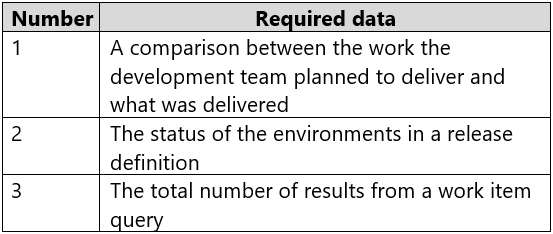


Access to Azure DevOps must be restricted to specific IP addresses.

Page load times for App1 must be captured and monitored.

Administrative effort must be minimized.

HOTSPOT (Drag and Drop is not supported)

You need to configure the alert for VM1. The solution must meet the technical requirements.

Which two settings should you configure? To answer, select the appropriate settings in the answer area.

Note: Each correct selection is worth one point.

Hot Area:

  1. See Explanation section for answer.

Answer(s): A

Explanation:


Setting 1: Threshold value
Set to 80 %

Scenario: An Azure Monitor alert for VM1 must be configured to meet the following requirements:
Be triggered when average CPU usage exceeds 80 percent for 15 minutes.

Calculate CPU usage averages once every minute.

Setting 2: Aggregation granularity
Set to 15 minutes.


You have a build pipeline in Azure Pipelines that occasionally fails.

You discover that a test measuring the response time of an API endpoint causes the failures.

You need to prevent the build pipeline from failing due to the test.

Which two actions should you perform? Each correct answer presents part of the solution.

Note: Each correct selection is worth one point.

  1. Set Flaky test detection to Off.
  2. Clear Flaky tests included in test pass percentage.
  3. Enable Test Impact Analysis (TIA).
  4. Manually mark the test as flaky.
  5. Enable test slicing.

Answer(s): B,D

Explanation:

D: You can mark or unmark a test as flaky based on analysis or context, by choosing Flaky.
To configure flaky test management, choose Project settings, and select Test management in the Pipelines section.
B:
Slide the On/Off button to On.


Reference:

https://docs.microsoft.com/en-us/azure/devops/pipelines/test/flaky-test-management


Your company uses the following resources:

Windows Server 2022 container images hosted in an Azure Container Registry.

Azure virtual machines that run the latest version of Ubuntu

An Azure Log Analytics workspace

Microsoft Entra ID

An Azure key vault

For which two resources can you receive vulnerability assessments in Microsoft Defender for Cloud? Each correct answer presents part of the solution.

Note: Each correct selection is worth one point.

  1. the Azure Log Analytics workspace
  2. the Azure key vault
  3. the Azure virtual machines that run the latest version of Ubuntu
  4. Microsoft Entra ID
  5. The Windows Server 2022 container images hosted in the Azure Container Registry.

Answer(s): C,E


You use Azure Pipelines to manage build pipelines, GitHub to store source code, and Dependabot to manage dependencies.

You have an app named App1.

Dependabot detects a dependency in App1 that requires an update.

What should you do first to apply the update?

  1. Create a pull request.
  2. Approve the pull request.
  3. Create a branch.
  4. Perform a commit.

Answer(s): B

Explanation:

DependaBot is a useful tool to regularly check for dependency updates. By helping to keep your project up to date, DependaBot can reduce technical debt and immediately apply security vulnerabilities when patches are released. How does DependaBot work?
1. DependaBot regularly checks dependencies for updates
2. If an update is found, DependaBot creates a new branch with this upgrade and Pull Request for approval
3. You review the new Pull Request, ensure the tests passed, review the code, and decide if you can merge the change


Reference:

https://samlearnsazure.blog/2019/12/20/github-using-dependabot/


Note: This question is part of a series of questions that present the same scenario. Each question in the series contains a unique solution that might meet the stated goals. Some question sets might have more than one correct solution, while others might not have a correct solution.

After you answer a question in this section, you will NOT be able to return to it. As a result, these questions will not appear in the review screen.

You manage a project in Azure DevOps.

You need to prevent the configuration of the project from changing over time.

Solution: Add a code coverage step to the build pipelines.

Does this meet the goal?

  1. Yes
  2. No

Answer(s): B

Explanation:

Instead implement Continuous Assurance for the project.


Reference:

https://azsk.azurewebsites.net/04-Continous-Assurance/Readme.html


Note: This question is part of a series of questions that present the same scenario. Each question in the series contains a unique solution that might meet the stated goals. Some question sets might have more than one correct solution, while others might not have a correct solution.

After you answer a question in this section, you will NOT be able to return to it. As a result, these questions will not appear in the review screen.

You manage a project in Azure DevOps.

You need to prevent the configuration of the project from changing over time.

Solution: Implement Continuous Integration for the project.

Does this meet the goal?

  1. Yes
  2. No

Answer(s): B

Explanation:

Instead implement Continuous Assurance for the project.


Reference:

https://azsk.azurewebsites.net/04-Continous-Assurance/Readme.html


Share your comments for Microsoft AZ-400 exam with other users:

A
Anonymous User
4/13/2026 1:00:51 PM

Question 2:

  • Answer: D. Azure Advisor

  • Why: To view security-related recommendations for resources in the Compute and Apps area (including App Service Web Apps and Functions), you use Azure Advisor. Advisor surfaces personalized best-practice recommendations across resources, including security, and shows which resources are affected and the severity.

  • Why not the others:
- Azure Log Analytics is for ad-hoc querying of telemetry, not for viewing security recommendations. - Azure Event Hubs is for streaming telemetry data, not for security recommendations.
  • Quick tip: In the portal, navigate to Azure Advisor and check the Security recommendations for App Services to see actionable items and affe

R
Rian
3/19/2026 9:12:10 AM

This is very good and accurate. Explanation is very helpful even thou some are not 100% right but good enough to pass.

AI Tutor 👋 I’m here to help!