Microsoft Designing and Implementing DevOps Solutions AZ-400 Exam Questions in PDF

Free Microsoft AZ-400 Dumps Questions (page: 8)


Case Study:

This is a case study. Case studies are not timed separately. You can use as much exam time as you would like to complete each case. However, there may be additional case studies and sections on this exam. You must manage your time to ensure that you are able to complete all questions included on this exam in the time provided.

To answer the questions included in a case study, you will need to reference information that is provided in the case study. Case studies might contain exhibits and other resources that provide more information about the scenario that is described in the case study. Each question is independent of the other questions in this case study.

At the end of this case study, a review screen will appear. This screen allows you to review your answers and to make changes before you move to the next section of the exam. After you begin a new section, you cannot return to this section.

To start the case study
To display the first question in this case study, click the Next button. Use the buttons in the left pane to explore the content of the case study before you answer the questions. Clicking these buttons displays information such as business requirements, existing environment, and problem statements. If the case study has an All Information tab, note that the information displayed is identical to the information displayed on the subsequent tabs.
When you are ready to answer a question, click the Question button to return to the question.

Overview

Contoso, Ltd. is a manufacturing company that has a main office in Chicago.


Existing Environment

Contoso plans to improve its IT development and operations processes by implementing Azure DevOps principles. Contoso has an Azure subscription and creates an Azure DevOps organization.

The Azure DevOps organization includes:

The Docker extension

A deployment pool named Pool7 that contains 10 Azure virtual machines that run Windows Server 2019

The Azure subscription contains an Azure Automation account.


Requirements

Planned changes

Contoso plans to create projects in Azure DevOps as shown in the following table.
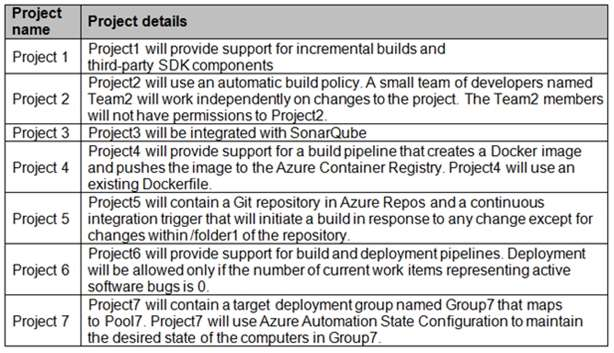


Technical requirements

Contoso identifies the following technical requirements:

Implement build agents for Project1.

Whenever possible, use Azure resources.

Avoid using deprecated technologies.

Implement a code flow strategy for Project2 that will:

- Enable Team2 to submit pull requests for Project2.
- Enable Team2 to work independently on changes to a copy of Project2.
- Ensure that any intermediary changes performed by Team2 on a copy of Project2 will be subject to the same restrictions as the ones defined in the build policy of Project2.
Whenever possible, implement automation and minimize administrative effort.

Implement Project3, Project5, Project6, and Project7 based on the planned changes.

Implement Project4 and configure the project to push Docker images to Azure Container Registry.

DRAG DROP (Drag and Drop is not supported)

You need to configure Azure Automation for the computers in Pool7.

Which three actions should you perform in sequence? To answer, move the appropriate actions from the list of actions to the answer area and arrange them in the correct order.

Select and Place:

  1. See Explanation section for answer.

Answer(s): A

Explanation:


Step 1: Create a Desired State Configuration (DSC) configuration file that has an extension of .ps1.

Step 2: Run the Import-AzureRmAutomationDscConfiguration Azure Powershell cmdlet The Import-AzureRmAutomationDscConfiguration cmdlet imports an APS Desired State Configuration (DSC) configuration into Azure Automation. Specify the path of an APS script that contains a single DSC configuration.

Example:
PS C:\>Import-AzureRmAutomationDscConfiguration -AutomationAccountName "Contoso17"- ResourceGroupName "ResourceGroup01" -SourcePath "C:\DSC\client.ps1" -Force

This command imports the DSC configuration in the file named client.ps1 into the Automation account named Contoso17. The command specifies the Force parameter. If there is an existing DSC configuration, this command replaces it.

Step 3: Run the Start-AzureRmAutomationDscCompilationJob Azure Powershell cmdlet The Start-AzureRmAutomationDscCompilationJob cmdlet compiles an APS Desired State Configuration (DSC) configuration in Azure Automation.


Reference:

https://docs.microsoft.com/en-us/powershell/module/azurerm.automation/import- azurermautomationdscconfiguration https://docs.microsoft.com/en-us/powershell/module/azurerm.automation/start- azurermautomationdsccompilationjob


You have an Azure Resource Manager template that deploys a multi-tier application.

You need to prevent the user who performs the deployment from viewing the account credentials and connection strings used by the application.

What should you use?

  1. Azure Key Vault
  2. a Web.config file
  3. an Appsettings.json file
  4. an Azure Storage table
  5. an Azure Resource Manager parameter file

Answer(s): A

Explanation:

When you need to pass a secure value (like a password) as a parameter during deployment, you can retrieve the value from an Azure Key Vault. You retrieve the value by referencing the key vault and secret in your parameter file. The value is never exposed because you only reference its key vault ID. The key vault can exist in a different subscription than the resource group you are deploying to.


Reference:

https://docs.microsoft.com/en-us/azure/azure-resource-manager/resource-manager-keyvault-parameter


You have an Azure DevOps organization named Contoso, an Azure DevOps project named Project1, an Azure subscription named Sub1, and an Azure key vault named vault1.

You need to ensure that you can reference the values of the secrets stored in vault1 in all the pipelines of Project1. The solution must prevent the values from being stored in the pipelines.

What should you do?

  1. Create a variable group in Project1.
  2. Add a secure file to Project1.
  3. Modify the security settings of the pipelines.
  4. Configure the security policy of Contoso.

Answer(s): A

Explanation:

Use a variable group to store values that you want to control and make available across multiple pipelines.


Reference:

https://docs.microsoft.com/en-us/azure/devops/pipelines/library/variable-groups


DRAG DROP (Drag and Drop is not supported)

You are configuring an Azure DevOps deployment pipeline. The deployed application will authenticate to a web service by using a secret stored in an Azure key vault.

You need to use the secret in the deployment pipeline.

Which three actions should you perform in sequence? To answer, move the appropriate actions from the list of actions to the answer area and arrange them in the correct order.

Select and Place:

  1. See Explanation section for answer.

Answer(s): A

Explanation:


Step 1: Create a service principal in Microsoft Entra ID.
You will need a service principal to deploy an app to an Azure resource from Azure Pipelines.

Step 2: Configure an access policy in the key vault.
You need to secure access to your key vaults by allowing only authorized applications and users. To access the data from the vault, you will need to provide read (Get) permissions to the service principal that you will be using for authentication in the pipeline.
Select Access policy and then select + Add Access Policy to setup a new policy.


Step 3: Add an Azure Resource Manager service connection to the pipeline You need to authorize the pipeline to deploy to Azure:
1. Select Pipelines | Pipelines,
2. Go to Releases under Pipelines and then select and Edit your pipeline.
3. Under Tasks, notice the release definition for Dev stage has a Azure Key Vault task. This task downloads Secrets from an Azure Key Vault. You will need to point to the subscription and the Azure Key Vault resource.
4. Click Manage, this will redirect to the Service connections page.


5.Click on New Service connection -> Azure Resource Manager -> Service Principal (manual). Fill the information from previously created service principal.


Reference:

https://azuredevopslabs.com/labs/vstsextend/azurekeyvault/


Note: This question is part of a series of questions that present the same scenario. Each question in the series contains a unique solution that might meet the stated goals. Some question sets might have more than one correct solution, while others might not have a correct solution.

After you answer a question in this section, you will NOT be able to return to it. As a result, these questions will not appear in the review screen.

You plan to update the Azure DevOps strategy of your company.

You need to identify the following issues as they occur during the company's development process:

Licensing violations

Prohibited libraries

Solution: You implement continuous integration.

Does this meet the goal?

  1. Yes
  2. No

Answer(s): B


Note: This question is part of a series of questions that present the same scenario. Each question in the series contains a unique solution that might meet the stated goals. Some question sets might have more than one correct solution, while others might not have a correct solution.

After you answer a question in this section, you will NOT be able to return to it. As a result, these questions will not appear in the review screen.

You plan to update the Azure DevOps strategy of your company.

You need to identify the following issues as they occur during the company's development process:

Licensing violations

Prohibited libraries

Solution: You implement pre-deployment gates.

Does this meet the goal?

  1. Yes
  2. No

Answer(s): B

Explanation:

Instead use implement continuous integration.
Note: WhiteSource is the leader in continuous open source software security and compliance management.
WhiteSource integrates into your build process, irrespective of your programming languages, build tools, or development environments. It works automatically, continuously, and silently in the background, checking the security, licensing, and quality of your open source components against WhiteSource constantly-updated definitive database of open source repositories.


Reference:

https://azuredevopslabs.com/labs/vstsextend/whitesource/


Note: This question is part of a series of questions that present the same scenario. Each question in the series contains a unique solution that might meet the stated goals. Some question sets might have more than one correct solution, while others might not have a correct solution.

After you answer a question in this section, you will NOT be able to return to it. As a result, these questions will not appear in the review screen.

You plan to update the Azure DevOps strategy of your company.

You need to identify the following issues as they occur during the company's development process:

Licensing violations

Prohibited libraries

Solution: You implement continuous deployment.

Does this meet the goal?

  1. Yes
  2. No

Answer(s): B

Explanation:

Instead implement continuous integration.
Note: WhiteSource is the leader in continuous open source software security and compliance management.
WhiteSource integrates into your build process, irrespective of your programming languages, build tools, or development environments. It works automatically, continuously, and silently in the background, checking the security, licensing, and quality of your open source components against WhiteSource constantly-updated definitive database of open source repositories.


Reference:

https://azuredevopslabs.com/labs/vstsextend/whitesource/


You have an Azure DevOps project named Project1 and an Azure subscription named Sub1.

You need to prevent releases from being deployed unless the releases comply with the Azure Policy rules assigned to Sub1.

What should you do in the release pipeline of Project1?

  1. Add a deployment gate.
  2. Modify the Deployment queue settings.
  3. Configure a deployment trigger.
  4. Create a pipeline variable.

Answer(s): A

Explanation:

You can check policy compliance with gates.
You can extend the approval process for the release by adding a gate. Gates allow you to configure automated calls to external services, where the results are used to approve or reject a deployment.
You can use gates to ensure that the release meets a wide range or criteria, without requiring user intervention.


Reference:

https://docs.microsoft.com/en-us/azure/devops/pipelines/release/deploy-using-approvals


Share your comments for Microsoft AZ-400 exam with other users:

A
Anonymous User
4/13/2026 1:00:51 PM

Question 2:

  • Answer: D. Azure Advisor

  • Why: To view security-related recommendations for resources in the Compute and Apps area (including App Service Web Apps and Functions), you use Azure Advisor. Advisor surfaces personalized best-practice recommendations across resources, including security, and shows which resources are affected and the severity.

  • Why not the others:
- Azure Log Analytics is for ad-hoc querying of telemetry, not for viewing security recommendations. - Azure Event Hubs is for streaming telemetry data, not for security recommendations.
  • Quick tip: In the portal, navigate to Azure Advisor and check the Security recommendations for App Services to see actionable items and affe

R
Rian
3/19/2026 9:12:10 AM

This is very good and accurate. Explanation is very helpful even thou some are not 100% right but good enough to pass.

AI Tutor 👋 I’m here to help!