Microsoft SC-200 Exam (page: 9)
Microsoft Security Operations Analyst
Updated on: 25-Dec-2025

Viewing Page 9 of 50

Case study
This is a case study. Case studies are not timed separately. You can use as much exam time as you would like to complete each case. However, there may be additional case studies and sections on this exam. You must manage your time to ensure that you are able to complete all questions included on this exam in the time provided.

To answer the questions included in a case study, you will need to reference information that is provided in the case study. Case studies might contain exhibits and other resources that provide more information about the scenario that is described in the case study. Each question is independent of the other questions in this case study.

At the end of this case study, a review screen will appear. This screen allows you to review your answers and to make changes before you move to the next section of the exam. After you begin a new section, you cannot return to this section.

To start the case study
To display the first question in this case study, click the Next button. Use the buttons in the left pane to explore the content of the case study before you answer the questions. Clicking these buttons displays information such as business requirements, existing environment, and problem statements. If the case study has an All Information tab, note that the information displayed is identical to the information displayed on the subsequent tabs. When you are ready to answer a question, click the question button to return to the question.

Overview
Litware Inc. is a renewable company.
Litware has offices in Boston and Seattle. Litware also has remote users located across the United States. To access Litware resources, including cloud resources, the remote users establish a VPN connection to either office.

Existing Environment

Identity Environment
The network contains an Active Directory forest named litware.com that syncs to an Azure Active Directory (Azure AD) tenant named litware.com.

Microsoft 365 Environment
Litware has a Microsoft 365 E5 subscription linked to the litware.com Azure AD tenant. Microsoft Defender for Endpoint is deployed to all computers that run Windows 10. All Microsoft Cloud App Security built-in anomaly detection policies are enabled.

Azure Environment
Litware has an Azure subscription linked to the litware.com Azure AD tenant. The subscription contains resources in the East US Azure region as shown in the following table.


Network Environment
Each Litware office connects directly to the internet and has a site-to-site VPN connection to the virtual networks in the Azure subscription.

On-premises Environment
The on-premises network contains the computers shown in the following table.


Current problems
Cloud App Security frequently generates false positive alerts when users connect to both offices simultaneously.

Planned Changes
Litware plans to implement the following changes:

-Create and configure Azure Sentinel in the Azure subscription.
-Validate Azure Sentinel functionality by using Azure AD test user accounts.

Business Requirements
Litware identifies the following business requirements:

-The principle of least privilege must be used whenever possible.
-Costs must be minimized, as long as all other requirements are met.
-Logs collected by Log Analytics must provide a full audit trail of user activities.
-All domain controllers must be protected by using Microsoft Defender for Identity.

Azure Information Protection Requirements
All files that have security labels and are stored on the Windows 10 computers must be available from the Azure Information Protection – Data discovery dashboard.

Microsoft Defender for Endpoint requirements
All Cloud App Security unsanctioned apps must be blocked on the Windows 10 computers by using Microsoft Defender for Endpoint.

Microsoft Cloud App Security requirements
Cloud App Security must identify whether a user connection is anomalous based on tenant-level data.

Azure Defender Requirements
All servers must send logs to the same Log Analytics workspace.

Azure Sentinel Requirements
Litware must meet the following Azure Sentinel requirements:

-Integrate Azure Sentinel and Cloud App Security.
-Ensure that a user named admin1 can configure Azure Sentinel playbooks.
-Create an Azure Sentinel analytics rule based on a custom query. The rule must automatically initiate the execution of a playbook.
-Add notes to events that represent data access from a specific IP address to provide the ability to reference the IP address when navigating through an investigation graph while hunting.
-Create a test rule that generates alerts when inbound access to Microsoft Office 365 by the Azure AD test user accounts is detected. Alerts generated by the rule must be grouped into individual incidents, with one incident per test user account.

You have a Microsoft 365 subscription that uses Microsoft Purview. Your company has a project named Project1.
You need to identify all the email messages that have the word Project1 in the subject line. The solution must search only the mailboxes of users that worked on Project1.
What should you do?

  1. Perform a user data search.
  2. Create a records management disposition.
  3. Perform an audit search.
  4. Perform a content search.

Answer(s): D

Explanation:

Content search in Microsoft Purview allows you to search for specific content across user mailboxes, SharePoint sites, and OneDrive locations. In this case, you want to identify email messages that contain the word Project1 in the subject line. A content search will allow you to specify the keyword "Project1" and narrow down the search to the mailboxes of specific users who worked on the project.
User data search is not a feature in Microsoft Purview that matches this requirement.
Records management disposition deals with managing records and their lifecycle (such as retention and deletion), but it is not related to searching email messages.
Audit search allows you to search the audit logs for activities performed by users, but it does not search the content of emails or documents.


Case study
This is a case study. Case studies are not timed separately. You can use as much exam time as you would like to complete each case. However, there may be additional case studies and sections on this exam. You must manage your time to ensure that you are able to complete all questions included on this exam in the time provided.

To answer the questions included in a case study, you will need to reference information that is provided in the case study. Case studies might contain exhibits and other resources that provide more information about the scenario that is described in the case study. Each question is independent of the other questions in this case study.

At the end of this case study, a review screen will appear. This screen allows you to review your answers and to make changes before you move to the next section of the exam. After you begin a new section, you cannot return to this section.

To start the case study
To display the first question in this case study, click the Next button. Use the buttons in the left pane to explore the content of the case study before you answer the questions. Clicking these buttons displays information such as business requirements, existing environment, and problem statements. If the case study has an All Information tab, note that the information displayed is identical to the information displayed on the subsequent tabs. When you are ready to answer a question, click the question button to return to the question.

Overview
Litware Inc. is a renewable company.
Litware has offices in Boston and Seattle. Litware also has remote users located across the United States. To access Litware resources, including cloud resources, the remote users establish a VPN connection to either office.

Existing Environment

Identity Environment
The network contains an Active Directory forest named litware.com that syncs to an Azure Active Directory (Azure AD) tenant named litware.com.

Microsoft 365 Environment
Litware has a Microsoft 365 E5 subscription linked to the litware.com Azure AD tenant. Microsoft Defender for Endpoint is deployed to all computers that run Windows 10. All Microsoft Cloud App Security built-in anomaly detection policies are enabled.

Azure Environment
Litware has an Azure subscription linked to the litware.com Azure AD tenant. The subscription contains resources in the East US Azure region as shown in the following table.


Network Environment
Each Litware office connects directly to the internet and has a site-to-site VPN connection to the virtual networks in the Azure subscription.

On-premises Environment
The on-premises network contains the computers shown in the following table.


Current problems
Cloud App Security frequently generates false positive alerts when users connect to both offices simultaneously.

Planned Changes
Litware plans to implement the following changes:

-Create and configure Azure Sentinel in the Azure subscription.
-Validate Azure Sentinel functionality by using Azure AD test user accounts.

Business Requirements
Litware identifies the following business requirements:

-The principle of least privilege must be used whenever possible.
-Costs must be minimized, as long as all other requirements are met.
-Logs collected by Log Analytics must provide a full audit trail of user activities.
-All domain controllers must be protected by using Microsoft Defender for Identity.

Azure Information Protection Requirements
All files that have security labels and are stored on the Windows 10 computers must be available from the Azure Information Protection – Data discovery dashboard.

Microsoft Defender for Endpoint requirements
All Cloud App Security unsanctioned apps must be blocked on the Windows 10 computers by using Microsoft Defender for Endpoint.

Microsoft Cloud App Security requirements
Cloud App Security must identify whether a user connection is anomalous based on tenant-level data.

Azure Defender Requirements
All servers must send logs to the same Log Analytics workspace.

Azure Sentinel Requirements
Litware must meet the following Azure Sentinel requirements:

-Integrate Azure Sentinel and Cloud App Security.
-Ensure that a user named admin1 can configure Azure Sentinel playbooks.
-Create an Azure Sentinel analytics rule based on a custom query. The rule must automatically initiate the execution of a playbook.
-Add notes to events that represent data access from a specific IP address to provide the ability to reference the IP address when navigating through an investigation graph while hunting.
-Create a test rule that generates alerts when inbound access to Microsoft Office 365 by the Azure AD test user accounts is detected. Alerts generated by the rule must be grouped into individual incidents, with one incident per test user account.

You have a Microsoft 365 subscription that uses Microsoft Defender XDR.
You discover that when Microsoft Defender for Endpoint generates alerts for a commonly used executable file, it causes alert fatigue.
You need to tune the alerts.
Which two actions can an alert tuning rule perform for the alerts? Each correct answer presents a complete solution.
NOTE: Each correct selection is worth one point.

  1. delete
  2. hide
  3. resolve
  4. merge
  5. assign

Answer(s): B,C


Case study
This is a case study. Case studies are not timed separately. You can use as much exam time as you would like to complete each case. However, there may be additional case studies and sections on this exam. You must manage your time to ensure that you are able to complete all questions included on this exam in the time provided.

To answer the questions included in a case study, you will need to reference information that is provided in the case study. Case studies might contain exhibits and other resources that provide more information about the scenario that is described in the case study. Each question is independent of the other questions in this case study.

At the end of this case study, a review screen will appear. This screen allows you to review your answers and to make changes before you move to the next section of the exam. After you begin a new section, you cannot return to this section.

To start the case study
To display the first question in this case study, click the Next button. Use the buttons in the left pane to explore the content of the case study before you answer the questions. Clicking these buttons displays information such as business requirements, existing environment, and problem statements. If the case study has an All Information tab, note that the information displayed is identical to the information displayed on the subsequent tabs. When you are ready to answer a question, click the question button to return to the question.

Overview
Litware Inc. is a renewable company.
Litware has offices in Boston and Seattle. Litware also has remote users located across the United States. To access Litware resources, including cloud resources, the remote users establish a VPN connection to either office.

Existing Environment

Identity Environment
The network contains an Active Directory forest named litware.com that syncs to an Azure Active Directory (Azure AD) tenant named litware.com.

Microsoft 365 Environment
Litware has a Microsoft 365 E5 subscription linked to the litware.com Azure AD tenant. Microsoft Defender for Endpoint is deployed to all computers that run Windows 10. All Microsoft Cloud App Security built-in anomaly detection policies are enabled.

Azure Environment
Litware has an Azure subscription linked to the litware.com Azure AD tenant. The subscription contains resources in the East US Azure region as shown in the following table.


Network Environment
Each Litware office connects directly to the internet and has a site-to-site VPN connection to the virtual networks in the Azure subscription.

On-premises Environment
The on-premises network contains the computers shown in the following table.


Current problems
Cloud App Security frequently generates false positive alerts when users connect to both offices simultaneously.

Planned Changes
Litware plans to implement the following changes:

-Create and configure Azure Sentinel in the Azure subscription.
-Validate Azure Sentinel functionality by using Azure AD test user accounts.

Business Requirements
Litware identifies the following business requirements:

-The principle of least privilege must be used whenever possible.
-Costs must be minimized, as long as all other requirements are met.
-Logs collected by Log Analytics must provide a full audit trail of user activities.
-All domain controllers must be protected by using Microsoft Defender for Identity.

Azure Information Protection Requirements
All files that have security labels and are stored on the Windows 10 computers must be available from the Azure Information Protection – Data discovery dashboard.

Microsoft Defender for Endpoint requirements
All Cloud App Security unsanctioned apps must be blocked on the Windows 10 computers by using Microsoft Defender for Endpoint.

Microsoft Cloud App Security requirements
Cloud App Security must identify whether a user connection is anomalous based on tenant-level data.

Azure Defender Requirements
All servers must send logs to the same Log Analytics workspace.

Azure Sentinel Requirements
Litware must meet the following Azure Sentinel requirements:

-Integrate Azure Sentinel and Cloud App Security.
-Ensure that a user named admin1 can configure Azure Sentinel playbooks.
-Create an Azure Sentinel analytics rule based on a custom query. The rule must automatically initiate the execution of a playbook.
-Add notes to events that represent data access from a specific IP address to provide the ability to reference the IP address when navigating through an investigation graph while hunting.
-Create a test rule that generates alerts when inbound access to Microsoft Office 365 by the Azure AD test user accounts is detected. Alerts generated by the rule must be grouped into individual incidents, with one incident per test user account.

Note: This section contains one or more sets of questions with the same scenario and problem. Each question presents a unique solution to the problem. You must determine whether the solution meets the stated goals. More than one solution in the set might solve the problem. It is also possible that none of the solutions in the set solve the problem.
After you answer a question in this section, you will NOT be able to return. As a result, these questions do not appear on the Review Screen.
You have a Microsoft 365 subscription.
You have 1,000 Windows devices that have a third-party antivirus product installed and Microsoft Defender Antivirus in passive mode.
You need to ensure that the devices are protected from malicious artifacts that were undetected by the third- party antivirus product.
Solution: You configure endpoint detection and response (EDR) in block mode. Does this meet the goal?

  1. Yes
  2. No

Answer(s): A

Explanation:

Enabling EDR in block mode allows Microsoft Defender to provide additional protection by blocking and remediating malicious artifacts that might bypass the third-party antivirus. EDR in block mode works even when Defender Antivirus is in passive mode, providing an effective safety net against threats undetected by the primary antivirus.


Case study
This is a case study. Case studies are not timed separately. You can use as much exam time as you would like to complete each case. However, there may be additional case studies and sections on this exam. You must manage your time to ensure that you are able to complete all questions included on this exam in the time provided.

To answer the questions included in a case study, you will need to reference information that is provided in the case study. Case studies might contain exhibits and other resources that provide more information about the scenario that is described in the case study. Each question is independent of the other questions in this case study.

At the end of this case study, a review screen will appear. This screen allows you to review your answers and to make changes before you move to the next section of the exam. After you begin a new section, you cannot return to this section.

To start the case study
To display the first question in this case study, click the Next button. Use the buttons in the left pane to explore the content of the case study before you answer the questions. Clicking these buttons displays information such as business requirements, existing environment, and problem statements. If the case study has an All Information tab, note that the information displayed is identical to the information displayed on the subsequent tabs. When you are ready to answer a question, click the question button to return to the question.

Overview
Litware Inc. is a renewable company.
Litware has offices in Boston and Seattle. Litware also has remote users located across the United States. To access Litware resources, including cloud resources, the remote users establish a VPN connection to either office.

Existing Environment

Identity Environment
The network contains an Active Directory forest named litware.com that syncs to an Azure Active Directory (Azure AD) tenant named litware.com.

Microsoft 365 Environment
Litware has a Microsoft 365 E5 subscription linked to the litware.com Azure AD tenant. Microsoft Defender for Endpoint is deployed to all computers that run Windows 10. All Microsoft Cloud App Security built-in anomaly detection policies are enabled.

Azure Environment
Litware has an Azure subscription linked to the litware.com Azure AD tenant. The subscription contains resources in the East US Azure region as shown in the following table.


Network Environment
Each Litware office connects directly to the internet and has a site-to-site VPN connection to the virtual networks in the Azure subscription.

On-premises Environment
The on-premises network contains the computers shown in the following table.


Current problems
Cloud App Security frequently generates false positive alerts when users connect to both offices simultaneously.

Planned Changes
Litware plans to implement the following changes:

-Create and configure Azure Sentinel in the Azure subscription.
-Validate Azure Sentinel functionality by using Azure AD test user accounts.

Business Requirements
Litware identifies the following business requirements:

-The principle of least privilege must be used whenever possible.
-Costs must be minimized, as long as all other requirements are met.
-Logs collected by Log Analytics must provide a full audit trail of user activities.
-All domain controllers must be protected by using Microsoft Defender for Identity.

Azure Information Protection Requirements
All files that have security labels and are stored on the Windows 10 computers must be available from the Azure Information Protection – Data discovery dashboard.

Microsoft Defender for Endpoint requirements
All Cloud App Security unsanctioned apps must be blocked on the Windows 10 computers by using Microsoft Defender for Endpoint.

Microsoft Cloud App Security requirements
Cloud App Security must identify whether a user connection is anomalous based on tenant-level data.

Azure Defender Requirements
All servers must send logs to the same Log Analytics workspace.

Azure Sentinel Requirements
Litware must meet the following Azure Sentinel requirements:

-Integrate Azure Sentinel and Cloud App Security.
-Ensure that a user named admin1 can configure Azure Sentinel playbooks.
-Create an Azure Sentinel analytics rule based on a custom query. The rule must automatically initiate the execution of a playbook.
-Add notes to events that represent data access from a specific IP address to provide the ability to reference the IP address when navigating through an investigation graph while hunting.
-Create a test rule that generates alerts when inbound access to Microsoft Office 365 by the Azure AD test user accounts is detected. Alerts generated by the rule must be grouped into individual incidents, with one incident per test user account.

Note: This section contains one or more sets of questions with the same scenario and problem. Each question presents a unique solution to the problem. You must determine whether the solution meets the stated goals. More than one solution in the set might solve the problem. It is also possible that none of the solutions in the set solve the problem.
After you answer a question in this section, you will NOT be able to return. As a result, these questions do not appear on the Review Screen.
You have a Microsoft 365 subscription.
You have 1,000 Windows devices that have a third-party antivirus product installed and Microsoft Defender Antivirus in passive mode.
You need to ensure that the devices are protected from malicious artifacts that were undetected by the third- party antivirus product.
Solution: You configure Controlled folder access. Does this meet the goal?

  1. Yes
  2. No

Answer(s): B

Explanation:

Controlled Folder Access is a feature of Microsoft Defender that protects specified folders from unauthorized changes, such as those by ransomware. While it is beneficial for protecting important files, it does not focus on identifying or blocking malicious artifacts undetected by the primary antivirus. This feature does not enhance the detection or blocking capabilities against a wide range of threats that might bypass the third-party antivirus.


Case study
This is a case study. Case studies are not timed separately. You can use as much exam time as you would like to complete each case. However, there may be additional case studies and sections on this exam. You must manage your time to ensure that you are able to complete all questions included on this exam in the time provided.

To answer the questions included in a case study, you will need to reference information that is provided in the case study. Case studies might contain exhibits and other resources that provide more information about the scenario that is described in the case study. Each question is independent of the other questions in this case study.

At the end of this case study, a review screen will appear. This screen allows you to review your answers and to make changes before you move to the next section of the exam. After you begin a new section, you cannot return to this section.

To start the case study
To display the first question in this case study, click the Next button. Use the buttons in the left pane to explore the content of the case study before you answer the questions. Clicking these buttons displays information such as business requirements, existing environment, and problem statements. If the case study has an All Information tab, note that the information displayed is identical to the information displayed on the subsequent tabs. When you are ready to answer a question, click the question button to return to the question.

Overview
Litware Inc. is a renewable company.
Litware has offices in Boston and Seattle. Litware also has remote users located across the United States. To access Litware resources, including cloud resources, the remote users establish a VPN connection to either office.

Existing Environment

Identity Environment
The network contains an Active Directory forest named litware.com that syncs to an Azure Active Directory (Azure AD) tenant named litware.com.

Microsoft 365 Environment
Litware has a Microsoft 365 E5 subscription linked to the litware.com Azure AD tenant. Microsoft Defender for Endpoint is deployed to all computers that run Windows 10. All Microsoft Cloud App Security built-in anomaly detection policies are enabled.

Azure Environment
Litware has an Azure subscription linked to the litware.com Azure AD tenant. The subscription contains resources in the East US Azure region as shown in the following table.


Network Environment
Each Litware office connects directly to the internet and has a site-to-site VPN connection to the virtual networks in the Azure subscription.

On-premises Environment
The on-premises network contains the computers shown in the following table.


Current problems
Cloud App Security frequently generates false positive alerts when users connect to both offices simultaneously.

Planned Changes
Litware plans to implement the following changes:

-Create and configure Azure Sentinel in the Azure subscription.
-Validate Azure Sentinel functionality by using Azure AD test user accounts.

Business Requirements
Litware identifies the following business requirements:

-The principle of least privilege must be used whenever possible.
-Costs must be minimized, as long as all other requirements are met.
-Logs collected by Log Analytics must provide a full audit trail of user activities.
-All domain controllers must be protected by using Microsoft Defender for Identity.

Azure Information Protection Requirements
All files that have security labels and are stored on the Windows 10 computers must be available from the Azure Information Protection – Data discovery dashboard.

Microsoft Defender for Endpoint requirements
All Cloud App Security unsanctioned apps must be blocked on the Windows 10 computers by using Microsoft Defender for Endpoint.

Microsoft Cloud App Security requirements
Cloud App Security must identify whether a user connection is anomalous based on tenant-level data.

Azure Defender Requirements
All servers must send logs to the same Log Analytics workspace.

Azure Sentinel Requirements
Litware must meet the following Azure Sentinel requirements:

-Integrate Azure Sentinel and Cloud App Security.
-Ensure that a user named admin1 can configure Azure Sentinel playbooks.
-Create an Azure Sentinel analytics rule based on a custom query. The rule must automatically initiate the execution of a playbook.
-Add notes to events that represent data access from a specific IP address to provide the ability to reference the IP address when navigating through an investigation graph while hunting.
-Create a test rule that generates alerts when inbound access to Microsoft Office 365 by the Azure AD test user accounts is detected. Alerts generated by the rule must be grouped into individual incidents, with one incident per test user account.

Note: This section contains one or more sets of questions with the same scenario and problem. Each
question presents a unique solution to the problem. You must determine whether the solution meets the stated goals. More than one solution in the set might solve the problem. It is also possible that none of the solutions in the set solve the problem.
After you answer a question in this section, you will NOT be able to return. As a result, these questions do not appear on the Review Screen.
You have a Microsoft 365 subscription.
You have 1,000 Windows devices that have a third-party antivirus product installed and Microsoft Defender Antivirus in passive mode.
You need to ensure that the devices are protected from malicious artifacts that were undetected by the third- party antivirus product.
Solution: You enable automated investigation and response (AIR). Does this meet the goal?

  1. Yes
  2. No

Answer(s): B

Explanation:

Automated Investigation and Response automates the investigation and remediation of alerts, helping security teams respond faster to potential threats. However, AIR primarily addresses post-alert actions rather than actively blocking threats at the endpoint level. It relies on alerts to trigger, so it does not fill the gap for additional real-time threat blocking, unlike EDR in block mode, which proactively blocks and remediates threats that may bypass the primary antivirus.


Case study
This is a case study. Case studies are not timed separately. You can use as much exam time as you would like to complete each case. However, there may be additional case studies and sections on this exam. You must manage your time to ensure that you are able to complete all questions included on this exam in the time provided.

To answer the questions included in a case study, you will need to reference information that is provided in the case study. Case studies might contain exhibits and other resources that provide more information about the scenario that is described in the case study. Each question is independent of the other questions in this case study.

At the end of this case study, a review screen will appear. This screen allows you to review your answers and to make changes before you move to the next section of the exam. After you begin a new section, you cannot return to this section.

To start the case study
To display the first question in this case study, click the Next button. Use the buttons in the left pane to explore the content of the case study before you answer the questions. Clicking these buttons displays information such as business requirements, existing environment, and problem statements. If the case study has an All Information tab, note that the information displayed is identical to the information displayed on the subsequent tabs. When you are ready to answer a question, click the question button to return to the question.

Overview
Litware Inc. is a renewable company.
Litware has offices in Boston and Seattle. Litware also has remote users located across the United States. To access Litware resources, including cloud resources, the remote users establish a VPN connection to either office.

Existing Environment

Identity Environment
The network contains an Active Directory forest named litware.com that syncs to an Azure Active Directory (Azure AD) tenant named litware.com.

Microsoft 365 Environment
Litware has a Microsoft 365 E5 subscription linked to the litware.com Azure AD tenant. Microsoft Defender for Endpoint is deployed to all computers that run Windows 10. All Microsoft Cloud App Security built-in anomaly detection policies are enabled.

Azure Environment
Litware has an Azure subscription linked to the litware.com Azure AD tenant. The subscription contains resources in the East US Azure region as shown in the following table.


Network Environment
Each Litware office connects directly to the internet and has a site-to-site VPN connection to the virtual networks in the Azure subscription.

On-premises Environment
The on-premises network contains the computers shown in the following table.


Current problems
Cloud App Security frequently generates false positive alerts when users connect to both offices simultaneously.

Planned Changes
Litware plans to implement the following changes:

-Create and configure Azure Sentinel in the Azure subscription.
-Validate Azure Sentinel functionality by using Azure AD test user accounts.

Business Requirements
Litware identifies the following business requirements:

-The principle of least privilege must be used whenever possible.
-Costs must be minimized, as long as all other requirements are met.
-Logs collected by Log Analytics must provide a full audit trail of user activities.
-All domain controllers must be protected by using Microsoft Defender for Identity.

Azure Information Protection Requirements
All files that have security labels and are stored on the Windows 10 computers must be available from the Azure Information Protection – Data discovery dashboard.

Microsoft Defender for Endpoint requirements
All Cloud App Security unsanctioned apps must be blocked on the Windows 10 computers by using Microsoft Defender for Endpoint.

Microsoft Cloud App Security requirements
Cloud App Security must identify whether a user connection is anomalous based on tenant-level data.

Azure Defender Requirements
All servers must send logs to the same Log Analytics workspace.

Azure Sentinel Requirements
Litware must meet the following Azure Sentinel requirements:

-Integrate Azure Sentinel and Cloud App Security.
-Ensure that a user named admin1 can configure Azure Sentinel playbooks.
-Create an Azure Sentinel analytics rule based on a custom query. The rule must automatically initiate the execution of a playbook.
-Add notes to events that represent data access from a specific IP address to provide the ability to reference the IP address when navigating through an investigation graph while hunting.
-Create a test rule that generates alerts when inbound access to Microsoft Office 365 by the Azure AD test user accounts is detected. Alerts generated by the rule must be grouped into individual incidents, with one incident per test user account.

You have a Microsoft 365 subscription that uses Microsoft Defender XDR.
You need to implement deception rules. The solution must ensure that you can limit the scope of the rules. What should you create first?

  1. device groups
  2. device tags
  3. honeytoken entity tags
  4. sensitive entity tags

Answer(s): B


Case study
This is a case study. Case studies are not timed separately. You can use as much exam time as you would like to complete each case. However, there may be additional case studies and sections on this exam. You must manage your time to ensure that you are able to complete all questions included on this exam in the time provided.

To answer the questions included in a case study, you will need to reference information that is provided in the case study. Case studies might contain exhibits and other resources that provide more information about the scenario that is described in the case study. Each question is independent of the other questions in this case study.

At the end of this case study, a review screen will appear. This screen allows you to review your answers and to make changes before you move to the next section of the exam. After you begin a new section, you cannot return to this section.

To start the case study
To display the first question in this case study, click the Next button. Use the buttons in the left pane to explore the content of the case study before you answer the questions. Clicking these buttons displays information such as business requirements, existing environment, and problem statements. If the case study has an All Information tab, note that the information displayed is identical to the information displayed on the subsequent tabs. When you are ready to answer a question, click the question button to return to the question.

Overview
Litware Inc. is a renewable company.
Litware has offices in Boston and Seattle. Litware also has remote users located across the United States. To access Litware resources, including cloud resources, the remote users establish a VPN connection to either office.

Existing Environment

Identity Environment
The network contains an Active Directory forest named litware.com that syncs to an Azure Active Directory (Azure AD) tenant named litware.com.

Microsoft 365 Environment
Litware has a Microsoft 365 E5 subscription linked to the litware.com Azure AD tenant. Microsoft Defender for Endpoint is deployed to all computers that run Windows 10. All Microsoft Cloud App Security built-in anomaly detection policies are enabled.

Azure Environment
Litware has an Azure subscription linked to the litware.com Azure AD tenant. The subscription contains resources in the East US Azure region as shown in the following table.


Network Environment
Each Litware office connects directly to the internet and has a site-to-site VPN connection to the virtual networks in the Azure subscription.

On-premises Environment
The on-premises network contains the computers shown in the following table.


Current problems
Cloud App Security frequently generates false positive alerts when users connect to both offices simultaneously.

Planned Changes
Litware plans to implement the following changes:

-Create and configure Azure Sentinel in the Azure subscription.
-Validate Azure Sentinel functionality by using Azure AD test user accounts.

Business Requirements
Litware identifies the following business requirements:

-The principle of least privilege must be used whenever possible.
-Costs must be minimized, as long as all other requirements are met.
-Logs collected by Log Analytics must provide a full audit trail of user activities.
-All domain controllers must be protected by using Microsoft Defender for Identity.

Azure Information Protection Requirements
All files that have security labels and are stored on the Windows 10 computers must be available from the Azure Information Protection – Data discovery dashboard.

Microsoft Defender for Endpoint requirements
All Cloud App Security unsanctioned apps must be blocked on the Windows 10 computers by using Microsoft Defender for Endpoint.

Microsoft Cloud App Security requirements
Cloud App Security must identify whether a user connection is anomalous based on tenant-level data.

Azure Defender Requirements
All servers must send logs to the same Log Analytics workspace.

Azure Sentinel Requirements
Litware must meet the following Azure Sentinel requirements:

-Integrate Azure Sentinel and Cloud App Security.
-Ensure that a user named admin1 can configure Azure Sentinel playbooks.
-Create an Azure Sentinel analytics rule based on a custom query. The rule must automatically initiate the execution of a playbook.
-Add notes to events that represent data access from a specific IP address to provide the ability to reference the IP address when navigating through an investigation graph while hunting.
-Create a test rule that generates alerts when inbound access to Microsoft Office 365 by the Azure AD test user accounts is detected. Alerts generated by the rule must be grouped into individual incidents, with one incident per test user account.

Note: This section contains one or more sets of questions with the same scenario and problem. Each question presents a unique solution to the problem. You must determine whether the solution meets the stated goals. More than one solution in the set might solve the problem. It is also possible that none of the solutions in the set solve the problem.
After you answer a question in this section, you will NOT be able to return. As a result, these questions do not appear on the Review Screen.
You have a Microsoft 365 subscription.
You have 1,000 Windows devices that have a third-party antivirus product installed and Microsoft Defender Antivirus in passive mode.
All Windows devices are onboarded to Microsoft Defender for Endpoint.
You need to ensure that the devices are protected from malicious artifacts that were undetected by the third- party antivirus product.
Solution: You enable Live Response. Does this meet the goal?

  1. Yes
  2. No

Answer(s): B

Explanation:

Correct:
You configure endpoint detection and response (EDR) in block mode.
Incorrect:
* You configure Controlled folder access.
* You enable automated investigation and response (AIR).
You enable Live Response.
Note:
You configure endpoint detection and response (EDR) in block mode.
Enabling EDR in block mode allows Microsoft Defender to provide additional protection by blocking and remediating malicious artifacts that might bypass the third-party antivirus. EDR in block mode works even when Defender Antivirus is in passive mode, providing an effective safety net against threats undetected by the primary antivirus.
Incorrect:
You configure Controlled folder access.
Controlled Folder Access is a feature of Microsoft Defender that protects specified folders from unauthorized changes, such as those by ransomware. While it is beneficial for protecting important files, it does not focus on identifying or blocking malicious artifacts undetected by the primary antivirus. This feature does not enhance the detection or blocking capabilities against a wide range of threats that might bypass the third-party antivirus.
* You enable automated investigation and response (AIR).
Automated Investigation and Response automates the investigation and remediation of alerts, helping security teams respond faster to potential threats. However, AIR primarily addresses post-alert actions rather than actively blocking threats at the endpoint level. It relies on alerts to trigger, so it does not fill the gap for additional real-time threat blocking, unlike EDR in block mode, which proactively blocks and remediates threats that may bypass the primary antivirus.


Reference:

https://learn.microsoft.com/en-us/answers/questions/1151652/defender-for-endpoint-enable-edr-in-block-mode


Case study

This is a case study. Case studies are not timed separately. You can use as much exam time as you would like to complete each case. However, there may be additional case studies and sections on this exam. You must manage your time to ensure that you are able to complete all questions included on this exam in the time provided.

To answer the questions included in a case study, you will need to reference information that is provided in the case study. Case studies might contain exhibits and other resources that provide more information about the scenario that is described in the case study. Each question is independent of the other questions in this case study.

At the end of this case study, a review screen will appear. This screen allows you to review your answers and to make changes before you move to the next section of the exam. After you begin a new section, you cannot return to this section.

To start the case study
To display the first question in this case study, click the Next button. Use the buttons in the left pane to explore the content of the case study before you answer the questions. Clicking these buttons displays information such as business requirements, existing environment, and problem statements. If the case study has an All Information tab, note that the information displayed is identical to the information displayed on the subsequent tabs. When you are ready to answer a question, click the Question button to return to the question.

Overview

Fabrikam, Inc. is a financial services company.

The company has branch offices in New York, London, and Singapore. Fabrikam has remote users located across the globe. The remote users access company resources, including cloud resources, by using a VPN connection to a branch office.

Existing Environment

Identity Environment

The network contains an Active Directory Domain Services (AD DS) forest named fabrikam.com that syncs with an Azure AD tenant named fabrikam.com. To sync the forest, Fabrikam uses Azure AD Connect with pass-through authentication enabled and password hash synchronization disabled.

The fabrikam.com forest contains two global groups named Group1 and Group2.

Microsoft 365 Environment

All the users at Fabrikam are assigned a Microsoft 365 E5 license and an Azure Active Directory Premium Plan 2 license.

Fabrikam implements Microsoft Defender for Identity and Microsoft Defender for Cloud Apps and enables log collectors.

Azure Environment

Fabrikam has an Azure subscription that contains the resources shown in the following table.
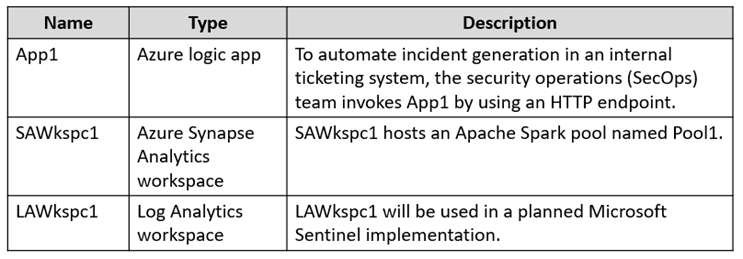


Amazon Web Services (AWS) Environment

Fabrikam has an Amazon Web Services (AWS) account named Account1. Account1 contains 100 Amazon Elastic Compute Cloud (EC2) instances that run a custom Windows Server 2022. The image includes Microsoft SQL Server 2019 and does NOT have any agents installed.

Current Issues

When the users use the VPN connections, Microsoft 365 Defender raises a high volume of impossible travel alerts that are false positives.

Defender for Identity raises a high volume of Suspected DCSync attack alerts that are false positives.

Requirements

Planned changes

Fabrikam plans to implement the following services:

-Microsoft Defender for Cloud
-Microsoft Sentinel

Business Requirements

Fabrikam identifies the following business requirements:

-Use the principle of least privilege, whenever possible.
-Minimize administrative effort.

Microsoft Defender for Cloud Apps Requirements

Fabrikam identifies the following Microsoft Defender for Cloud Apps requirements:

Ensure that impossible travel alert policies are based on the previous activities of each user.
Reduce the amount of impossible travel alerts that are false positives.

Microsoft Defender for Identity Requirements

Minimize the administrative effort required to investigate the false positive alerts.

Microsoft Defender for Cloud Requirements

Fabrikam identifies the following Microsoft Defender for Cloud requirements:

-Ensure that the members of Group2 can modify security policies.
-Ensure that the members of Group1 can assign regulatory compliance policy initiatives at the Azure subscription level.
-Automate the deployment of the Azure Connected Machine agent for Azure Arc-enabled servers to the existing and future resources of Account1.
-Minimize the administrative effort required to investigate the false positive alerts.

Microsoft Sentinel Requirements

Fabrikam identifies the following Microsoft Sentinel requirements:

-Query for NXDOMAIN DNS requests from the last seven days by using built-in Advanced Security Information Model (ASIM) unifying parsers.
-From AWS EC2 instances, collect Windows Security event log entries that include local group membership changes.
-Identify anomalous activities of Azure AD users by using User and Entity Behavior Analytics (UEBA).
-Evaluate the potential impact of compromised Azure AD user credentials by using UEBA.
-Ensure that App1 is available for use in Microsoft Sentinel automation rules.
-Identify the mean time to triage for incidents generated during the last 30 days.
-Identify the mean time to close incidents generated during the last 30 days.
-Ensure that the members of Group1 can create and run playbooks.
-Ensure that the members of Group1 can manage analytics rules.
-Run hunting queries on Pool1 by using Jupyter notebooks.
-Ensure that the members of Group2 can manage incidents.
-Maximize the performance of data queries.
-Minimize the amount of collected data.

HOTSPOT (Drag and Drop is not supported)
You need to meet the Microsoft Defender for Cloud Apps requirements.
What should you do? To answer, select the appropriate options in the answer area.
NOTE: Each correct selection is worth one point.
Hot Area:

  1. See Explanation section for answer.

Answer(s): A

Explanation:


Box 1: Low
Fabrikam identifies the following Microsoft Defender for Cloud Apps requirements: Reduce the amount of impossible travel alerts that are false positives.
Ensure that impossible travel alert policies are based on the previous activities of each user.
The sensitivity slider allows you to affect the algorithm and define how strict the detection logic is. The higher the sensitivity level, fewer activities will be suppressed as part of the detection logic. In this way, you can adapt the detection according to your coverage needs and your SNR targets.
Note: In the Impossible Travel policy, you can set the sensitivity slider to determine the level of anomalous behavior needed before an alert is triggered. For example, if you set it to low or medium, it will suppress Impossible Travel alerts from a user's common locations, and if you set it to high, it will surface such alerts. You can choose from the following sensitivity levels:
Low: System, tenant, and user suppressions Medium: System and user suppressions High: Only system suppressions
Box 2: IP address range
Anomalies are detected by scanning user activity. The risk is evaluated by looking at over 30 different risk indicators, grouped into risk factors, as follows:
Risky IP address Login failures Admin activity Inactive accounts Location Impossible travel
Device and user agent Activity rate
Incorrect:
In addition to native Defender for Cloud Apps alerts, you'll also get the following detection alerts based on information received from Azure Active Directory (AD) Identity Protection:
Leaked credentials
Triggered when a user's valid credentials have been leaked.
Risky sign-in: Combines a number of Azure AD Identity Protection sign-in detections into a single detection.


Reference:

https://learn.microsoft.com/en-us/defender-cloud-apps/anomaly-detection-policy


Viewing Page 9 of 50


Share your comments for Microsoft SC-200 exam with other users:

Brijesh kr 6/29/2023 4:07:00 AM

awesome contents
INDIA