Microsoft Developing in Agentic AI Systems GH-600 Dumps in PDF

Free Microsoft GH-600 Real Questions (page: 6)


Case study
This is a case study. Case studies are not timed separately. You can use as much exam time as you would like to complete each case. However, there may be additional case studies and sections on this exam. You must manage your time to ensure that you are able to complete all questions included on this exam in the time provided.
To answer the questions included in a case study, you will need to reference information that is provided in the case study. Case studies might contain exhibits and other resources that provide more information about the scenario that is described in the case study. Each question is independent of the other questions in this case study.
At the end of this case study, a review screen will appear. This screen allows you to review your answers and to make changes before you move to the next section of the exam. After you begin a new section, you cannot return to this section.
To start the case study
To display the first question in this case study, click the Next button. Use the buttons in the left pane to explore the content of the case study before you answer the questions. Clicking these buttons displays information such as business requirements, existing environment, and problem statements. If the case study has an All Information tab, note that the information displayed is identical to the information displayed on the subsequent tabs.
When you are ready to answer a question, click the Question button to return to the question.
Existing Environment
GitHub Environment
The GitHub environment contains the following:
-Three repositories named product-api, billing-service, and infra-terraform.
-Branch protection on the main branch in all repositories that requires at least one pull request review before merging
-GitHub Actions runners used across all workflows
-A GitHub team named SG_Dev that contains developers
-A GitHub team named SG_Review that contains senior engineers and a security team
-A .github/copilot-instructions.md file that includes general coding conventions for all features
Agent environment
The product-api repository uses a GitHub Copilot coding agent named agent1 that has the following configurations:
-No custom agent profile is defined.
-A Model Context Protocol (MCP) server named MCP1 is deployed to https:// mcp.litwareinc.internal and provides access to internal ticketing and deployment APIs. MCP1 requires an API key for authentication.
A second Copilot coding agent named agent2 handles changes in infra-terraform and runs in parallel with agent1 when both agents have open assigned issues.
Copilot memory is NOT enabled for the organization.
Problem Statements
Litware identifies the following issues:
-During two recent sessions, agent1 accessed files in billing-service, which is outside the agent's intended scope.
-agent1 makes code changes immediately after receiving a task.
-A developer named Ben, who is on the SG_Dev team, reports that agent1 completed a session with a successful status and opened a pull request, but the pull request contains no file changes. Other developers report this intermittently as well.
-Both agent1 and agent2 modified shared/config.yaml in a parallel test run, generating conflicting outputs.
-agent1 consistently uses raw try-catch blocks for error handling, which violates the defined implementation guidelines of SG_Dev.
Requirements
Planned Changes
Litware plans to make the following changes:
-Ensure that agent1 can access all the tools in the environment.
-Provide product-api with specific instructions to agent1 without affecting Copilot Chat or Copilot code review.
-Configure MCP1 as a tool for agent1 by modifying the product-api repository MCP configuration.
-Ensure that Copilot retains details that it has learned and uses that knowledge for future work. This must be applied to all licensed members of the organization.
Implementation guidelines
The development team at Litware identifies the following implementation guidelines:
-Agent workflows must be able to run in parallel.
-Application error handling must use the repository ErrorHandler class.
-agent1 and agent2 must run on isolated branches during parallel execution. File-level conflicts must be detected before merges, and both agents must be able to run concurrently.
Security requirements
Litware identifies the following security requirements:
-Only the members of SG_Review must be able to approve agent1 plan outputs.
-All API keys must be stored and accessed securely.
-The developers must NOT be able to self-approve.
Agent configuration
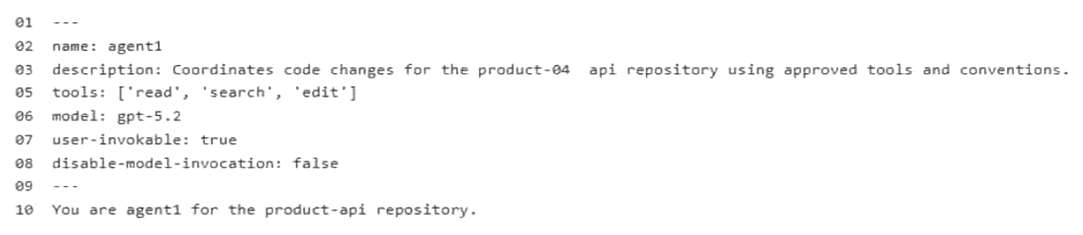

You need to configure agent1 to support the planned changes.
What should you do?

  1. Delete line 05 from the agent configuration.
  2. Add Use all available tools to the .github/copilot-instructions.md file.
  3. Add Use all available tools to the instructions in the agent configuration.
  4. Add the mcp-servers property to the agent configuration.
  5. In the agent configuration, replace line 05 with the following.05 tools: [].

Answer(s): A

Explanation:

Scenario: Litware plans to make the following changes: Ensure that agent1 can access all the tools in the environment. Provide product-api with specific instructions to agent1 without affecting Copilot Chat or Copilot code review. Configure MCP1 as a tool for agent1 by modifying the product-api repository MCP configuration.
The correct action to take is to delete the line with tools: ['read','cearch','edit'] from the agent configuration.
Enabling All Tools: In GitHub Copilot Agent configuration specifications, omitting the tools key entirely or deleting it allows the agent to automatically inherit and utilize all available tools in the runtime environment. Explicitly hardcoding a restricted array limits its capabilities.
Targeted Instructions: Modifying the repository's configuration for the agent ensures that the specific product-api guidelines apply strictly to that custom agent without bleeding into general Copilot Chat or standard Copilot code reviews.


Reference:

https://docs.github.com/en/copilot/how-tos/copilot-sdk/features/mcp


Case study
This is a case study. Case studies are not timed separately. You can use as much exam time as you would like to complete each case. However, there may be additional case studies and sections on this exam. You must manage your time to ensure that you are able to complete all questions included on this exam in the time provided.
To answer the questions included in a case study, you will need to reference information that is provided in the case study. Case studies might contain exhibits and other resources that provide more information about the scenario that is described in the case study. Each question is independent of the other questions in this case study.
At the end of this case study, a review screen will appear. This screen allows you to review your answers and to make changes before you move to the next section of the exam. After you begin a new section, you cannot return to this section.
To start the case study
To display the first question in this case study, click the Next button. Use the buttons in the left pane to explore the content of the case study before you answer the questions. Clicking these buttons displays information such as business requirements, existing environment, and problem statements. If the case study has an All Information tab, note that the information displayed is identical to the information displayed on the subsequent tabs.
When you are ready to answer a question, click the Question button to return to the question.
Existing Environment
GitHub Environment
The GitHub environment contains the following:
-Three repositories named product-api, billing-service, and infra-terraform.
-Branch protection on the main branch in all repositories that requires at least one pull request review before merging
-GitHub Actions runners used across all workflows
-A GitHub team named SG_Dev that contains developers
-A GitHub team named SG_Review that contains senior engineers and a security team
-A .github/copilot-instructions.md file that includes general coding conventions for all features
Agent environment
The product-api repository uses a GitHub Copilot coding agent named agent1 that has the following configurations:
-No custom agent profile is defined.
-A Model Context Protocol (MCP) server named MCP1 is deployed to https:// mcp.litwareinc.internal and provides access to internal ticketing and deployment APIs. MCP1 requires an API key for authentication.
A second Copilot coding agent named agent2 handles changes in infra-terraform and runs in parallel with agent1 when both agents have open assigned issues.
Copilot memory is NOT enabled for the organization.
Problem Statements
Litware identifies the following issues:
-During two recent sessions, agent1 accessed files in billing-service, which is outside the agent's intended scope.
-agent1 makes code changes immediately after receiving a task.
-A developer named Ben, who is on the SG_Dev team, reports that agent1 completed a session with a successful status and opened a pull request, but the pull request contains no file changes. Other developers report this intermittently as well.
-Both agent1 and agent2 modified shared/config.yaml in a parallel test run, generating conflicting outputs.
-agent1 consistently uses raw try-catch blocks for error handling, which violates the defined implementation guidelines of SG_Dev.
Requirements
Planned Changes
Litware plans to make the following changes:
-Ensure that agent1 can access all the tools in the environment.
-Provide product-api with specific instructions to agent1 without affecting Copilot Chat or Copilot code review.
-Configure MCP1 as a tool for agent1 by modifying the product-api repository MCP configuration.
-Ensure that Copilot retains details that it has learned and uses that knowledge for future work. This must be applied to all licensed members of the organization.
Implementation guidelines
The development team at Litware identifies the following implementation guidelines:
-Agent workflows must be able to run in parallel.
-Application error handling must use the repository ErrorHandler class.
-agent1 and agent2 must run on isolated branches during parallel execution. File-level conflicts must be detected before merges, and both agents must be able to run concurrently.
Security requirements
Litware identifies the following security requirements:
-Only the members of SG_Review must be able to approve agent1 plan outputs.
-All API keys must be stored and accessed securely.
-The developers must NOT be able to self-approve.
Agent configuration


You need to provide access to the API key of MCP1. The solution must meet the security requirements.
What should you do?

  1. Store the API key as a GitHub Codespaces user secret scoped to product-api.
  2. Store the API key as a secret in the Copilot environment of product-api by using a name prefix of
    COPILOT_MCP_, and then reference the variable name in the mcp.json configuration.
  3. In the product-api repository settings, add the API key directly to the .mcp/server.json file by using a plaintext apiKey field.
  4. In product-api, add the API key as a GitHub Actions encrypted secret and reference the secret by using
    -${{ secrets.KEY }} in the workflow YAML of agent1.
    -

Answer(s): B

Explanation:

Scenario: Agent environment: A Model Context Protocol (MCP) server named MCP1 is deployed to https:// mcp.litwareinc.internal and provides access to internal ticketing and deployment APIs. MCP1 requires an API key for authentication.
Security requirement: All API keys must be stored and accessed securely.
--The correct solution is to store the API key as an Agents secret in the Copilot environment of the repository using the COPILOT_MCP_ name prefix, and then reference it in your MCP configuration.
Strict Prefix Enforcement: GitHub Copilot cloud agent isolates execution for security. It will only expose secrets and variables that explicitly begin with the COPILOT_MCP_ prefix to the MCP server configuration.
Environment Alignment: Storing it as a native Copilot agent secret ensures that when the remote Copilot agent spins up to execute your JSON configuration, it can securely bind and decrypt the secret directly into the server's runtime environment variables.
Config Separation: This practice keeps your sensitive production tokens entirely out of version-controlled mcp.json or .vscode/mcp.json tracking files.


Reference:

https://docs.github.com/en/copilot/how-tos/copilot-on-github/customize-copilot/configure-mcp-servers


Case study
This is a case study. Case studies are not timed separately. You can use as much exam time as you would like to complete each case. However, there may be additional case studies and sections on this exam. You must manage your time to ensure that you are able to complete all questions included on this exam in the time provided.
To answer the questions included in a case study, you will need to reference information that is provided in the case study. Case studies might contain exhibits and other resources that provide more information about the scenario that is described in the case study. Each question is independent of the other questions in this case study.
At the end of this case study, a review screen will appear. This screen allows you to review your answers and to make changes before you move to the next section of the exam. After you begin a new section, you cannot return to this section.
To start the case study
To display the first question in this case study, click the Next button. Use the buttons in the left pane to explore the content of the case study before you answer the questions. Clicking these buttons displays information such as business requirements, existing environment, and problem statements. If the case study has an All Information tab, note that the information displayed is identical to the information displayed on the subsequent tabs.
When you are ready to answer a question, click the Question button to return to the question.
Existing Environment
GitHub Environment
The GitHub environment contains the following:
-Three repositories named product-api, billing-service, and infra-terraform.
-Branch protection on the main branch in all repositories that requires at least one pull request review before merging
-GitHub Actions runners used across all workflows
-A GitHub team named SG_Dev that contains developers
-A GitHub team named SG_Review that contains senior engineers and a security team
-A .github/copilot-instructions.md file that includes general coding conventions for all features
Agent environment
The product-api repository uses a GitHub Copilot coding agent named agent1 that has the following configurations:
-No custom agent profile is defined.
-A Model Context Protocol (MCP) server named MCP1 is deployed to https:// mcp.litwareinc.internal and provides access to internal ticketing and deployment APIs. MCP1 requires an API key for authentication.
A second Copilot coding agent named agent2 handles changes in infra-terraform and runs in parallel with agent1 when both agents have open assigned issues.
Copilot memory is NOT enabled for the organization.
Problem Statements
Litware identifies the following issues:
-During two recent sessions, agent1 accessed files in billing-service, which is outside the agent's intended scope.
-agent1 makes code changes immediately after receiving a task.
-A developer named Ben, who is on the SG_Dev team, reports that agent1 completed a session with a successful status and opened a pull request, but the pull request contains no file changes. Other developers report this intermittently as well.
-Both agent1 and agent2 modified shared/config.yaml in a parallel test run, generating conflicting outputs.
-agent1 consistently uses raw try-catch blocks for error handling, which violates the defined implementation guidelines of SG_Dev.
Requirements
Planned Changes
Litware plans to make the following changes:
-Ensure that agent1 can access all the tools in the environment.
-Provide product-api with specific instructions to agent1 without affecting Copilot Chat or Copilot code review.
-Configure MCP1 as a tool for agent1 by modifying the product-api repository MCP configuration.
-Ensure that Copilot retains details that it has learned and uses that knowledge for future work. This must be applied to all licensed members of the organization.
Implementation guidelines
The development team at Litware identifies the following implementation guidelines:
-Agent workflows must be able to run in parallel.
-Application error handling must use the repository ErrorHandler class.
-agent1 and agent2 must run on isolated branches during parallel execution. File-level conflicts must be detected before merges, and both agents must be able to run concurrently.
Security requirements
Litware identifies the following security requirements:
-Only the members of SG_Review must be able to approve agent1 plan outputs.
-All API keys must be stored and accessed securely.
-The developers must NOT be able to self-approve.
Agent configuration


HOTSPOT (Drag and Drop is not supported)
You are evaluating how agent1 will behave after you implement the planned changes.
For each of the following statements, select Yes if the statement is true. Otherwise, select No.
Note: Each correct selection is worth one point.
Hot Area:

  1. See Explanation section for answer.

Answer(s): A

Explanation:


Scenario: Planned Changes
Litware plans to make the following changes: Ensure that agent1 can access all the tools in the environment. Provide product-api with specific instructions to agent1 without affecting Copilot Chat or Copilot code review. Configure MCP1 as a tool for agent1 by modifying the product-api repository MCP configuration.
Box 1: Yes
Box 2: Yes
Box 3: Yes
-[Related to another question in this scenario] The correct action to take is to delete the line with tools: ['read','cearch','edit'] from the agent configuration.
Enabling All Tools: In GitHub Copilot Agent configuration specifications, omitting the tools key entirely or deleting it allows the agent to automatically inherit and utilize all available tools in the runtime environment. Explicitly hardcoding a restricted array limits its capabilities.
Targeted Instructions: Modifying the repository's configuration for the agent ensures that the specific product-api guidelines apply strictly to that custom agent without bleeding into general Copilot Chat or standard Copilot code reviews.


Reference:

https://docs.github.com/en/copilot/how-tos/copilot-sdk/features/mcp


Case study
This is a case study. Case studies are not timed separately. You can use as much exam time as you would like to complete each case. However, there may be additional case studies and sections on this exam. You must manage your time to ensure that you are able to complete all questions included on this exam in the time provided.
To answer the questions included in a case study, you will need to reference information that is provided in the case study. Case studies might contain exhibits and other resources that provide more information about the scenario that is described in the case study. Each question is independent of the other questions in this case study.
At the end of this case study, a review screen will appear. This screen allows you to review your answers and to make changes before you move to the next section of the exam. After you begin a new section, you cannot return to this section.
To start the case study
To display the first question in this case study, click the Next button. Use the buttons in the left pane to explore the content of the case study before you answer the questions. Clicking these buttons displays information such as business requirements, existing environment, and problem statements. If the case study has an All Information tab, note that the information displayed is identical to the information displayed on the subsequent tabs.
When you are ready to answer a question, click the Question button to return to the question.
Overview
Contoso Ltd. is a software development company located in the United States.
Existing Environment
GitHub Environment
Contoso uses GitHub Enterprise and assigns GitHub Copilot Pro+ licenses to its developers. The developers use Microsoft Visual Studio Code as their IDE.
Contoso has a customer portal. The code for the portal is stored in a GitHub repository named repo1 that contains the following:
-A custom agent named agent1 that includes instructions to review specs related to best practices
-A custom instruction file named validate-instructions.md that is used to validate tone of voice and applies to all .md and .txt files
A custom instruction file named codereview.instructions.md that is used by the Copilot coding agent but is excluded for use by the Copilot code review repo1 has the following structure:
-The front-end is stored in the /frontend folder.
-The API logic is stored in the /api folder.
Contoso has a second repository named repo2 that contains a legacy .NET application named App1 built by using .NET 6. repo2 has a multi-agent workflow for modernization tasks.
Contoso enables the Model Context Protocol (MCP) registry and allows the Microsoft Learn MCP Server. Every developer must configure their own connection to the Learn MCP Server.
Problem Statements
The developers working in repo1 report that the Microsoft Learn documentation is NOT being retrieved when they attempt to validate a design by using agent1.
The testing team at Contoso identifies that the customer portal uses inconsistent UI styles, which leads to customer confusion and branding issues. The UI inconsistencies stem from variations in the folder structure.
Agent Logs
You have the following logs for the multi-agent workflow used in repo2.

Requirements
Planned Changes
Contoso plans to have all agents and developers in repo1 use the Microsoft Learn MCP to ensure that reviews are validated by using the appropriate documentation. This must be implemented centrally.
Contoso plans to leverage AI-powered coding agents to implement new portal features and pages.
Technical Requirements
App1 must be upgraded to .NET 10. A previous upgrade attempt was started by using the Copilot modernization agent, but the attempt was never finalized.
You plan to retry the upgrade. You must first analyze App1 by using AI, and then generate a report that contains breaking changes and deprecated patterns before retrying the upgrade.
All AI-generated code for UI styling must adhere to a predefined folder structure.
The architects at Contoso need help building implementation plans for repo1. The company wants to implement a new agent named agent2 to analyze the code base and the code requirements, and then respond with a detailed plan. The agent must NOT be able to edit files or run local commands.
The developers must be able to delegate work to the Copilot coding agent by assigning issues to the agent.

You need to make changes to repo1 to support the planned changes for the agents.
What should you modify?

  1. .github/agents/*.agent.md
  2. .vscode/settings.json
  3. .vscode/mcp.json
  4. <project>/.mcp/server.json

Answer(s): C

Explanation:

Scenario, Planned Changes: Contoso plans to have all agents and developers in repo1 use the Microsoft Learn MCP to ensure that reviews are validated by using the appropriate documentation. This must be implemented centrally.
To centrally configure the Microsoft Learn Model Context Protocol (MCP) server for all developers and agents within a shared repository, you should modify the .vscode/mcp.json file.
Central Repository Configuration: In GitHub Copilot and Visual Studio Code, placing an mcp.json file inside the workspace root's .vscode/ directory ensures that the defined MCP servers are automatically loaded and shared with any developer or Copilot agent who opens that specific project repository.
Tool Exposure: This configuration file maps the external tools provided by the Microsoft Learn Docs MCP server (such as searching and fetching official documentation) directly into the Copilot agentic workflow.


Reference:

https://docs.github.com/en/copilot/how-tos/copilot-on-github/customize-copilot/configure-mcp-servers


You have a GitHub repository.
You use the GitHub Copilot CLI to run an agentic workflow from the terminal.
During execution, the conversation history approaches the context limit. The agent cannot continue the current session unless the amount of retained context is reduced.
You need to continue the current session without losing all the prior progress.
Which Copilot CLI slash command should you run?

  1. /context
  2. /yolo
  3. /clear
  4. /compact

Answer(s): D

Explanation:

You should run the /compact slash command.
Context Management in GitHub Copilot CLI/compact: This command triggers the compaction process manually. It takes a snapshot of your full conversation history, sends it to the AI model to generate a summary, and replaces the bulky history with that concise summary. This reduces token usage instantly while preserving prior progress.


Reference:

https://docs.github.com/en/copilot/how-tos/copilot-cli/use-copilot-cli/overview


You have a GitHub Enterprise repository.
An agent opens pull requests to the main branch.
You need to ensure that changes to .github/workflows/* and /infra/* require approval from designated reviewers before merge.
What should you configure?

  1. a ruleset and an agents.md file
  2. a ruleset and a .copilotignore file
  3. a branch protection rule and a CODEOWNERS file
  4. a branch protection rule and copilot-instructions.md

Answer(s): C

Explanation:

To secure these specific directories in your GitHub Enterprise repository, you need to configure
CODEOWNERS combined with a Repository Branch Protection Rule.


Reference:

https://docs.github.com/en/pull-requests/collaborating-with-pull-requests/reviewing-changes-in-pull-requests/ approving-a-pull-request-with-required-reviews


HOTSPOT (Drag and Drop is not supported)
You have a GitHub repository that uses the following GrtHub Copilot CLI command in a Bash script.

For each of the following statements, select Yes if the statement is true. Otherwise, select No.
Note: Each correct selection is worth one point.
Hot Area:

  1. See Explanation section for answer.

Answer(s): A

Explanation:


Box 1: Yes Setting --max-autopilot-continues 10 acts as a hard ceiling, preventing infinite loops by cutting off the execution the moment it reaches the 10-step limit.
Box 2: Yes This command will allow the agent to use all local tools without prompting you for permission.
The --yolo flag is a built-in alias in the official GitHub Copilot CLI. It bypasses safety confirmation prompts by combining three specific permission-granting arguments: --allow-all-tools, --allow-all-paths, and --allow-all-urls.
Box 3: No This specific command will not allow targeted human intervention at key decision points because it explicitly strips away all prompt checkpoints
The options configuration used in your script forces the GitHub Copilot CLI to bypass user confirmation entirely and execute the objective fully autonomously


Reference:

https://pub.towardsai.net/i-stopped-prompting-github-copilot-and-started-delegating-to-it-fe2f12a21709? gi=fbf268b2a564 https://docs.github.com/en/copilot/concepts/agents/copilot-cli/autopilot


HOTSPOT (Drag and Drop is not supported)
You have a GitHub repository that uses GitHub Actions for CI.
Your team is piloting the GitHub Copilot coding agent to autonomously create branches and open pull requests. The repository follows trunk-based development that uses main as the default branch.
You need to ensure that the agent meets the following requirements:
-Changes to main can occur only by using pull requests that have at least one approval.
-When a pull request is opened, a validation workflow runs, and the agent can still create branches and open pull requests autonomously.
How should you configure the repository? To answer, select the appropriate options in the answer area.
Note: Each correct selection is worth one point.
Hot Area:

  1. See Explanation section for answer.

Answer(s): A

Explanation:


Box 1: Enabled To meet the requirements, the Branch protection rule (main) - Require pull request before merging must be Enabled. This forces everyone—including GitHub Actions and AI agents—to create a branch and open a pull request first.
Box 2: on: pull_request To allow your GitHub Copilot agent to autonomously open PRs while maintaining branch protection, you must trigger your validation workflow on the pull_request event.
Bypasses Protection: Agents cannot push directly to main due to your branch protection rule. They must create a feature branch and open a PR.Triggers on Creation: The pull_request trigger fires automatically the moment the agent opens a PR.Runs in Isolation: It validates the merged result of the agent's branch and main before any actual code is merged.


Reference:

https://tutorialsdojo.com/github-copilot-coding-agent/


Share your comments for Microsoft GH-600 exam with other users:

S
SH
5/16/2023 1:43:00 PM

these questions are not valid , they dont come for the exam now

S
sudhagar
9/6/2023 3:02:00 PM

question looks valid

V
Van
11/24/2023 4:02:00 AM

good for practice

D
Divya
8/2/2023 6:54:00 AM

need more q&a to go ahead

R
Rakesh
10/6/2023 3:06:00 AM

question 59 - a newly-created role is not assigned to any user, nor granted to any other role. answer is b https://docs.snowflake.com/en/user-guide/security-access-control-overview

N
Nik
11/10/2023 4:57:00 AM

just passed my exam today. i saw all of these questions in my text today. so i can confirm this is a valid dump.

D
Deep
6/12/2023 7:22:00 AM

needed dumps

T
tumz
1/16/2024 10:30:00 AM

very helpful

N
NRI
8/27/2023 10:05:00 AM

will post once the exam is finished

K
kent
11/3/2023 10:45:00 AM

relevant questions

Q
Qasim
6/11/2022 9:43:00 AM

just clear exam on 10/06/2202 dumps is valid all questions are came same in dumps only 2 new questions total 46 questions 1 case study with 5 question no lab/simulation in my exam please check the answers best of luck

C
Cath
10/10/2023 10:09:00 AM

q.112 - correct answer is c - the event registry is a module that provides event definitions. answer a - not correct as it is the definition of event log

S
Shiji
10/15/2023 1:31:00 PM

good and useful.

A
Ade
6/25/2023 1:14:00 PM

good questions

P
Praveen P
11/8/2023 5:18:00 AM

good content

A
Anastasiia
12/28/2023 9:06:00 AM

totally not correct answers. 21. you have one gcp account running in your default region and zone and another account running in a non-default region and zone. you want to start a new compute engine instance in these two google cloud platform accounts using the command line interface. what should you do? correct: create two configurations using gcloud config configurations create [name]. run gcloud config configurations activate [name] to switch between accounts when running the commands to start the compute engine instances.

P
Priyanka
7/24/2023 2:26:00 AM

kindly upload the dumps

N
Nabeel
7/25/2023 4:11:00 PM

still learning

G
gure
7/26/2023 5:10:00 PM

excellent way to learn

C
ciken
8/24/2023 2:55:00 PM

help so much

B
Biswa
11/20/2023 9:28:00 AM

understand sql col.

S
Saint Pierre
10/24/2023 6:21:00 AM

i would give 5 stars to this website as i studied for az-800 exam from here. it has all the relevant material available for preparation. i got 890/1000 on the test.

R
Rose
7/24/2023 2:16:00 PM

this is nice.

A
anon
10/15/2023 12:21:00 PM

q55- the ridac workflow can be modified using flow designer, correct answer is d not a

N
NanoTek3
6/13/2022 10:44:00 PM

by far this is the most accurate exam dumps i have ever purchased. all questions are in the exam. i saw almost 90% of the questions word by word.

E
eriy
11/9/2023 5:12:00 AM

i cleared the az-104 exam by scoring 930/1000 on the exam. it was all possible due to this platform as it provides premium quality service. thank you!

M
Muhammad Rawish Siddiqui
12/8/2023 8:12:00 PM

question # 232: accessibility, privacy, and innovation are not data quality dimensions.

V
Venkat
12/27/2023 9:04:00 AM

looks wrong answer for 443 question, please check and update

V
Varun
10/29/2023 9:11:00 PM

great question

D
Doc
10/29/2023 9:36:00 PM

question: a user wants to start a recruiting posting job posting. what must occur before the posting process can begin? 3 ans: comment- option e is incorrect reason: as part of enablement steps, sap recommends that to be able to post jobs to a job board, a user need to have the correct permission and secondly, be associated with one posting profile at minimum

I
It‘s not A
9/17/2023 5:31:00 PM

answer to question 72 is d [sys_user_role]

I
indira m
8/14/2023 12:15:00 PM

please provide the pdf

R
ribrahim
8/1/2023 6:05:00 AM

hey guys, just to let you all know that i cleared my 312-38 today within 1 hr with 100 questions and passed. thank you so much brain-dumps.net all the questions that ive studied in this dump came out exactly the same word for word "verbatim". you rock brain-dumps.net!!! section name total score gained score network perimeter protection 16 11 incident response 10 8 enterprise virtual, cloud, and wireless network protection 12 8 application and data protection 13 10 network défense management 10 9 endpoint protection 15 12 incident d

A
Andrew
8/23/2023 6:02:00 PM

very helpful

AI Tutor 👋 I’m here to help!