Microsoft Developing in Agentic AI Systems GH-600 Dumps in PDF

Free Microsoft GH-600 Real Questions (page: 1)


Case study
This is a case study. Case studies are not timed separately. You can use as much exam time as you would like to complete each case. However, there may be additional case studies and sections on this exam. You must manage your time to ensure that you are able to complete all questions included on this exam in the time provided.
To answer the questions included in a case study, you will need to reference information that is provided in the case study. Case studies might contain exhibits and other resources that provide more information about the scenario that is described in the case study. Each question is independent of the other questions in this case study.
At the end of this case study, a review screen will appear. This screen allows you to review your answers and to make changes before you move to the next section of the exam. After you begin a new section, you cannot return to this section.
To start the case study
To display the first question in this case study, click the Next button. Use the buttons in the left pane to explore the content of the case study before you answer the questions. Clicking these buttons displays information such as business requirements, existing environment, and problem statements. If the case study has an All Information tab, note that the information displayed is identical to the information displayed on the subsequent tabs.
When you are ready to answer a question, click the Question button to return to the question.
Overview
Contoso Ltd. is a software development company located in the United States.
Existing Environment
GitHub Environment
Contoso uses GitHub Enterprise and assigns GitHub Copilot Pro+ licenses to its developers. The developers use Microsoft Visual Studio Code as their IDE.
Contoso has a customer portal. The code for the portal is stored in a GitHub repository named repo1 that contains the following:
-A custom agent named agent1 that includes instructions to review specs related to best practices
-A custom instruction file named validate-instructions.md that is used to validate tone of voice and applies to all .md and .txt files
A custom instruction file named codereview.instructions.md that is used by the Copilot coding agent but is excluded for use by the Copilot code review repo1 has the following structure:
-The front-end is stored in the /frontend folder.
-The API logic is stored in the /api folder.
Contoso has a second repository named repo2 that contains a legacy .NET application named App1 built by using .NET 6. repo2 has a multi-agent workflow for modernization tasks.
Contoso enables the Model Context Protocol (MCP) registry and allows the Microsoft Learn MCP Server. Every developer must configure their own connection to the Learn MCP Server.
Problem Statements
The developers working in repo1 report that the Microsoft Learn documentation is NOT being retrieved when they attempt to validate a design by using agent1.
The testing team at Contoso identifies that the customer portal uses inconsistent UI styles, which leads to customer confusion and branding issues. The UI inconsistencies stem from variations in the folder structure.
Agent Logs
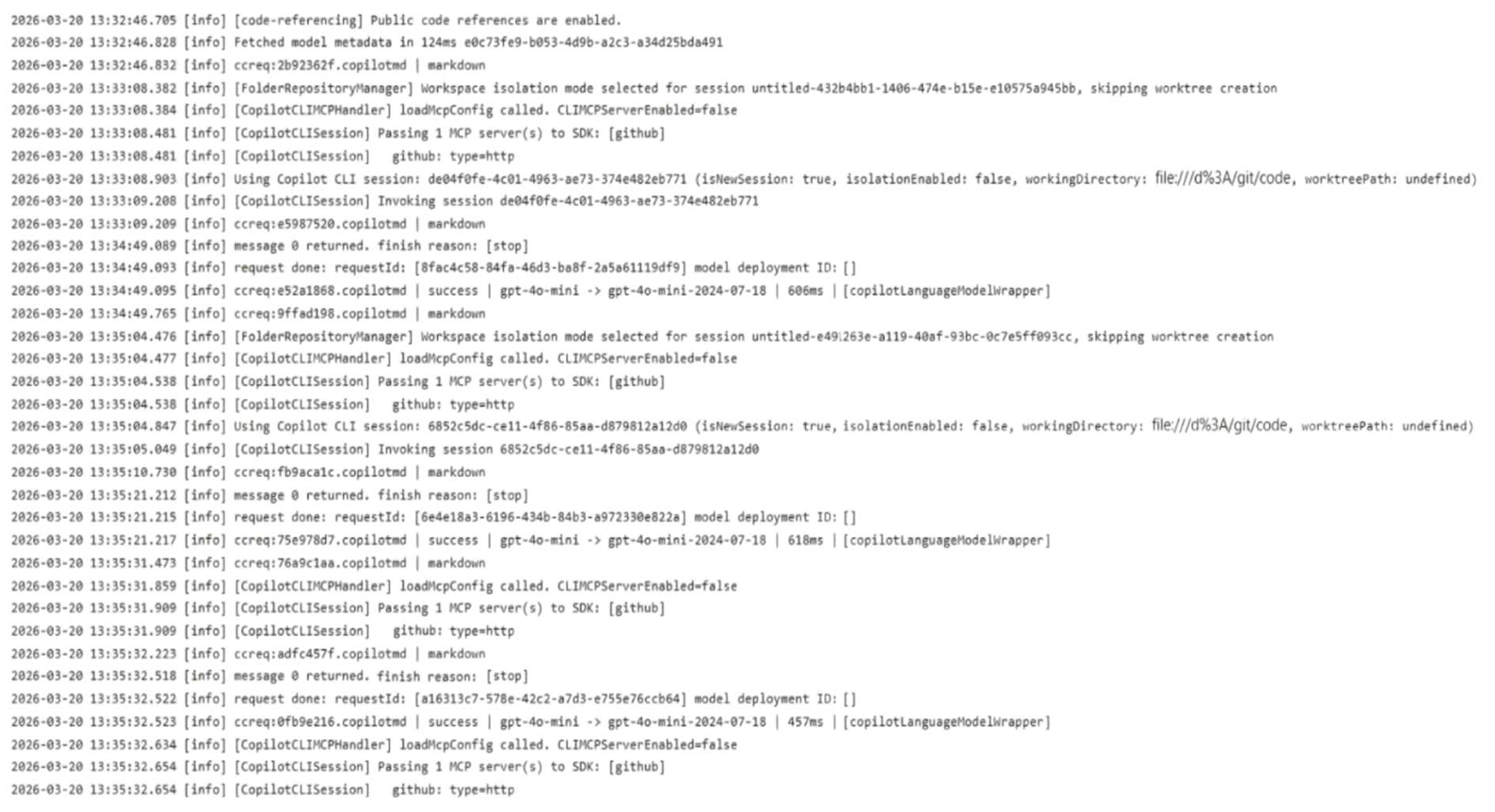
You have the following logs for the multi-agent workflow used in repo2.
Requirements
Planned Changes
Contoso plans to have all agents and developers in repo1 use the Microsoft Learn MCP to ensure that reviews are validated by using the appropriate documentation. This must be implemented centrally.
Contoso plans to leverage AI-powered coding agents to implement new portal features and pages.
Technical Requirements
App1 must be upgraded to .NET 10. A previous upgrade attempt was started by using the Copilot modernization agent, but the attempt was never finalized.
You plan to retry the upgrade. You must first analyze App1 by using AI, and then generate a report that contains breaking changes and deprecated patterns before retrying the upgrade.
All AI-generated code for UI styling must adhere to a predefined folder structure.
The architects at Contoso need help building implementation plans for repo1. The company wants to implement a new agent named agent2 to analyze the code base and the code requirements, and then respond with a detailed plan. The agent must NOT be able to edit files or run local commands.
The developers must be able to delegate work to the Copilot coding agent by assigning issues to the agent.

HOTSPOT (Drag and Drop is not supported)
You need to implement agent2 to meet the technical requirements.
How should you complete the YAML configuration? To answer, drag the appropriate values to the correct targets. Each value may be used once, more than once, or not at all. You may need to drag the split bar between panes or scroll to view content.
Note: Each correct selection is worth one point.
Hot Area:

  1. See Explanation section for answer.

Answer(s): A

Explanation:


Box 1: 'search', Search allows the agent to look for specific keywords, classes, or patterns across your repository to understand the current structure and code requirements.
Box 2: 'read' Read grants the agent read-only permission to examine the full contents of the codebase files without having the capability to alter them.


Reference:

https://github.com/github/copilot-cli/issues/1663


Case study
This is a case study. Case studies are not timed separately. You can use as much exam time as you would like to complete each case. However, there may be additional case studies and sections on this exam. You must manage your time to ensure that you are able to complete all questions included on this exam in the time provided.
To answer the questions included in a case study, you will need to reference information that is provided in the case study. Case studies might contain exhibits and other resources that provide more information about the scenario that is described in the case study. Each question is independent of the other questions in this case study.
At the end of this case study, a review screen will appear. This screen allows you to review your answers and to make changes before you move to the next section of the exam. After you begin a new section, you cannot return to this section.
To start the case study
To display the first question in this case study, click the Next button. Use the buttons in the left pane to explore the content of the case study before you answer the questions. Clicking these buttons displays information such as business requirements, existing environment, and problem statements. If the case study has an All Information tab, note that the information displayed is identical to the information displayed on the subsequent tabs.
When you are ready to answer a question, click the Question button to return to the question.
Overview
Contoso Ltd. is a software development company located in the United States.
Existing Environment
GitHub Environment
Contoso uses GitHub Enterprise and assigns GitHub Copilot Pro+ licenses to its developers. The developers use Microsoft Visual Studio Code as their IDE.
Contoso has a customer portal. The code for the portal is stored in a GitHub repository named repo1 that contains the following:
-A custom agent named agent1 that includes instructions to review specs related to best practices
-A custom instruction file named validate-instructions.md that is used to validate tone of voice and applies to all .md and .txt files
A custom instruction file named codereview.instructions.md that is used by the Copilot coding agent but is excluded for use by the Copilot code review repo1 has the following structure:
-The front-end is stored in the /frontend folder.
-The API logic is stored in the /api folder.
Contoso has a second repository named repo2 that contains a legacy .NET application named App1 built by using .NET 6. repo2 has a multi-agent workflow for modernization tasks.
Contoso enables the Model Context Protocol (MCP) registry and allows the Microsoft Learn MCP Server. Every developer must configure their own connection to the Learn MCP Server.
Problem Statements
The developers working in repo1 report that the Microsoft Learn documentation is NOT being retrieved when they attempt to validate a design by using agent1.
The testing team at Contoso identifies that the customer portal uses inconsistent UI styles, which leads to customer confusion and branding issues. The UI inconsistencies stem from variations in the folder structure.
Agent Logs
You have the following logs for the multi-agent workflow used in repo2.

Requirements
Planned Changes
Contoso plans to have all agents and developers in repo1 use the Microsoft Learn MCP to ensure that reviews are validated by using the appropriate documentation. This must be implemented centrally.
Contoso plans to leverage AI-powered coding agents to implement new portal features and pages.
Technical Requirements
App1 must be upgraded to .NET 10. A previous upgrade attempt was started by using the Copilot modernization agent, but the attempt was never finalized.
You plan to retry the upgrade. You must first analyze App1 by using AI, and then generate a report that contains breaking changes and deprecated patterns before retrying the upgrade.
All AI-generated code for UI styling must adhere to a predefined folder structure.
The architects at Contoso need help building implementation plans for repo1. The company wants to implement a new agent named agent2 to analyze the code base and the code requirements, and then respond with a detailed plan. The agent must NOT be able to edit files or run local commands.
The developers must be able to delegate work to the Copilot coding agent by assigning issues to the agent.

Before App1 is upgraded, you need to verify each individual upgrade step and whether all tests have passed.
Which file should you use?

  1. assessment.md
  2. plan.md
  3. agent.md
  4. tasks.md

Answer(s): A

Explanation:

To analyze a legacy application using GitHub Copilot modernization agents before executing a .NET 10 upgrade, you must use the assessment.md file
Scenario: Contoso has a second repository named repo2 that contains a legacy .NET application named App1 built by using .NET 6. repo2 has a multi-agent workflow for modernization tasks.
Technical Requirements App1 must be upgraded to .NET 10. A previous upgrade attempt was started by using the Copilot modernization agent, but the attempt was never finalized. You plan to retry the upgrade. You must first analyze App1 by using AI, and then generate a report that contains breaking changes and deprecated patterns before retrying the upgrade.


Reference:

https://learn.microsoft.com/en-us/dotnet/core/porting/github-copilot-app-modernization/overview


DRAG DROP (Drag and Drop is not supported)
You have a GitHub repository that has a GitHub Actions workflow. The workflow runs an AI agent.
You need to ensure that the default GITHUB_TOKEN permissions are read-only, and write access is granted to only the job that performs repository write operations. The workflow must be able to create and approve pull requests only when explicitly enabled.
How should you complete the workflow? To answer, drag the appropriate values to the correct targets. Each value may be used once, more than once, or not at all. You may need to drag the split bar between panes or scroll to view content.
Note: Each correct selection is worth one point.
Select and Place:

  1. See Explanation section for answer.

Answer(s): A

Explanation:


How should you complete the workflow?
Box 1: contents: read Set Global Read-Only Permissions To enforce the principle of least privilege, the top-level permissions block must strip all default write capabilities from the GITHUB_TOKEN. Setting contents: read allows the workflow to fetch the code but prevents any accidental repository modifications.
Box 2: contents: write Grant Job-Level Write Access
Only the specific job responsible for modifying the repository should receive write access. The update_artifacts job requires permission to push code modifications back to the repository.
Box 3: pull-requests: write To successfully create and approve pull requests, you must explicitly enable this capability in your GitHub repository settings:


Reference:

https://docs.github.com/en/organizations/managing-organization-settings/disabling-or-limiting-github-actions-for-your-organization


DRAG DROP (Drag and Drop is not supported)
You have a GitHub repository that uses the GitHub Copilot coding agent to resolve issues and create draft pull requests. The repository uses GitHub Actions for CI, and reviewers rely on pull request timelines and workflow artifacts to understand what the agent did.
During long-running agent tasks, the reviewers lose track of decisions and validation steps, which causes repeated questions and reworks when context drifts between iterations.
You need to persist task progress and decisions as durable artifacts and ensure that the reviewers can verify what the agent did during and after execution by using GitHub as the system of record.
What should you do for each requirement? To answer, drag the appropriate actions to the correct requirements. Each action may be used once, more than once, or not at all. You may need to drag the split bar between panes or scroll to view content.
Note: Each correct selection is worth one point.
Select and Place:

  1. See Explanation section for answer.

Answer(s): A

Explanation:


Box 1: Use the upload-artifact action and configure artifact retention in the CI workflow To meet this requirement you should use the actions/upload-artifact action and configure the retention-days property in your GitHub Actions CI workflow.
By default, GitHub retains workflow artifacts for a maximum of 90 days for public and private repositories (customizable down to 1 day). Utilizing these configurations ensures that human reviewers can download and inspect the agent's background outputs long after the initial execution concludes.
Box 2: Assign an issue and wait for the agent to view. The best action is to assign an issue and wait for the agent to view.
Assigning a GitHub issue to the Copilot coding agent triggers it to autonomously start working on the background task.
While investigating code and implementing the required fixes, it provides real-time, human-reviewable progress updates directly within the issue or pull request timeline (such as showing a "Copilot has started work" event, or tracking its steps inside the agent workflow). This completely satisfies the requirement for ongoing, transparent signaling for reviewers.
Box 3: Select View session to stream live agent logs You should select "View session" (or navigate to the Agents tab) on GitHub to stream live agent logs.
When using the GitHub Copilot cloud agent asynchronously to resolve issues and generate draft pull requests, the process occurs entirely in a GitHub-hosted background environment.
While automated status summaries eventually populate the pull request timeline, real-time auditing during an active run requires looking directly at the active session stream.


Reference:

https://docs.github.com/en/organizations/managing-organization-settings/configuring-the-retention-period-for-github-actions-artifacts-and-logs-in-your-organization https://docs.github.com/en/copilot/how-tos/use-copilot-agents/cloud-agent/troubleshoot-cloud-agent


DRAG DROP (Drag and Drop is not supported)
You have a GitHub Enterprise Cloud Organization that uses the GitHub Copilot coding agent to resolve issues asynchronously.
When an issue is assigned to GitHub Copilot, the agent creates a draft pull request, but your team cannot always tell whether the agent is actively working, has completed its session, or is awaiting workflow approval.
Which execution context does each signal indicate? To answer, drag the appropriate context to the correct signals. Each signal may be used once, more than once, or not at all. You may need to drag the split bar between panes or scroll to view content.
Note: Each correct selection is worth one point.
Select and Place:

  1. See Explanation section for answer.

Answer(s): A

Explanation:


Box 1: The agent acknowledges the assignment and will create the draft pull request.
When an issue is assigned to the GitHub Copilot coding agent, the eyes emoji reaction indicates that the agent has acknowledged the task and is actively starting work in the background.
Box 2: The agent session is actively running and generating live logs. The signal indicating that "the pull request timeline shows Copilot started work" means that the agent session is actively running and generating live logs.
When a pull request timeline shows that Copilot started work, it indicates that the execution context is actively working.
Actively working: Indicated when the pull request timeline explicitly logs that Copilot started work or updates the PR body with a list of in-progress sub-tasks.
Box 3: A human must manually approve and run the workflow.
When a draft pull request exists but GitHub Actions checks are not running, it indicates that the execution context is awaiting workflow approval.


Reference:

https://docs.github.com/en/copilot/how-tos/copilot-on-github/use-copilot-agents/kick-off-a-task


You have a repository that uses the GitHub Copilot coding agent and supports hooks stored under .github/ hooks.
You need a Shell command to run automatically whenever an agent execution fails.
Which type of hook should you use?

  1. postToolUse
  2. sessionEnd
  3. errorOccurred
  4. agentStop

Answer(s): C

Explanation:

To automatically run a Shell command whenever a GitHub Copilot coding agent execution fails, you should use the errorOccurred (also referred to as onErrorOccurred) hook.
Hook Mechanics & ConfigurationGitHub Copilot agent hooks are defined using JSON configuration files placed in the .github/hooks/ directory.
Event Type: errorOccurred (or onErrorOccurred depending on your specific environment and version).
Execution Behavior: When an execution fails, the agent stops, triggers this hook, and passes detailed error metrics and session context as a JSON payload to the script's standard input (stdin).
Incorrect: [Not B] sessionEnd - Agent session completes or is terminated.


Reference:

https://awesome-copilot.github.com/learning-hub/automating-with-hooks/


You are about to start a complex refactoring task in the GitHub Copilot CLI.
Before Copilot makes any changes, you need to review and agree on the approach.
What should you do first?

  1. Start the Copilot CLI and specify the --agent=Task parameter.
  2. Start the Copilot CLI and specify the --allow-all parameter.
  3. From the Copilot CLI, switch to plan mode.
  4. From the Copilot CLI, run the /compact command.

Answer(s): C

Explanation:

The first action you should take is to switch to Agent mode or use the Plan agent to review, edit, and approve a detailed step-by-step Markdown plan before any code is modified.
Use the Plan Agent: If available in your environment, trigger the plan phase so Copilot scans your codebase in a read-only state to outline its entire approach first.
Review the Proposed Plan: Carefully inspect the resulting Markdown structure to catch any architectural issues or wrong directions before the "doing" phase begins.
Utilize edit Mode Intentionally: Alternatively, if you prefer granular control over file adjustments rather than a fully autonomous agent workflow, opt for edit mode. This allows you to specifically select the target files and describe the natural language updates manually.


Reference:

https://aidevme.com/think-before-you-build-github-copilots-plan-agent-in-visual-studio-structured-ai-assisted-development/


A team assigns an issue to the GitHub Copilot coding agent by using the following one-line description: Fix the login bug.
Copilot creates a pull request, but the pull request is missing changes and has an incorrect scope.
How should you resolve the issue?

  1. Enable Copilot memory.
  2. Update the Model Context Protocol (MCP) server rate limits.
  3. Add a clear description of the problem to the issue.
  4. Allocate more resources to copilot-setup-steps.yml.

Answer(s): C

Explanation:

Adding a clear description of the problem to the issue will directly remedy this problem.Coding agents like GitHub Copilot rely heavily on the context, details, and constraints provided in the issue to understand what needs to be fixed. A one-line description like "Fix the login bug" is too vague, leading to guesswork, incorrect scope, and incomplete code changes.
Defines Scope: Explicitly stating what is broken prevents the agent from changing unrelated files.
Identifies the Root Cause: Providing error logs or steps to reproduce guides the agent to the exact lines of code that need fixing.
Sets Expectations: Specifying the expected correct behavior ensures the agent generates all the necessary changes, preventing missing code.


Reference:

https://docs.github.com/en/copilot/how-tos/use-copilot-agents/cloud-agent/troubleshoot-cloud-agent


Share your comments for Microsoft GH-600 exam with other users:

H
Hiren Ladva
7/8/2023 10:34:00 PM

yes i m prepared exam

O
oliverjames
10/24/2023 5:37:00 AM

my experience was great with this site as i studied for the ms-900 from here and got 900/1000 on the test. my main focus was on the tutorials which were provided and practice questions. thanks!

B
Bhuddhiman
7/20/2023 11:52:00 AM

great course

A
Anuj
1/14/2024 4:07:00 PM

very good question

S
Saravana Kumar TS
12/8/2023 9:49:00 AM

question: 93 which statement is true regarding the result? sales contain 6 columns and values contain 7 columns so c is not right answer.

L
Lue
3/30/2023 11:43:00 PM

highly recommend just passed my exam.

D
DC
1/7/2024 10:17:00 AM

great practice! thanks

A
Anonymus
11/9/2023 5:41:00 AM

anyone who wrote this exam recently?

K
Khalid Javid
11/17/2023 3:46:00 PM

kindly share the dump

N
Na
8/9/2023 8:39:00 AM

could you please upload cfe fraud prevention and deterrence questions? it will be very much helpful.

S
shime
10/23/2023 10:03:00 AM

this is really very very helpful for mcd level 1

V
Vnu
6/3/2023 2:39:00 AM

very helpful!

S
Steve
8/17/2023 2:19:00 PM

question #18s answer should be a, not d. this should be corrected. it should be minvalidityperiod

R
RITEISH
12/24/2023 4:33:00 AM

thanks for the exact solution

S
SB
10/15/2023 7:58:00 AM

need to refer the questions and have to give the exam

M
Mike Derfalem
7/16/2023 7:59:00 PM

i need it right now if it was possible please

I
Isak
7/6/2023 3:21:00 AM

i need it very much please share it in the fastest time.

M
Maria
6/23/2023 11:40:00 AM

correct answer is d for student.java program

N
Nagendra Pedipina
7/12/2023 9:10:00 AM

q:37 c is correct

J
John
9/16/2023 9:37:00 PM

q6 exam topic: terramearth, c: correct answer: copy 1petabyte to encrypted usb device ???

S
SAM
12/4/2023 12:56:00 AM

explained answers

A
Andy
12/26/2023 9:35:00 PM

plan to take theaws certified developer - associate dva-c02 in the next few weeks

S
siva
5/17/2023 12:32:00 AM

very helpfull

M
mouna
9/27/2023 8:53:00 AM

good questions

B
Bhavya
9/12/2023 7:18:00 AM

help to practice csa exam

M
Malik
9/28/2023 1:09:00 PM

nice tip and well documented

R
rodrigo
6/22/2023 7:55:00 AM

i need the exam

D
Dan
6/29/2023 1:53:00 PM

please upload

A
Ale M
11/22/2023 6:38:00 PM

prepping for fsc exam

A
ahmad hassan
9/6/2023 3:26:00 AM

pd1 with great experience

Ž
Žarko
9/5/2023 3:35:00 AM

@t it seems like azure service bus message quesues could be the best solution

S
Shiji
10/15/2023 1:08:00 PM

helpful to check your understanding.

D
Da Costa
8/27/2023 11:43:00 AM

question 128 the answer should be static not auto

B
bot
7/26/2023 6:45:00 PM

more comments here

AI Tutor 👋 I’m here to help!