Microsoft Administering 365 and AI Services AB-650 Dumps in PDF

Free Microsoft AB-650 Real Questions (page: 9)


This is a case study. Case studies are not timed separately from other exam sections. You can use as much exam time as you would like to complete each case study. However, there might be additional case studies or other exam sections. Manage your time to ensure that you can complete all the exam sections in the time provided. Pay attention to the Exam Progress at the top of the screen so you have sufficient time to complete any exam sections that follow this case study.
To answer the case study questions, you will need to reference information that is provided in the case. Case studies and associated questions might contain exhibits or other resources that provide more information about the scenario described in the case. Information provided in an individual question does not apply to the other questions in the case study.
A Review Screen will appear at the end of this case study. From the Review Screen, you can review and change your answers before you move to the next exam section. After you leave this case study, you will NOT be able to return to it.
To start the case study
To display the first question in this case study, select the “Next” button. To the left of the question, a menu provides links to information such as business requirements, the existing environment, and problem statements. Please read through all this information before answering any questions.
When you are ready to answer a question, select the “Question” button to return to the question.
Contoso, Ltd. is a consulting company that has a main office in San Francisco and a branch office in Dallas.
Existing Environment
Microsoft Entra configuration
Contoso has an Azure subscription.
Contoso has a Microsoft 365 E5 subscription.
Contoso has a Microsoft Entra tenant named contoso.com. The tenant has an administrative unit named AU1 that contains the following membership rule.
(device.deviceTrustType –eq “Workplace”) and (device.deviceOSType –in [“Windows”, “Android”])
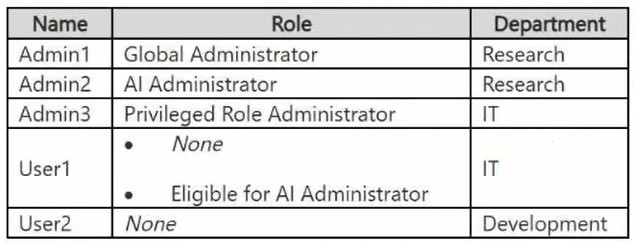
The tenant contains the cloud-only users shown in the following table.
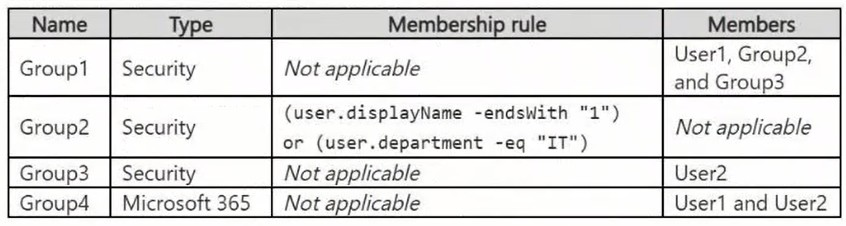
The tenant contains the groups shown in the following table.
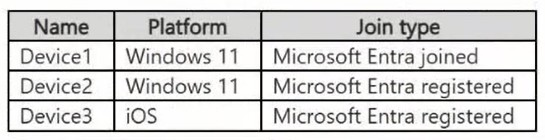
The tenant contains the devices shown in the following table.
All the devices are managed by using Microsoft Intune.
Microsoft Entra authentication methods
Contoso contains an Authentication methods policy for Microsoft Authenticator that has the following settings:
● Include: Group1
● Exclude: Group3
● Authentication mode: Passwordless
Privileged Identity Management (PIM) configuration
Privileged roles are managed by using Privileged Identity Management (PIM).
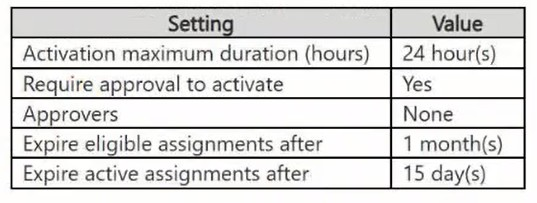
The PIM settings for the AI Administrator role are configured as shown in the following table.
Email configuration
Each user has a Microsoft Exchange mailbox.
Contoso contains an anti-spam outbound policy named Antispam1 that has the following configurations:
● Included groups: Group4
● Excluded users: User2
● Set an external message limit: 3
● Set an internal message limit: 5
● Set a daily message limit: 13
● Restriction placed on users who reach the message limit: Restrict the user from sending mail
Microsoft SharePoint configuration
Contoso has a Microsoft SharePoint site named Site1 that stores the following types of content and various other documents:
● Project documents: All the documents have a project code that includes the letters PR, followed by a dash and nine digits (for example PR-123456789).
● Proposal documents: All the documents have a customer ID that includes seven to 10 alphanumerical characters. All the customer IDs are recorded in a Microsoft Excel workbook.
● Feedback forms: All the documents were created by using the same template.
Microsoft AI services
Contoso implements the following Microsoft AI services:
● Microsoft 365 Copilot for selected users
● Microsoft Foundry agents, including an agent named Agent1
Requirements
Planned changes
Contoso plans to implement the following changes:
● Issue new Android devices to the Group1 users.
● Assign Microsoft 365 Copilot licenses to the users in Group1.
● Add an additional email address alias for the users in Group4.
● Create a Conditional Access policy named CAPolicy1 for Group3.
● Disable web search for Microsoft 365 Copilot and Microsoft 365 Copilot Chat.
● Create classifiers to identify project documents and proposal documents stored on Site1.
Technical requirements
Contoso identifies the following technical requirements:
● The users in Group3 that access Microsoft 365 resources from anonymous IP addresses must complete multifactor authentication (MFA).
● Microsoft 365 Copilot responses must NOT use content from the project documents stored on Site1.
● Microsoft 365 Copilot responses must use content from only Microsoft 365 locations.
● The total costs of Agent1 must be monitored and evaluated monthly.
● All the Android devices must be registered in Microsoft Entra.
● Administrative effort must be minimized.
● Administrative costs must be minimized.

HOTSPOT (Drag and Drop is not supported)
You have a Microsoft 365 subscription that contains two groups named Group1 and Group2.
You need to configure tenant notifications to meet the following requirements.
● Group1: Receive email notifications when major service updates occur.
● Group2: Receive email alerts when Microsoft 365 maintenance event occur.
Which type of notification should you configure for each group?
Hot Area:

  1. See Explanation section for answer.

Answer(s): A

Explanation:


Use Message Center Preferences to configure email notifications for major Microsoft 365 service updates and changes announced through Message center.
Use Service Health alerts to notify administrators about service incidents and planned maintenance events that can affect Microsoft 365 availability or performance.


This is a case study. Case studies are not timed separately from other exam sections. You can use as much exam time as you would like to complete each case study. However, there might be additional case studies or other exam sections. Manage your time to ensure that you can complete all the exam sections in the time provided. Pay attention to the Exam Progress at the top of the screen so you have sufficient time to complete any exam sections that follow this case study.
To answer the case study questions, you will need to reference information that is provided in the case. Case studies and associated questions might contain exhibits or other resources that provide more information about the scenario described in the case. Information provided in an individual question does not apply to the other questions in the case study.
A Review Screen will appear at the end of this case study. From the Review Screen, you can review and change your answers before you move to the next exam section. After you leave this case study, you will NOT be able to return to it.
To start the case study
To display the first question in this case study, select the “Next” button. To the left of the question, a menu provides links to information such as business requirements, the existing environment, and problem statements. Please read through all this information before answering any questions.
When you are ready to answer a question, select the “Question” button to return to the question.
Contoso, Ltd. is a consulting company that has a main office in San Francisco and a branch office in Dallas.
Existing Environment
Microsoft Entra configuration
Contoso has an Azure subscription.
Contoso has a Microsoft 365 E5 subscription.
Contoso has a Microsoft Entra tenant named contoso.com. The tenant has an administrative unit named AU1 that contains the following membership rule.
(device.deviceTrustType –eq “Workplace”) and (device.deviceOSType –in [“Windows”, “Android”])
The tenant contains the cloud-only users shown in the following table.

The tenant contains the groups shown in the following table.

The tenant contains the devices shown in the following table.

All the devices are managed by using Microsoft Intune.
Microsoft Entra authentication methods
Contoso contains an Authentication methods policy for Microsoft Authenticator that has the following settings:
● Include: Group1
● Exclude: Group3
● Authentication mode: Passwordless
Privileged Identity Management (PIM) configuration
Privileged roles are managed by using Privileged Identity Management (PIM).
The PIM settings for the AI Administrator role are configured as shown in the following table.

Email configuration
Each user has a Microsoft Exchange mailbox.
Contoso contains an anti-spam outbound policy named Antispam1 that has the following configurations:
● Included groups: Group4
● Excluded users: User2
● Set an external message limit: 3
● Set an internal message limit: 5
● Set a daily message limit: 13
● Restriction placed on users who reach the message limit: Restrict the user from sending mail
Microsoft SharePoint configuration
Contoso has a Microsoft SharePoint site named Site1 that stores the following types of content and various other documents:
● Project documents: All the documents have a project code that includes the letters PR, followed by a dash and nine digits (for example PR-123456789).
● Proposal documents: All the documents have a customer ID that includes seven to 10 alphanumerical characters. All the customer IDs are recorded in a Microsoft Excel workbook.
● Feedback forms: All the documents were created by using the same template.
Microsoft AI services
Contoso implements the following Microsoft AI services:
● Microsoft 365 Copilot for selected users
● Microsoft Foundry agents, including an agent named Agent1
Requirements
Planned changes
Contoso plans to implement the following changes:
● Issue new Android devices to the Group1 users.
● Assign Microsoft 365 Copilot licenses to the users in Group1.
● Add an additional email address alias for the users in Group4.
● Create a Conditional Access policy named CAPolicy1 for Group3.
● Disable web search for Microsoft 365 Copilot and Microsoft 365 Copilot Chat.
● Create classifiers to identify project documents and proposal documents stored on Site1.
Technical requirements
Contoso identifies the following technical requirements:
● The users in Group3 that access Microsoft 365 resources from anonymous IP addresses must complete multifactor authentication (MFA).
● Microsoft 365 Copilot responses must NOT use content from the project documents stored on Site1.
● Microsoft 365 Copilot responses must use content from only Microsoft 365 locations.
● The total costs of Agent1 must be monitored and evaluated monthly.
● All the Android devices must be registered in Microsoft Entra.
● Administrative effort must be minimized.
● Administrative costs must be minimized.

HOTSPOT (Drag and Drop is not supported)
You have a Microsoft 365 E5 subscription.
You need to configure a group naming policy.
Which portal should you use, and to which types of groups will the policy apply? To answer, select the appropriate options in the answer area.
Note: Each correct selection is worth one point.
Hot Area:

  1. See Explanation section for answer.

Answer(s): A

Explanation:


A Microsoft 365 group naming policy is configured in the Microsoft Entra admin center. The policy applies to Microsoft 365 groups, including groups created through services such as Outlook and Teams, but it does not apply to security groups, mail-enabled security groups, or distribution groups.


This is a case study. Case studies are not timed separately from other exam sections. You can use as much exam time as you would like to complete each case study. However, there might be additional case studies or other exam sections. Manage your time to ensure that you can complete all the exam sections in the time provided. Pay attention to the Exam Progress at the top of the screen so you have sufficient time to complete any exam sections that follow this case study.
To answer the case study questions, you will need to reference information that is provided in the case. Case studies and associated questions might contain exhibits or other resources that provide more information about the scenario described in the case. Information provided in an individual question does not apply to the other questions in the case study.
A Review Screen will appear at the end of this case study. From the Review Screen, you can review and change your answers before you move to the next exam section. After you leave this case study, you will NOT be able to return to it.
To start the case study
To display the first question in this case study, select the “Next” button. To the left of the question, a menu provides links to information such as business requirements, the existing environment, and problem statements. Please read through all this information before answering any questions.
When you are ready to answer a question, select the “Question” button to return to the question.
Contoso, Ltd. is a consulting company that has a main office in San Francisco and a branch office in Dallas.
Existing Environment
Microsoft Entra configuration
Contoso has an Azure subscription.
Contoso has a Microsoft 365 E5 subscription.
Contoso has a Microsoft Entra tenant named contoso.com. The tenant has an administrative unit named AU1 that contains the following membership rule.
(device.deviceTrustType –eq “Workplace”) and (device.deviceOSType –in [“Windows”, “Android”])
The tenant contains the cloud-only users shown in the following table.

The tenant contains the groups shown in the following table.

The tenant contains the devices shown in the following table.

All the devices are managed by using Microsoft Intune.
Microsoft Entra authentication methods
Contoso contains an Authentication methods policy for Microsoft Authenticator that has the following settings:
● Include: Group1
● Exclude: Group3
● Authentication mode: Passwordless
Privileged Identity Management (PIM) configuration
Privileged roles are managed by using Privileged Identity Management (PIM).
The PIM settings for the AI Administrator role are configured as shown in the following table.

Email configuration
Each user has a Microsoft Exchange mailbox.
Contoso contains an anti-spam outbound policy named Antispam1 that has the following configurations:
● Included groups: Group4
● Excluded users: User2
● Set an external message limit: 3
● Set an internal message limit: 5
● Set a daily message limit: 13
● Restriction placed on users who reach the message limit: Restrict the user from sending mail
Microsoft SharePoint configuration
Contoso has a Microsoft SharePoint site named Site1 that stores the following types of content and various other documents:
● Project documents: All the documents have a project code that includes the letters PR, followed by a dash and nine digits (for example PR-123456789).
● Proposal documents: All the documents have a customer ID that includes seven to 10 alphanumerical characters. All the customer IDs are recorded in a Microsoft Excel workbook.
● Feedback forms: All the documents were created by using the same template.
Microsoft AI services
Contoso implements the following Microsoft AI services:
● Microsoft 365 Copilot for selected users
● Microsoft Foundry agents, including an agent named Agent1
Requirements
Planned changes
Contoso plans to implement the following changes:
● Issue new Android devices to the Group1 users.
● Assign Microsoft 365 Copilot licenses to the users in Group1.
● Add an additional email address alias for the users in Group4.
● Create a Conditional Access policy named CAPolicy1 for Group3.
● Disable web search for Microsoft 365 Copilot and Microsoft 365 Copilot Chat.
● Create classifiers to identify project documents and proposal documents stored on Site1.
Technical requirements
Contoso identifies the following technical requirements:
● The users in Group3 that access Microsoft 365 resources from anonymous IP addresses must complete multifactor authentication (MFA).
● Microsoft 365 Copilot responses must NOT use content from the project documents stored on Site1.
● Microsoft 365 Copilot responses must use content from only Microsoft 365 locations.
● The total costs of Agent1 must be monitored and evaluated monthly.
● All the Android devices must be registered in Microsoft Entra.
● Administrative effort must be minimized.
● Administrative costs must be minimized.

You have a Microsoft 365 subscription that has an initial domain named contoso.onmicrosoft.com and two verified custom domains named contoso.com and fabrikam.com.
The contoso.com domain is NOT the default domain. No users, groups, or applications reference contoso.com.
The subscription contains the administrator accounts shown in the following table.

You need to delete contoso.com by using an account that is assigned the minimum required Microsoft Entra role.
Which account should you use?

  1. admin4@contoso.onmicrosoft.com
  2. admin3@fabrikam.com
  3. admin2@fabrikam.com
  4. admin1@contoso.onmicrosoft.com

Answer(s): D

Explanation:

The Domain Name Administrator role provides the least privilege required to manage verified custom domains in Microsoft Entra, including removing a custom domain when it is not the default domain and no users, groups, or applications reference it. Since contoso.com meets those removal prerequisites, the account assigned this role is sufficient.


This is a case study. Case studies are not timed separately from other exam sections. You can use as much exam time as you would like to complete each case study. However, there might be additional case studies or other exam sections. Manage your time to ensure that you can complete all the exam sections in the time provided. Pay attention to the Exam Progress at the top of the screen so you have sufficient time to complete any exam sections that follow this case study.
To answer the case study questions, you will need to reference information that is provided in the case. Case studies and associated questions might contain exhibits or other resources that provide more information about the scenario described in the case. Information provided in an individual question does not apply to the other questions in the case study.
A Review Screen will appear at the end of this case study. From the Review Screen, you can review and change your answers before you move to the next exam section. After you leave this case study, you will NOT be able to return to it.
To start the case study
To display the first question in this case study, select the “Next” button. To the left of the question, a menu provides links to information such as business requirements, the existing environment, and problem statements. Please read through all this information before answering any questions.
When you are ready to answer a question, select the “Question” button to return to the question.
Contoso, Ltd. is a consulting company that has a main office in San Francisco and a branch office in Dallas.
Existing Environment
Microsoft Entra configuration
Contoso has an Azure subscription.
Contoso has a Microsoft 365 E5 subscription.
Contoso has a Microsoft Entra tenant named contoso.com. The tenant has an administrative unit named AU1 that contains the following membership rule.
(device.deviceTrustType –eq “Workplace”) and (device.deviceOSType –in [“Windows”, “Android”])
The tenant contains the cloud-only users shown in the following table.

The tenant contains the groups shown in the following table.

The tenant contains the devices shown in the following table.

All the devices are managed by using Microsoft Intune.
Microsoft Entra authentication methods
Contoso contains an Authentication methods policy for Microsoft Authenticator that has the following settings:
● Include: Group1
● Exclude: Group3
● Authentication mode: Passwordless
Privileged Identity Management (PIM) configuration
Privileged roles are managed by using Privileged Identity Management (PIM).
The PIM settings for the AI Administrator role are configured as shown in the following table.

Email configuration
Each user has a Microsoft Exchange mailbox.
Contoso contains an anti-spam outbound policy named Antispam1 that has the following configurations:
● Included groups: Group4
● Excluded users: User2
● Set an external message limit: 3
● Set an internal message limit: 5
● Set a daily message limit: 13
● Restriction placed on users who reach the message limit: Restrict the user from sending mail
Microsoft SharePoint configuration
Contoso has a Microsoft SharePoint site named Site1 that stores the following types of content and various other documents:
● Project documents: All the documents have a project code that includes the letters PR, followed by a dash and nine digits (for example PR-123456789).
● Proposal documents: All the documents have a customer ID that includes seven to 10 alphanumerical characters. All the customer IDs are recorded in a Microsoft Excel workbook.
● Feedback forms: All the documents were created by using the same template.
Microsoft AI services
Contoso implements the following Microsoft AI services:
● Microsoft 365 Copilot for selected users
● Microsoft Foundry agents, including an agent named Agent1
Requirements
Planned changes
Contoso plans to implement the following changes:
● Issue new Android devices to the Group1 users.
● Assign Microsoft 365 Copilot licenses to the users in Group1.
● Add an additional email address alias for the users in Group4.
● Create a Conditional Access policy named CAPolicy1 for Group3.
● Disable web search for Microsoft 365 Copilot and Microsoft 365 Copilot Chat.
● Create classifiers to identify project documents and proposal documents stored on Site1.
Technical requirements
Contoso identifies the following technical requirements:
● The users in Group3 that access Microsoft 365 resources from anonymous IP addresses must complete multifactor authentication (MFA).
● Microsoft 365 Copilot responses must NOT use content from the project documents stored on Site1.
● Microsoft 365 Copilot responses must use content from only Microsoft 365 locations.
● The total costs of Agent1 must be monitored and evaluated monthly.
● All the Android devices must be registered in Microsoft Entra.
● Administrative effort must be minimized.
● Administrative costs must be minimized.

You have a Microsoft 365 subscription that contains a distribution list named Group1.
Group1 does NOT have nested groups and is used by project members to send emails.
You need to provide the project members with group-based collaboration resources. The solution must meet the following requirements:
● Enable group owners to manage the membership of Group1
● Provide a shared calendar and shared files
● Support Microsoft Teams integration
● Minimize administrative effort
What should you do?

  1. Create a Microsoft SharePoint team site
  2. Create a dynamic security group
  3. Upgrade Group1 to a Microsoft 365 group
  4. Create a mail-enabled security group

Answer(s): C

Explanation:

Upgrade Group1 to a Microsoft 365 group. This preserves the existing group-based membership model while adding collaboration resources such as a shared mailbox, shared calendar, SharePoint-based shared files, and Microsoft Teams integration. Group owners can manage membership directly, which minimizes administrative effort.


This is a case study. Case studies are not timed separately from other exam sections. You can use as much exam time as you would like to complete each case study. However, there might be additional case studies or other exam sections. Manage your time to ensure that you can complete all the exam sections in the time provided. Pay attention to the Exam Progress at the top of the screen so you have sufficient time to complete any exam sections that follow this case study.
To answer the case study questions, you will need to reference information that is provided in the case. Case studies and associated questions might contain exhibits or other resources that provide more information about the scenario described in the case. Information provided in an individual question does not apply to the other questions in the case study.
A Review Screen will appear at the end of this case study. From the Review Screen, you can review and change your answers before you move to the next exam section. After you leave this case study, you will NOT be able to return to it.
To start the case study
To display the first question in this case study, select the “Next” button. To the left of the question, a menu provides links to information such as business requirements, the existing environment, and problem statements. Please read through all this information before answering any questions.
When you are ready to answer a question, select the “Question” button to return to the question.
Contoso, Ltd. is a consulting company that has a main office in San Francisco and a branch office in Dallas.
Existing Environment
Microsoft Entra configuration
Contoso has an Azure subscription.
Contoso has a Microsoft 365 E5 subscription.
Contoso has a Microsoft Entra tenant named contoso.com. The tenant has an administrative unit named AU1 that contains the following membership rule.
(device.deviceTrustType –eq “Workplace”) and (device.deviceOSType –in [“Windows”, “Android”])
The tenant contains the cloud-only users shown in the following table.

The tenant contains the groups shown in the following table.

The tenant contains the devices shown in the following table.

All the devices are managed by using Microsoft Intune.
Microsoft Entra authentication methods
Contoso contains an Authentication methods policy for Microsoft Authenticator that has the following settings:
● Include: Group1
● Exclude: Group3
● Authentication mode: Passwordless
Privileged Identity Management (PIM) configuration
Privileged roles are managed by using Privileged Identity Management (PIM).
The PIM settings for the AI Administrator role are configured as shown in the following table.

Email configuration
Each user has a Microsoft Exchange mailbox.
Contoso contains an anti-spam outbound policy named Antispam1 that has the following configurations:
● Included groups: Group4
● Excluded users: User2
● Set an external message limit: 3
● Set an internal message limit: 5
● Set a daily message limit: 13
● Restriction placed on users who reach the message limit: Restrict the user from sending mail
Microsoft SharePoint configuration
Contoso has a Microsoft SharePoint site named Site1 that stores the following types of content and various other documents:
● Project documents: All the documents have a project code that includes the letters PR, followed by a dash and nine digits (for example PR-123456789).
● Proposal documents: All the documents have a customer ID that includes seven to 10 alphanumerical characters. All the customer IDs are recorded in a Microsoft Excel workbook.
● Feedback forms: All the documents were created by using the same template.
Microsoft AI services
Contoso implements the following Microsoft AI services:
● Microsoft 365 Copilot for selected users
● Microsoft Foundry agents, including an agent named Agent1
Requirements
Planned changes
Contoso plans to implement the following changes:
● Issue new Android devices to the Group1 users.
● Assign Microsoft 365 Copilot licenses to the users in Group1.
● Add an additional email address alias for the users in Group4.
● Create a Conditional Access policy named CAPolicy1 for Group3.
● Disable web search for Microsoft 365 Copilot and Microsoft 365 Copilot Chat.
● Create classifiers to identify project documents and proposal documents stored on Site1.
Technical requirements
Contoso identifies the following technical requirements:
● The users in Group3 that access Microsoft 365 resources from anonymous IP addresses must complete multifactor authentication (MFA).
● Microsoft 365 Copilot responses must NOT use content from the project documents stored on Site1.
● Microsoft 365 Copilot responses must use content from only Microsoft 365 locations.
● The total costs of Agent1 must be monitored and evaluated monthly.
● All the Android devices must be registered in Microsoft Entra.
● Administrative effort must be minimized.
● Administrative costs must be minimized.

HOTSPOT (Drag and Drop is not supported)
You need to implement CAPolicy1. The solution must meet the technical requirements.
Which two Conditional Access settings should you configure? To answer, select the appropriate settings in the answer area.
Note: Each correct selection is worth one point.
Hot Area:

  1. See Explanation section for answer.

Answer(s): A

Explanation:


Configure the Sign-in risk condition to target risky sign-ins associated with anonymous IP addresses. Microsoft Entra ID Protection recognizes activity from anonymous IP addresses as a sign-in risk signal. Configure the Grant access control to Require multifactor authentication, ensuring that affected Group3 users must complete MFA before accessing Microsoft 365 resources.


This is a case study. Case studies are not timed separately from other exam sections. You can use as much exam time as you would like to complete each case study. However, there might be additional case studies or other exam sections. Manage your time to ensure that you can complete all the exam sections in the time provided. Pay attention to the Exam Progress at the top of the screen so you have sufficient time to complete any exam sections that follow this case study.
To answer the case study questions, you will need to reference information that is provided in the case. Case studies and associated questions might contain exhibits or other resources that provide more information about the scenario described in the case. Information provided in an individual question does not apply to the other questions in the case study.
A Review Screen will appear at the end of this case study. From the Review Screen, you can review and change your answers before you move to the next exam section. After you leave this case study, you will NOT be able to return to it.
To start the case study
To display the first question in this case study, select the “Next” button. To the left of the question, a menu provides links to information such as business requirements, the existing environment, and problem statements. Please read through all this information before answering any questions.
When you are ready to answer a question, select the “Question” button to return to the question.
Contoso, Ltd. is a consulting company that has a main office in San Francisco and a branch office in Dallas.
Existing Environment
Microsoft Entra configuration
Contoso has an Azure subscription.
Contoso has a Microsoft 365 E5 subscription.
Contoso has a Microsoft Entra tenant named contoso.com. The tenant has an administrative unit named AU1 that contains the following membership rule.
(device.deviceTrustType –eq “Workplace”) and (device.deviceOSType –in [“Windows”, “Android”])
The tenant contains the cloud-only users shown in the following table.

The tenant contains the groups shown in the following table.

The tenant contains the devices shown in the following table.

All the devices are managed by using Microsoft Intune.
Microsoft Entra authentication methods
Contoso contains an Authentication methods policy for Microsoft Authenticator that has the following settings:
● Include: Group1
● Exclude: Group3
● Authentication mode: Passwordless
Privileged Identity Management (PIM) configuration
Privileged roles are managed by using Privileged Identity Management (PIM).
The PIM settings for the AI Administrator role are configured as shown in the following table.

Email configuration
Each user has a Microsoft Exchange mailbox.
Contoso contains an anti-spam outbound policy named Antispam1 that has the following configurations:
● Included groups: Group4
● Excluded users: User2
● Set an external message limit: 3
● Set an internal message limit: 5
● Set a daily message limit: 13
● Restriction placed on users who reach the message limit: Restrict the user from sending mail
Microsoft SharePoint configuration
Contoso has a Microsoft SharePoint site named Site1 that stores the following types of content and various other documents:
● Project documents: All the documents have a project code that includes the letters PR, followed by a dash and nine digits (for example PR-123456789).
● Proposal documents: All the documents have a customer ID that includes seven to 10 alphanumerical characters. All the customer IDs are recorded in a Microsoft Excel workbook.
● Feedback forms: All the documents were created by using the same template.
Microsoft AI services
Contoso implements the following Microsoft AI services:
● Microsoft 365 Copilot for selected users
● Microsoft Foundry agents, including an agent named Agent1
Requirements
Planned changes
Contoso plans to implement the following changes:
● Issue new Android devices to the Group1 users.
● Assign Microsoft 365 Copilot licenses to the users in Group1.
● Add an additional email address alias for the users in Group4.
● Create a Conditional Access policy named CAPolicy1 for Group3.
● Disable web search for Microsoft 365 Copilot and Microsoft 365 Copilot Chat.
● Create classifiers to identify project documents and proposal documents stored on Site1.
Technical requirements
Contoso identifies the following technical requirements:
● The users in Group3 that access Microsoft 365 resources from anonymous IP addresses must complete multifactor authentication (MFA).
● Microsoft 365 Copilot responses must NOT use content from the project documents stored on Site1.
● Microsoft 365 Copilot responses must use content from only Microsoft 365 locations.
● The total costs of Agent1 must be monitored and evaluated monthly.
● All the Android devices must be registered in Microsoft Entra.
● Administrative effort must be minimized.
● Administrative costs must be minimized.

You have a Microsoft 365 subscription that contains a Microsoft SharePoint communication site named Site1 and a security group named Group1.
Some users that are outside of Group1 have direct permissions or sharing links to the content in Site1.
You need to ensure that users can access Site1 and its content only when they meet both of the following conditions.
● The user is a member of Group1.
● The user has SharePoint permissions to the content.
The solution must meet the following requirements:
● Apply only to Site1.
● Preserve the existing SharePoint permissions.
● Minimize administrative effort.
What should you do?

  1. Configure sharing restrictions outside of Restricted Access Control groups
  2. Configure Restricted Content Discovery for Site1
  3. Configure Restricted Access Control for Site1
  4. Configure site permissions for Site1

Answer(s): C

Explanation:

Configure Restricted Access Control for Site1 and specify Group1. Restricted Access Control adds an additional authorization requirement: users must both belong to an allowed group and already have the required SharePoint permissions. It applies at the site level, preserves existing permissions and sharing configuration, and avoids manually restructuring Site1 permissions.


This is a case study. Case studies are not timed separately from other exam sections. You can use as much exam time as you would like to complete each case study. However, there might be additional case studies or other exam sections. Manage your time to ensure that you can complete all the exam sections in the time provided. Pay attention to the Exam Progress at the top of the screen so you have sufficient time to complete any exam sections that follow this case study.
To answer the case study questions, you will need to reference information that is provided in the case. Case studies and associated questions might contain exhibits or other resources that provide more information about the scenario described in the case. Information provided in an individual question does not apply to the other questions in the case study.
A Review Screen will appear at the end of this case study. From the Review Screen, you can review and change your answers before you move to the next exam section. After you leave this case study, you will NOT be able to return to it.
To start the case study
To display the first question in this case study, select the “Next” button. To the left of the question, a menu provides links to information such as business requirements, the existing environment, and problem statements. Please read through all this information before answering any questions.
When you are ready to answer a question, select the “Question” button to return to the question.
Contoso, Ltd. is a consulting company that has a main office in San Francisco and a branch office in Dallas.
Existing Environment
Microsoft Entra configuration
Contoso has an Azure subscription.
Contoso has a Microsoft 365 E5 subscription.
Contoso has a Microsoft Entra tenant named contoso.com. The tenant has an administrative unit named AU1 that contains the following membership rule.
(device.deviceTrustType –eq “Workplace”) and (device.deviceOSType –in [“Windows”, “Android”])
The tenant contains the cloud-only users shown in the following table.

The tenant contains the groups shown in the following table.

The tenant contains the devices shown in the following table.

All the devices are managed by using Microsoft Intune.
Microsoft Entra authentication methods
Contoso contains an Authentication methods policy for Microsoft Authenticator that has the following settings:
● Include: Group1
● Exclude: Group3
● Authentication mode: Passwordless
Privileged Identity Management (PIM) configuration
Privileged roles are managed by using Privileged Identity Management (PIM).
The PIM settings for the AI Administrator role are configured as shown in the following table.

Email configuration
Each user has a Microsoft Exchange mailbox.
Contoso contains an anti-spam outbound policy named Antispam1 that has the following configurations:
● Included groups: Group4
● Excluded users: User2
● Set an external message limit: 3
● Set an internal message limit: 5
● Set a daily message limit: 13
● Restriction placed on users who reach the message limit: Restrict the user from sending mail
Microsoft SharePoint configuration
Contoso has a Microsoft SharePoint site named Site1 that stores the following types of content and various other documents:
● Project documents: All the documents have a project code that includes the letters PR, followed by a dash and nine digits (for example PR-123456789).
● Proposal documents: All the documents have a customer ID that includes seven to 10 alphanumerical characters. All the customer IDs are recorded in a Microsoft Excel workbook.
● Feedback forms: All the documents were created by using the same template.
Microsoft AI services
Contoso implements the following Microsoft AI services:
● Microsoft 365 Copilot for selected users
● Microsoft Foundry agents, including an agent named Agent1
Requirements
Planned changes
Contoso plans to implement the following changes:
● Issue new Android devices to the Group1 users.
● Assign Microsoft 365 Copilot licenses to the users in Group1.
● Add an additional email address alias for the users in Group4.
● Create a Conditional Access policy named CAPolicy1 for Group3.
● Disable web search for Microsoft 365 Copilot and Microsoft 365 Copilot Chat.
● Create classifiers to identify project documents and proposal documents stored on Site1.
Technical requirements
Contoso identifies the following technical requirements:
● The users in Group3 that access Microsoft 365 resources from anonymous IP addresses must complete multifactor authentication (MFA).
● Microsoft 365 Copilot responses must NOT use content from the project documents stored on Site1.
● Microsoft 365 Copilot responses must use content from only Microsoft 365 locations.
● The total costs of Agent1 must be monitored and evaluated monthly.
● All the Android devices must be registered in Microsoft Entra.
● Administrative effort must be minimized.
● Administrative costs must be minimized.

You have a Microsoft 365 subscription.
You create a retention label named Retention1 as shown in the following exhibit.

You apply Retention1 to all the Microsoft OneDrive content.
On January 1, 2025, a user stores a file named File1 in OneDrive.
On January 10, 2025, the user modifies File1.
On February 1, 2025, the user deletes File1.
When will File1 be removed permanently and unrecoverable from OneDrive?

  1. February 1, 2025
  2. July, 2025
  3. July 10, 2025
  4. August 1, 2025

Answer(s): B

Explanation:

Retention1 retains the file for six months based on when the item was created and then deletes it. File1 was created on January 1, 2025, so its retention period ends on July 1, 2025. The later modification and user deletion do not reset this creation-based retention period.


Reference:

https://learn.microsoft.com/en-us/purview/retention?tabs=table-overriden https://learn.microsoft.com/en-us/purview/retention-settings


This is a case study. Case studies are not timed separately from other exam sections. You can use as much exam time as you would like to complete each case study. However, there might be additional case studies or other exam sections. Manage your time to ensure that you can complete all the exam sections in the time provided. Pay attention to the Exam Progress at the top of the screen so you have sufficient time to complete any exam sections that follow this case study.
To answer the case study questions, you will need to reference information that is provided in the case. Case studies and associated questions might contain exhibits or other resources that provide more information about the scenario described in the case. Information provided in an individual question does not apply to the other questions in the case study.
A Review Screen will appear at the end of this case study. From the Review Screen, you can review and change your answers before you move to the next exam section. After you leave this case study, you will NOT be able to return to it.
To start the case study
To display the first question in this case study, select the “Next” button. To the left of the question, a menu provides links to information such as business requirements, the existing environment, and problem statements. Please read through all this information before answering any questions.
When you are ready to answer a question, select the “Question” button to return to the question.
Contoso, Ltd. is a consulting company that has a main office in San Francisco and a branch office in Dallas.
Existing Environment
Microsoft Entra configuration
Contoso has an Azure subscription.
Contoso has a Microsoft 365 E5 subscription.
Contoso has a Microsoft Entra tenant named contoso.com. The tenant has an administrative unit named AU1 that contains the following membership rule.
(device.deviceTrustType –eq “Workplace”) and (device.deviceOSType –in [“Windows”, “Android”])
The tenant contains the cloud-only users shown in the following table.

The tenant contains the groups shown in the following table.

The tenant contains the devices shown in the following table.

All the devices are managed by using Microsoft Intune.
Microsoft Entra authentication methods
Contoso contains an Authentication methods policy for Microsoft Authenticator that has the following settings:
● Include: Group1
● Exclude: Group3
● Authentication mode: Passwordless
Privileged Identity Management (PIM) configuration
Privileged roles are managed by using Privileged Identity Management (PIM).
The PIM settings for the AI Administrator role are configured as shown in the following table.

Email configuration
Each user has a Microsoft Exchange mailbox.
Contoso contains an anti-spam outbound policy named Antispam1 that has the following configurations:
● Included groups: Group4
● Excluded users: User2
● Set an external message limit: 3
● Set an internal message limit: 5
● Set a daily message limit: 13
● Restriction placed on users who reach the message limit: Restrict the user from sending mail
Microsoft SharePoint configuration
Contoso has a Microsoft SharePoint site named Site1 that stores the following types of content and various other documents:
● Project documents: All the documents have a project code that includes the letters PR, followed by a dash and nine digits (for example PR-123456789).
● Proposal documents: All the documents have a customer ID that includes seven to 10 alphanumerical characters. All the customer IDs are recorded in a Microsoft Excel workbook.
● Feedback forms: All the documents were created by using the same template.
Microsoft AI services
Contoso implements the following Microsoft AI services:
● Microsoft 365 Copilot for selected users
● Microsoft Foundry agents, including an agent named Agent1
Requirements
Planned changes
Contoso plans to implement the following changes:
● Issue new Android devices to the Group1 users.
● Assign Microsoft 365 Copilot licenses to the users in Group1.
● Add an additional email address alias for the users in Group4.
● Create a Conditional Access policy named CAPolicy1 for Group3.
● Disable web search for Microsoft 365 Copilot and Microsoft 365 Copilot Chat.
● Create classifiers to identify project documents and proposal documents stored on Site1.
Technical requirements
Contoso identifies the following technical requirements:
● The users in Group3 that access Microsoft 365 resources from anonymous IP addresses must complete multifactor authentication (MFA).
● Microsoft 365 Copilot responses must NOT use content from the project documents stored on Site1.
● Microsoft 365 Copilot responses must use content from only Microsoft 365 locations.
● The total costs of Agent1 must be monitored and evaluated monthly.
● All the Android devices must be registered in Microsoft Entra.
● Administrative effort must be minimized.
● Administrative costs must be minimized.

You are testing a data loss prevention (DLP) policy to protect the sharing of credit card information with external users.
During testing, you discover that a user can share credit card information with external users by using email. However, the user is prevented from sharing files that contain credit card information by using Microsoft SharePoint.
You need to prevent the user from sharing the credit card information by using email and SharePoint.
What should you configure?

  1. the user overrides of the DLP policy rule
  2. the locations of the DLP policy
  3. the status of the DLP policy
  4. the conditions of the DLP policy rule

Answer(s): B

Explanation:

Configure the locations of the DLP policy so that it applies to both Exchange email and SharePoint sites. The existing behavior shows that SharePoint is already covered, while email is not being evaluated by the policy. Adding the Exchange location ensures credit card information is protected from external sharing through email as well.


Share your comments for Microsoft AB-650 exam with other users:

B
Bhavya
9/13/2023 10:15:00 AM

very usefull

R
Rahul Kumar
8/31/2023 12:30:00 PM

need certification.

D
Diran Ole
9/17/2023 5:15:00 PM

great exam prep

V
Venkata Subbarao Bandaru
6/24/2023 8:45:00 AM

i require dump

D
D
7/15/2023 1:38:00 AM

good morning, could you please upload this exam again,

A
Ann
9/15/2023 5:39:00 PM

hi can you please upload the dumps for sap contingent module. thanks

S
Sridhar
1/16/2024 9:19:00 PM

good questions

S
Summer
10/4/2023 9:57:00 PM

looking forward to the real exam

V
vv
12/2/2023 2:45:00 PM

good ones for exam preparation

D
Danny Zas
9/15/2023 4:45:00 AM

this is a good experience

S
SM 1211
10/12/2023 10:06:00 PM

hi everyone

A
A
10/2/2023 6:08:00 PM

waiting for the dump. please upload.

A
Anonymous
7/16/2023 11:05:00 AM

upload cks exam questions

J
Johan
12/13/2023 8:16:00 AM

awesome training material

P
PC
7/28/2023 3:49:00 PM

where is dump

Y
YoloStar Yoloing
10/22/2023 9:58:00 PM

q. 289 - the correct answer should be b not d, since the question asks for the most secure way to provide access to a s3 bucket (a single one), and by principle of the least privilege you should not be giving access to all buckets.

Z
Zelalem Nega
5/14/2023 12:45:00 PM

please i need if possible h12-831,

U
unknown-R
11/23/2023 7:36:00 AM

good collection of questions and solution for pl500 certification

S
Swaminathan
5/11/2023 9:59:00 AM

i would like to appear the exam.

V
Veenu
10/24/2023 6:26:00 AM

i am very happy as i cleared my comptia a+ 220-1101 exam. i studied from as it has all exam dumps and mock tests available. i got 91% on the test.

K
Karan
5/17/2023 4:26:00 AM

need this dump

R
Ramesh Kutumbaka
12/30/2023 11:17:00 PM

its really good to eventuate knowledge before appearing for the actual exam.

A
anonymous
7/20/2023 10:31:00 PM

this is great

X
Xenofon
6/26/2023 9:35:00 AM

please i want the questions to pass the exam

D
Diego
1/21/2024 8:21:00 PM

i need to pass exam

V
Vichhai
12/25/2023 3:25:00 AM

great, i appreciate it.

P
P Simon
8/25/2023 2:39:00 AM

please could you upload (isc)2 certified in cybersecurity (cc) exam questions

K
Karim
10/8/2023 8:34:00 PM

good questions, wrong answers

I
Itumeleng
1/6/2024 12:53:00 PM

im preparing for exams

M
MS
1/19/2024 2:56:00 PM

question no: 42 isnt azure vm an iaas solution? so, shouldnt the answer be "no"?

K
keylly
11/28/2023 10:10:00 AM

im study azure

D
dorcas
9/22/2023 8:08:00 AM

i need this now

T
treyf
11/9/2023 5:13:00 AM

i took the aws saa-c03 test and scored 935/1000. it has all the exam dumps and important info.

A
anonymous
1/11/2024 4:50:00 AM

good questions

AI Tutor 👋 I’m here to help!