Microsoft Administering 365 and AI Services AB-650 Dumps in PDF

Free Microsoft AB-650 Real Questions (page: 1)


This is a case study. Case studies are not timed separately from other exam sections. You can use as much exam time as you would like to complete each case study. However, there might be additional case studies or other exam sections. Manage your time to ensure that you can complete all the exam sections in the time provided. Pay attention to the Exam Progress at the top of the screen so you have sufficient time to complete any exam sections that follow this case study.
To answer the case study questions, you will need to reference information that is provided in the case. Case studies and associated questions might contain exhibits or other resources that provide more information about the scenario described in the case. Information provided in an individual question does not apply to the other questions in the case study.
A Review Screen will appear at the end of this case study. From the Review Screen, you can review and change your answers before you move to the next exam section. After you leave this case study, you will NOT be able to return to it.
To start the case study
To display the first question in this case study, select the “Next” button. To the left of the question, a menu provides links to information such as business requirements, the existing environment, and problem statements. Please read through all this information before answering any questions.
When you are ready to answer a question, select the “Question” button to return to the question.
Contoso, Ltd. is a consulting company that has a main office in San Francisco and a branch office in Dallas.
Existing Environment
Microsoft Entra configuration
Contoso has an Azure subscription.
Contoso has a Microsoft 365 E5 subscription.
Contoso has a Microsoft Entra tenant named contoso.com. The tenant has an administrative unit named AU1 that contains the following membership rule.
(device.deviceTrustType –eq “Workplace”) and (device.deviceOSType –in [“Windows”, “Android”])
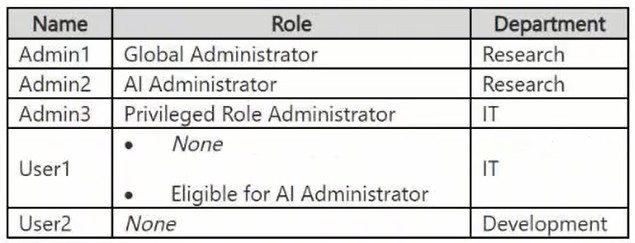
The tenant contains the cloud-only users shown in the following table.
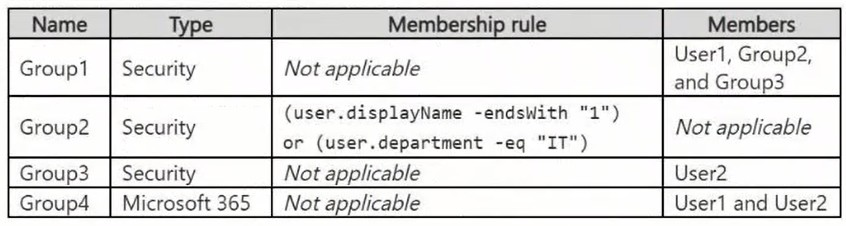
The tenant contains the groups shown in the following table.
The tenant contains the devices shown in the following table.
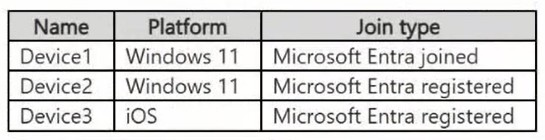
All the devices are managed by using Microsoft Intune.
Microsoft Entra authentication methods
Contoso contains an Authentication methods policy for Microsoft Authenticator that has the following settings:
● Include: Group1
● Exclude: Group3
● Authentication mode: Passwordless
Privileged Identity Management (PIM) configuration
Privileged roles are managed by using Privileged Identity Management (PIM).
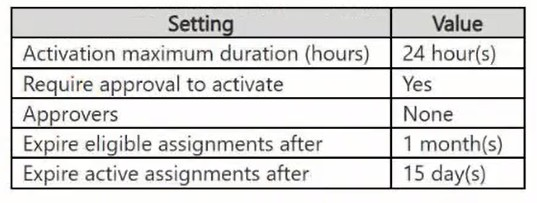
The PIM settings for the AI Administrator role are configured as shown in the following table.
Email configuration
Each user has a Microsoft Exchange mailbox.
Contoso contains an anti-spam outbound policy named Antispam1 that has the following configurations:
● Included groups: Group4
● Excluded users: User2
● Set an external message limit: 3
● Set an internal message limit: 5
● Set a daily message limit: 13
● Restriction placed on users who reach the message limit: Restrict the user from sending mail
Microsoft SharePoint configuration
Contoso has a Microsoft SharePoint site named Site1 that stores the following types of content and various other documents:
● Project documents: All the documents have a project code that includes the letters PR, followed by a dash and nine digits (for example PR-123456789).
● Proposal documents: All the documents have a customer ID that includes seven to 10 alphanumerical characters. All the customer IDs are recorded in a Microsoft Excel workbook.
● Feedback forms: All the documents were created by using the same template.
Microsoft AI services
Contoso implements the following Microsoft AI services:
● Microsoft 365 Copilot for selected users
● Microsoft Foundry agents, including an agent named Agent1
Requirements
Planned changes
Contoso plans to implement the following changes:
● Issue new Android devices to the Group1 users.
● Assign Microsoft 365 Copilot licenses to the users in Group1.
● Add an additional email address alias for the users in Group4.
● Create a Conditional Access policy named CAPolicy1 for Group3.
● Disable web search for Microsoft 365 Copilot and Microsoft 365 Copilot Chat.
● Create classifiers to identify project documents and proposal documents stored on Site1.
Technical requirements
Contoso identifies the following technical requirements:
● The users in Group3 that access Microsoft 365 resources from anonymous IP addresses must complete multifactor authentication (MFA).
● Microsoft 365 Copilot responses must NOT use content from the project documents stored on Site1.
● Microsoft 365 Copilot responses must use content from only Microsoft 365 locations.
● The total costs of Agent1 must be monitored and evaluated monthly.
● All the Android devices must be registered in Microsoft Entra.
● Administrative effort must be minimized.
● Administrative costs must be minimized.

HOTSPOT (Drag and Drop is not supported)
You need to evaluate the configuration of AU1.
For each of the following statements, select Yes if the statement is true. Otherwise, select No.
Note: Each correct selection is worth one point.
Hot Area:

  1. See Explanation section for answer.

Answer(s): A

Explanation:


AU1 uses a dynamic device membership rule, so members are controlled by the rule and cannot be added manually while dynamic membership is enabled.
Device2 is Microsoft Entra registered, which corresponds to deviceTrustType = "Workplace", and it runs Windows. Therefore, it satisfies the AU1 membership rule and is a member of AU1.
Issuing devices to members of Group1 does not automatically make those devices members of AU1. Dynamic administrative unit membership is evaluated from the device attributes specified in the rule, not from the group membership of the device users.


Reference:

https://learn.microsoft.com/en-us/entra/identity/role-based-access-control/admin-units-members-dynamic?tabs =admin-center https://learn.microsoft.com/en-us/entra/identity/users/groups-dynamic-membership


This is a case study. Case studies are not timed separately from other exam sections. You can use as much exam time as you would like to complete each case study. However, there might be additional case studies or other exam sections. Manage your time to ensure that you can complete all the exam sections in the time provided. Pay attention to the Exam Progress at the top of the screen so you have sufficient time to complete any exam sections that follow this case study.
To answer the case study questions, you will need to reference information that is provided in the case. Case studies and associated questions might contain exhibits or other resources that provide more information about the scenario described in the case. Information provided in an individual question does not apply to the other questions in the case study.
A Review Screen will appear at the end of this case study. From the Review Screen, you can review and change your answers before you move to the next exam section. After you leave this case study, you will NOT be able to return to it.
To start the case study
To display the first question in this case study, select the “Next” button. To the left of the question, a menu provides links to information such as business requirements, the existing environment, and problem statements. Please read through all this information before answering any questions.
When you are ready to answer a question, select the “Question” button to return to the question.
Contoso, Ltd. is a consulting company that has a main office in San Francisco and a branch office in Dallas.
Existing Environment
Microsoft Entra configuration
Contoso has an Azure subscription.
Contoso has a Microsoft 365 E5 subscription.
Contoso has a Microsoft Entra tenant named contoso.com. The tenant has an administrative unit named AU1 that contains the following membership rule.
(device.deviceTrustType –eq “Workplace”) and (device.deviceOSType –in [“Windows”, “Android”])
The tenant contains the cloud-only users shown in the following table.

The tenant contains the groups shown in the following table.

The tenant contains the devices shown in the following table.

All the devices are managed by using Microsoft Intune.
Microsoft Entra authentication methods
Contoso contains an Authentication methods policy for Microsoft Authenticator that has the following settings:
● Include: Group1
● Exclude: Group3
● Authentication mode: Passwordless
Privileged Identity Management (PIM) configuration
Privileged roles are managed by using Privileged Identity Management (PIM).
The PIM settings for the AI Administrator role are configured as shown in the following table.

Email configuration
Each user has a Microsoft Exchange mailbox.
Contoso contains an anti-spam outbound policy named Antispam1 that has the following configurations:
● Included groups: Group4
● Excluded users: User2
● Set an external message limit: 3
● Set an internal message limit: 5
● Set a daily message limit: 13
● Restriction placed on users who reach the message limit: Restrict the user from sending mail
Microsoft SharePoint configuration
Contoso has a Microsoft SharePoint site named Site1 that stores the following types of content and various other documents:
● Project documents: All the documents have a project code that includes the letters PR, followed by a dash and nine digits (for example PR-123456789).
● Proposal documents: All the documents have a customer ID that includes seven to 10 alphanumerical characters. All the customer IDs are recorded in a Microsoft Excel workbook.
● Feedback forms: All the documents were created by using the same template.
Microsoft AI services
Contoso implements the following Microsoft AI services:
● Microsoft 365 Copilot for selected users
● Microsoft Foundry agents, including an agent named Agent1
Requirements
Planned changes
Contoso plans to implement the following changes:
● Issue new Android devices to the Group1 users.
● Assign Microsoft 365 Copilot licenses to the users in Group1.
● Add an additional email address alias for the users in Group4.
● Create a Conditional Access policy named CAPolicy1 for Group3.
● Disable web search for Microsoft 365 Copilot and Microsoft 365 Copilot Chat.
● Create classifiers to identify project documents and proposal documents stored on Site1.
Technical requirements
Contoso identifies the following technical requirements:
● The users in Group3 that access Microsoft 365 resources from anonymous IP addresses must complete multifactor authentication (MFA).
● Microsoft 365 Copilot responses must NOT use content from the project documents stored on Site1.
● Microsoft 365 Copilot responses must use content from only Microsoft 365 locations.
● The total costs of Agent1 must be monitored and evaluated monthly.
● All the Android devices must be registered in Microsoft Entra.
● Administrative effort must be minimized.
● Administrative costs must be minimized.

DRAG DROP (Drag and Drop is not supported)
You have a Microsoft 365 subscription.
You need to meet the following requirements.
● Report a Microsoft 365 service issue.
● Request help on how to add a new user to a Microsoft Entra tenant.
What should you use in the Microsoft 365 admin center? To answer, drag the appropriate features to the correct requirements. Each feature may be used once, more than once, or not at all. You may need to drag the split bar between panes or scroll to view content.
Note: Each correct selection is worth one point.
Select and Place:

  1. See Explanation section for answer.

Answer(s): A

Explanation:


Use Service health to review Microsoft 365 service status and report service problems to Microsoft.
Use New service request to contact Microsoft support when administrative assistance is required, such as help adding a user to the Microsoft Entra tenant.


This is a case study. Case studies are not timed separately from other exam sections. You can use as much exam time as you would like to complete each case study. However, there might be additional case studies or other exam sections. Manage your time to ensure that you can complete all the exam sections in the time provided. Pay attention to the Exam Progress at the top of the screen so you have sufficient time to complete any exam sections that follow this case study.
To answer the case study questions, you will need to reference information that is provided in the case. Case studies and associated questions might contain exhibits or other resources that provide more information about the scenario described in the case. Information provided in an individual question does not apply to the other questions in the case study.
A Review Screen will appear at the end of this case study. From the Review Screen, you can review and change your answers before you move to the next exam section. After you leave this case study, you will NOT be able to return to it.
To start the case study
To display the first question in this case study, select the “Next” button. To the left of the question, a menu provides links to information such as business requirements, the existing environment, and problem statements. Please read through all this information before answering any questions.
When you are ready to answer a question, select the “Question” button to return to the question.
Contoso, Ltd. is a consulting company that has a main office in San Francisco and a branch office in Dallas.
Existing Environment
Microsoft Entra configuration
Contoso has an Azure subscription.
Contoso has a Microsoft 365 E5 subscription.
Contoso has a Microsoft Entra tenant named contoso.com. The tenant has an administrative unit named AU1 that contains the following membership rule.
(device.deviceTrustType –eq “Workplace”) and (device.deviceOSType –in [“Windows”, “Android”])
The tenant contains the cloud-only users shown in the following table.

The tenant contains the groups shown in the following table.

The tenant contains the devices shown in the following table.

All the devices are managed by using Microsoft Intune.
Microsoft Entra authentication methods
Contoso contains an Authentication methods policy for Microsoft Authenticator that has the following settings:
● Include: Group1
● Exclude: Group3
● Authentication mode: Passwordless
Privileged Identity Management (PIM) configuration
Privileged roles are managed by using Privileged Identity Management (PIM).
The PIM settings for the AI Administrator role are configured as shown in the following table.

Email configuration
Each user has a Microsoft Exchange mailbox.
Contoso contains an anti-spam outbound policy named Antispam1 that has the following configurations:
● Included groups: Group4
● Excluded users: User2
● Set an external message limit: 3
● Set an internal message limit: 5
● Set a daily message limit: 13
● Restriction placed on users who reach the message limit: Restrict the user from sending mail
Microsoft SharePoint configuration
Contoso has a Microsoft SharePoint site named Site1 that stores the following types of content and various other documents:
● Project documents: All the documents have a project code that includes the letters PR, followed by a dash and nine digits (for example PR-123456789).
● Proposal documents: All the documents have a customer ID that includes seven to 10 alphanumerical characters. All the customer IDs are recorded in a Microsoft Excel workbook.
● Feedback forms: All the documents were created by using the same template.
Microsoft AI services
Contoso implements the following Microsoft AI services:
● Microsoft 365 Copilot for selected users
● Microsoft Foundry agents, including an agent named Agent1
Requirements
Planned changes
Contoso plans to implement the following changes:
● Issue new Android devices to the Group1 users.
● Assign Microsoft 365 Copilot licenses to the users in Group1.
● Add an additional email address alias for the users in Group4.
● Create a Conditional Access policy named CAPolicy1 for Group3.
● Disable web search for Microsoft 365 Copilot and Microsoft 365 Copilot Chat.
● Create classifiers to identify project documents and proposal documents stored on Site1.
Technical requirements
Contoso identifies the following technical requirements:
● The users in Group3 that access Microsoft 365 resources from anonymous IP addresses must complete multifactor authentication (MFA).
● Microsoft 365 Copilot responses must NOT use content from the project documents stored on Site1.
● Microsoft 365 Copilot responses must use content from only Microsoft 365 locations.
● The total costs of Agent1 must be monitored and evaluated monthly.
● All the Android devices must be registered in Microsoft Entra.
● Administrative effort must be minimized.
● Administrative costs must be minimized.

You have a Microsoft 365 E5 subscription and use Microsoft Intune for managing mobile devices.
You need to access service health alerts from a mobile phone.
What should you use?

  1. Intune Company Portal
  2. the Intune app
  3. the Microsoft 365 Admin mobile app
  4. the Microsoft Authenticator app

Answer(s): C

Explanation:

The Microsoft 365 Admin mobile app provides administrators with access to Microsoft 365 service health information and alerts from a mobile device. This allows administrators to monitor incidents and advisories without using the full web-based admin center.


This is a case study. Case studies are not timed separately from other exam sections. You can use as much exam time as you would like to complete each case study. However, there might be additional case studies or other exam sections. Manage your time to ensure that you can complete all the exam sections in the time provided. Pay attention to the Exam Progress at the top of the screen so you have sufficient time to complete any exam sections that follow this case study.
To answer the case study questions, you will need to reference information that is provided in the case. Case studies and associated questions might contain exhibits or other resources that provide more information about the scenario described in the case. Information provided in an individual question does not apply to the other questions in the case study.
A Review Screen will appear at the end of this case study. From the Review Screen, you can review and change your answers before you move to the next exam section. After you leave this case study, you will NOT be able to return to it.
To start the case study
To display the first question in this case study, select the “Next” button. To the left of the question, a menu provides links to information such as business requirements, the existing environment, and problem statements. Please read through all this information before answering any questions.
When you are ready to answer a question, select the “Question” button to return to the question.
Contoso, Ltd. is a consulting company that has a main office in San Francisco and a branch office in Dallas.
Existing Environment
Microsoft Entra configuration
Contoso has an Azure subscription.
Contoso has a Microsoft 365 E5 subscription.
Contoso has a Microsoft Entra tenant named contoso.com. The tenant has an administrative unit named AU1 that contains the following membership rule.
(device.deviceTrustType –eq “Workplace”) and (device.deviceOSType –in [“Windows”, “Android”])
The tenant contains the cloud-only users shown in the following table.

The tenant contains the groups shown in the following table.

The tenant contains the devices shown in the following table.

All the devices are managed by using Microsoft Intune.
Microsoft Entra authentication methods
Contoso contains an Authentication methods policy for Microsoft Authenticator that has the following settings:
● Include: Group1
● Exclude: Group3
● Authentication mode: Passwordless
Privileged Identity Management (PIM) configuration
Privileged roles are managed by using Privileged Identity Management (PIM).
The PIM settings for the AI Administrator role are configured as shown in the following table.

Email configuration
Each user has a Microsoft Exchange mailbox.
Contoso contains an anti-spam outbound policy named Antispam1 that has the following configurations:
● Included groups: Group4
● Excluded users: User2
● Set an external message limit: 3
● Set an internal message limit: 5
● Set a daily message limit: 13
● Restriction placed on users who reach the message limit: Restrict the user from sending mail
Microsoft SharePoint configuration
Contoso has a Microsoft SharePoint site named Site1 that stores the following types of content and various other documents:
● Project documents: All the documents have a project code that includes the letters PR, followed by a dash and nine digits (for example PR-123456789).
● Proposal documents: All the documents have a customer ID that includes seven to 10 alphanumerical characters. All the customer IDs are recorded in a Microsoft Excel workbook.
● Feedback forms: All the documents were created by using the same template.
Microsoft AI services
Contoso implements the following Microsoft AI services:
● Microsoft 365 Copilot for selected users
● Microsoft Foundry agents, including an agent named Agent1
Requirements
Planned changes
Contoso plans to implement the following changes:
● Issue new Android devices to the Group1 users.
● Assign Microsoft 365 Copilot licenses to the users in Group1.
● Add an additional email address alias for the users in Group4.
● Create a Conditional Access policy named CAPolicy1 for Group3.
● Disable web search for Microsoft 365 Copilot and Microsoft 365 Copilot Chat.
● Create classifiers to identify project documents and proposal documents stored on Site1.
Technical requirements
Contoso identifies the following technical requirements:
● The users in Group3 that access Microsoft 365 resources from anonymous IP addresses must complete multifactor authentication (MFA).
● Microsoft 365 Copilot responses must NOT use content from the project documents stored on Site1.
● Microsoft 365 Copilot responses must use content from only Microsoft 365 locations.
● The total costs of Agent1 must be monitored and evaluated monthly.
● All the Android devices must be registered in Microsoft Entra.
● Administrative effort must be minimized.
● Administrative costs must be minimized.

HOTSPOT (Drag and Drop is not supported)
Your company has a Microsoft 365 subscription that contains the domains shown in the following exhibit.

Use the drop-down menus to select the answer choice that completes each statement based on the information presented in the graphic.
Note: Each correct selection is worth one point.
Hot Area:

  1. See Explanation section for answer.

Answer(s): A

Explanation:


All three domains are present in the Microsoft 365 tenant and can be used as sign-in/username suffixes. The Incomplete setup status for contoso.com indicates that required service DNS configuration is not complete, not that the domain is unavailable for user identities.
For inbound Exchange Online email, the domain must be configured for the Exchange service with the required DNS records. The default contoso221018.onmicrosoft.com domain is healthy, while contoso.com has incomplete setup and the east.contoso221018.onmicrosoft.com domain has no services selected.


This is a case study. Case studies are not timed separately from other exam sections. You can use as much exam time as you would like to complete each case study. However, there might be additional case studies or other exam sections. Manage your time to ensure that you can complete all the exam sections in the time provided. Pay attention to the Exam Progress at the top of the screen so you have sufficient time to complete any exam sections that follow this case study.
To answer the case study questions, you will need to reference information that is provided in the case. Case studies and associated questions might contain exhibits or other resources that provide more information about the scenario described in the case. Information provided in an individual question does not apply to the other questions in the case study.
A Review Screen will appear at the end of this case study. From the Review Screen, you can review and change your answers before you move to the next exam section. After you leave this case study, you will NOT be able to return to it.
To start the case study
To display the first question in this case study, select the “Next” button. To the left of the question, a menu provides links to information such as business requirements, the existing environment, and problem statements. Please read through all this information before answering any questions.
When you are ready to answer a question, select the “Question” button to return to the question.
Contoso, Ltd. is a consulting company that has a main office in San Francisco and a branch office in Dallas.
Existing Environment
Microsoft Entra configuration
Contoso has an Azure subscription.
Contoso has a Microsoft 365 E5 subscription.
Contoso has a Microsoft Entra tenant named contoso.com. The tenant has an administrative unit named AU1 that contains the following membership rule.
(device.deviceTrustType –eq “Workplace”) and (device.deviceOSType –in [“Windows”, “Android”])
The tenant contains the cloud-only users shown in the following table.

The tenant contains the groups shown in the following table.

The tenant contains the devices shown in the following table.

All the devices are managed by using Microsoft Intune.
Microsoft Entra authentication methods
Contoso contains an Authentication methods policy for Microsoft Authenticator that has the following settings:
● Include: Group1
● Exclude: Group3
● Authentication mode: Passwordless
Privileged Identity Management (PIM) configuration
Privileged roles are managed by using Privileged Identity Management (PIM).
The PIM settings for the AI Administrator role are configured as shown in the following table.

Email configuration
Each user has a Microsoft Exchange mailbox.
Contoso contains an anti-spam outbound policy named Antispam1 that has the following configurations:
● Included groups: Group4
● Excluded users: User2
● Set an external message limit: 3
● Set an internal message limit: 5
● Set a daily message limit: 13
● Restriction placed on users who reach the message limit: Restrict the user from sending mail
Microsoft SharePoint configuration
Contoso has a Microsoft SharePoint site named Site1 that stores the following types of content and various other documents:
● Project documents: All the documents have a project code that includes the letters PR, followed by a dash and nine digits (for example PR-123456789).
● Proposal documents: All the documents have a customer ID that includes seven to 10 alphanumerical characters. All the customer IDs are recorded in a Microsoft Excel workbook.
● Feedback forms: All the documents were created by using the same template.
Microsoft AI services
Contoso implements the following Microsoft AI services:
● Microsoft 365 Copilot for selected users
● Microsoft Foundry agents, including an agent named Agent1
Requirements
Planned changes
Contoso plans to implement the following changes:
● Issue new Android devices to the Group1 users.
● Assign Microsoft 365 Copilot licenses to the users in Group1.
● Add an additional email address alias for the users in Group4.
● Create a Conditional Access policy named CAPolicy1 for Group3.
● Disable web search for Microsoft 365 Copilot and Microsoft 365 Copilot Chat.
● Create classifiers to identify project documents and proposal documents stored on Site1.
Technical requirements
Contoso identifies the following technical requirements:
● The users in Group3 that access Microsoft 365 resources from anonymous IP addresses must complete multifactor authentication (MFA).
● Microsoft 365 Copilot responses must NOT use content from the project documents stored on Site1.
● Microsoft 365 Copilot responses must use content from only Microsoft 365 locations.
● The total costs of Agent1 must be monitored and evaluated monthly.
● All the Android devices must be registered in Microsoft Entra.
● Administrative effort must be minimized.
● Administrative costs must be minimized.

HOTSPOT (Drag and Drop is not supported)
You have a Microsoft 365 E5 subscription that contains a user named User1.
You need to perform the following actions:
● Create a shared mailbox named Mbox1 in the subscription.
● Grant User1 the Send As permission for Mbox1.
Which Microsoft 365 portals can you use to perform each task? To answer, select the appropriate options in the answer area.
Note: Each correct selection is worth one point.
Hot Area:

  1. See Explanation section for answer.

Answer(s): A

Explanation:


A shared mailbox can be created from either the Exchange admin center or the Microsoft 365 admin center. The Send As permission can also be assigned from either of those portals. Microsoft Entra admin center manages identities and directory objects, but it does not provide Exchange mailbox delegation management.


Reference:

https://learn.microsoft.com/en-us/exchange/collaboration/shared-mailboxes/create-shared-mailboxes https://learn.microsoft.com/en-us/microsoft-365/admin/add-users/give-mailbox-permissions-to-another-user?vi ew=o365-worldwide


This is a case study. Case studies are not timed separately from other exam sections. You can use as much exam time as you would like to complete each case study. However, there might be additional case studies or other exam sections. Manage your time to ensure that you can complete all the exam sections in the time provided. Pay attention to the Exam Progress at the top of the screen so you have sufficient time to complete any exam sections that follow this case study.
To answer the case study questions, you will need to reference information that is provided in the case. Case studies and associated questions might contain exhibits or other resources that provide more information about the scenario described in the case. Information provided in an individual question does not apply to the other questions in the case study.
A Review Screen will appear at the end of this case study. From the Review Screen, you can review and change your answers before you move to the next exam section. After you leave this case study, you will NOT be able to return to it.
To start the case study
To display the first question in this case study, select the “Next” button. To the left of the question, a menu provides links to information such as business requirements, the existing environment, and problem statements. Please read through all this information before answering any questions.
When you are ready to answer a question, select the “Question” button to return to the question.
Contoso, Ltd. is a consulting company that has a main office in San Francisco and a branch office in Dallas.
Existing Environment
Microsoft Entra configuration
Contoso has an Azure subscription.
Contoso has a Microsoft 365 E5 subscription.
Contoso has a Microsoft Entra tenant named contoso.com. The tenant has an administrative unit named AU1 that contains the following membership rule.
(device.deviceTrustType –eq “Workplace”) and (device.deviceOSType –in [“Windows”, “Android”])
The tenant contains the cloud-only users shown in the following table.

The tenant contains the groups shown in the following table.

The tenant contains the devices shown in the following table.

All the devices are managed by using Microsoft Intune.
Microsoft Entra authentication methods
Contoso contains an Authentication methods policy for Microsoft Authenticator that has the following settings:
● Include: Group1
● Exclude: Group3
● Authentication mode: Passwordless
Privileged Identity Management (PIM) configuration
Privileged roles are managed by using Privileged Identity Management (PIM).
The PIM settings for the AI Administrator role are configured as shown in the following table.

Email configuration
Each user has a Microsoft Exchange mailbox.
Contoso contains an anti-spam outbound policy named Antispam1 that has the following configurations:
● Included groups: Group4
● Excluded users: User2
● Set an external message limit: 3
● Set an internal message limit: 5
● Set a daily message limit: 13
● Restriction placed on users who reach the message limit: Restrict the user from sending mail
Microsoft SharePoint configuration
Contoso has a Microsoft SharePoint site named Site1 that stores the following types of content and various other documents:
● Project documents: All the documents have a project code that includes the letters PR, followed by a dash and nine digits (for example PR-123456789).
● Proposal documents: All the documents have a customer ID that includes seven to 10 alphanumerical characters. All the customer IDs are recorded in a Microsoft Excel workbook.
● Feedback forms: All the documents were created by using the same template.
Microsoft AI services
Contoso implements the following Microsoft AI services:
● Microsoft 365 Copilot for selected users
● Microsoft Foundry agents, including an agent named Agent1
Requirements
Planned changes
Contoso plans to implement the following changes:
● Issue new Android devices to the Group1 users.
● Assign Microsoft 365 Copilot licenses to the users in Group1.
● Add an additional email address alias for the users in Group4.
● Create a Conditional Access policy named CAPolicy1 for Group3.
● Disable web search for Microsoft 365 Copilot and Microsoft 365 Copilot Chat.
● Create classifiers to identify project documents and proposal documents stored on Site1.
Technical requirements
Contoso identifies the following technical requirements:
● The users in Group3 that access Microsoft 365 resources from anonymous IP addresses must complete multifactor authentication (MFA).
● Microsoft 365 Copilot responses must NOT use content from the project documents stored on Site1.
● Microsoft 365 Copilot responses must use content from only Microsoft 365 locations.
● The total costs of Agent1 must be monitored and evaluated monthly.
● All the Android devices must be registered in Microsoft Entra.
● Administrative effort must be minimized.
● Administrative costs must be minimized.

You have a Microsoft 365 subscription.
Your company has multiple branch offices, including a branch office named Branch1. The users in Branch1 connect to Microsoft 365 by using a corporate web proxy.
On the Network connectivity page in the Microsoft 365 admin center, Branch1 displays the following network insight:
“We’re detecting WebSocket (WSS) connection failures to the domain: *.cloud.microsoft, which causes Copilot to not work correctly for your users.”
HTTPS access to Microsoft 365 apps from Branch1 succeeds.
You need to resolve the insight without changing connectivity for the other branch offices.
What should you configure?

  1. the Branch1 web proxy policy to allow required protocols for the hosts in *.cloud.microsoft
  2. the Branch1 DNS resolver policy to optimize regional name resolution for the hosts in *.cloud.microsoft
  3. the Branch1 web proxy policy to exempt hosts in *.cloud.microsoft from TLS inspection
  4. the Branch1 firewall policy to allow HTTPS connections for the hosts in *.cloud.microsoft

Answer(s): A

Explanation:

The insight specifically identifies WebSocket (WSS) connection failures to *.cloud.microsoft. Configure the Branch1 web proxy policy to permit WebSocket protocol upgrades and WSS connections to hosts in that wildcard domain. HTTPS already works, so simply allowing HTTPS does not address the failed WebSocket connections.


Reference:

https://learn.microsoft.com/en-us/microsoft-365/enterprise/office-365-network-mac-perf-insights?view=o365-w orldwide https://learn.microsoft.com/en-us/microsoft-365/enterprise/office-365-network-mac-perf-connection-blockers?vi ew=o365-worldwide


This is a case study. Case studies are not timed separately from other exam sections. You can use as much exam time as you would like to complete each case study. However, there might be additional case studies or other exam sections. Manage your time to ensure that you can complete all the exam sections in the time provided. Pay attention to the Exam Progress at the top of the screen so you have sufficient time to complete any exam sections that follow this case study.
To answer the case study questions, you will need to reference information that is provided in the case. Case studies and associated questions might contain exhibits or other resources that provide more information about the scenario described in the case. Information provided in an individual question does not apply to the other questions in the case study.
A Review Screen will appear at the end of this case study. From the Review Screen, you can review and change your answers before you move to the next exam section. After you leave this case study, you will NOT be able to return to it.
To start the case study
To display the first question in this case study, select the “Next” button. To the left of the question, a menu provides links to information such as business requirements, the existing environment, and problem statements. Please read through all this information before answering any questions.
When you are ready to answer a question, select the “Question” button to return to the question.
Contoso, Ltd. is a consulting company that has a main office in San Francisco and a branch office in Dallas.
Existing Environment
Microsoft Entra configuration
Contoso has an Azure subscription.
Contoso has a Microsoft 365 E5 subscription.
Contoso has a Microsoft Entra tenant named contoso.com. The tenant has an administrative unit named AU1 that contains the following membership rule.
(device.deviceTrustType –eq “Workplace”) and (device.deviceOSType –in [“Windows”, “Android”])
The tenant contains the cloud-only users shown in the following table.

The tenant contains the groups shown in the following table.

The tenant contains the devices shown in the following table.

All the devices are managed by using Microsoft Intune.
Microsoft Entra authentication methods
Contoso contains an Authentication methods policy for Microsoft Authenticator that has the following settings:
● Include: Group1
● Exclude: Group3
● Authentication mode: Passwordless
Privileged Identity Management (PIM) configuration
Privileged roles are managed by using Privileged Identity Management (PIM).
The PIM settings for the AI Administrator role are configured as shown in the following table.

Email configuration
Each user has a Microsoft Exchange mailbox.
Contoso contains an anti-spam outbound policy named Antispam1 that has the following configurations:
● Included groups: Group4
● Excluded users: User2
● Set an external message limit: 3
● Set an internal message limit: 5
● Set a daily message limit: 13
● Restriction placed on users who reach the message limit: Restrict the user from sending mail
Microsoft SharePoint configuration
Contoso has a Microsoft SharePoint site named Site1 that stores the following types of content and various other documents:
● Project documents: All the documents have a project code that includes the letters PR, followed by a dash and nine digits (for example PR-123456789).
● Proposal documents: All the documents have a customer ID that includes seven to 10 alphanumerical characters. All the customer IDs are recorded in a Microsoft Excel workbook.
● Feedback forms: All the documents were created by using the same template.
Microsoft AI services
Contoso implements the following Microsoft AI services:
● Microsoft 365 Copilot for selected users
● Microsoft Foundry agents, including an agent named Agent1
Requirements
Planned changes
Contoso plans to implement the following changes:
● Issue new Android devices to the Group1 users.
● Assign Microsoft 365 Copilot licenses to the users in Group1.
● Add an additional email address alias for the users in Group4.
● Create a Conditional Access policy named CAPolicy1 for Group3.
● Disable web search for Microsoft 365 Copilot and Microsoft 365 Copilot Chat.
● Create classifiers to identify project documents and proposal documents stored on Site1.
Technical requirements
Contoso identifies the following technical requirements:
● The users in Group3 that access Microsoft 365 resources from anonymous IP addresses must complete multifactor authentication (MFA).
● Microsoft 365 Copilot responses must NOT use content from the project documents stored on Site1.
● Microsoft 365 Copilot responses must use content from only Microsoft 365 locations.
● The total costs of Agent1 must be monitored and evaluated monthly.
● All the Android devices must be registered in Microsoft Entra.
● Administrative effort must be minimized.
● Administrative costs must be minimized.

HOTSPOT (Drag and Drop is not supported)
You have a Microsoft 365 subscription that contains a security group named Group1.The object ID of Group1 is stored in a PowerShell variable named $groupId.
You have a CSV file named C:\Temp\members.csv that contains a column named memberObjectId. The column stores the directory object ID of each user that will be added to Group1.
You need to perform a bulk membership update for Group1 by using Microsoft Graph PowerShell.
How should you complete the script? To answer, select the appropriate options in the answer area.
NOTE: Each correct selection is worth one point.
Hot Area:

  1. See Explanation section for answer.

Answer(s): A

Explanation:


Connect-MgGraph establishes a Microsoft Graph PowerShell session with the required GroupMember.ReadWrite.All permission. New-MgGroupMemberByRef adds each referenced directory object as a member of Group1 by using the group ID and the user's directory object ID.


This is a case study. Case studies are not timed separately from other exam sections. You can use as much exam time as you would like to complete each case study. However, there might be additional case studies or other exam sections. Manage your time to ensure that you can complete all the exam sections in the time provided. Pay attention to the Exam Progress at the top of the screen so you have sufficient time to complete any exam sections that follow this case study.
To answer the case study questions, you will need to reference information that is provided in the case. Case studies and associated questions might contain exhibits or other resources that provide more information about the scenario described in the case. Information provided in an individual question does not apply to the other questions in the case study.
A Review Screen will appear at the end of this case study. From the Review Screen, you can review and change your answers before you move to the next exam section. After you leave this case study, you will NOT be able to return to it.
To start the case study
To display the first question in this case study, select the “Next” button. To the left of the question, a menu provides links to information such as business requirements, the existing environment, and problem statements. Please read through all this information before answering any questions.
When you are ready to answer a question, select the “Question” button to return to the question.
Contoso, Ltd. is a consulting company that has a main office in San Francisco and a branch office in Dallas.
Existing Environment
Microsoft Entra configuration
Contoso has an Azure subscription.
Contoso has a Microsoft 365 E5 subscription.
Contoso has a Microsoft Entra tenant named contoso.com. The tenant has an administrative unit named AU1 that contains the following membership rule.
(device.deviceTrustType –eq “Workplace”) and (device.deviceOSType –in [“Windows”, “Android”])
The tenant contains the cloud-only users shown in the following table.

The tenant contains the groups shown in the following table.

The tenant contains the devices shown in the following table.

All the devices are managed by using Microsoft Intune.
Microsoft Entra authentication methods
Contoso contains an Authentication methods policy for Microsoft Authenticator that has the following settings:
● Include: Group1
● Exclude: Group3
● Authentication mode: Passwordless
Privileged Identity Management (PIM) configuration
Privileged roles are managed by using Privileged Identity Management (PIM).
The PIM settings for the AI Administrator role are configured as shown in the following table.

Email configuration
Each user has a Microsoft Exchange mailbox.
Contoso contains an anti-spam outbound policy named Antispam1 that has the following configurations:
● Included groups: Group4
● Excluded users: User2
● Set an external message limit: 3
● Set an internal message limit: 5
● Set a daily message limit: 13
● Restriction placed on users who reach the message limit: Restrict the user from sending mail
Microsoft SharePoint configuration
Contoso has a Microsoft SharePoint site named Site1 that stores the following types of content and various other documents:
● Project documents: All the documents have a project code that includes the letters PR, followed by a dash and nine digits (for example PR-123456789).
● Proposal documents: All the documents have a customer ID that includes seven to 10 alphanumerical characters. All the customer IDs are recorded in a Microsoft Excel workbook.
● Feedback forms: All the documents were created by using the same template.
Microsoft AI services
Contoso implements the following Microsoft AI services:
● Microsoft 365 Copilot for selected users
● Microsoft Foundry agents, including an agent named Agent1
Requirements
Planned changes
Contoso plans to implement the following changes:
● Issue new Android devices to the Group1 users.
● Assign Microsoft 365 Copilot licenses to the users in Group1.
● Add an additional email address alias for the users in Group4.
● Create a Conditional Access policy named CAPolicy1 for Group3.
● Disable web search for Microsoft 365 Copilot and Microsoft 365 Copilot Chat.
● Create classifiers to identify project documents and proposal documents stored on Site1.
Technical requirements
Contoso identifies the following technical requirements:
● The users in Group3 that access Microsoft 365 resources from anonymous IP addresses must complete multifactor authentication (MFA).
● Microsoft 365 Copilot responses must NOT use content from the project documents stored on Site1.
● Microsoft 365 Copilot responses must use content from only Microsoft 365 locations.
● The total costs of Agent1 must be monitored and evaluated monthly.
● All the Android devices must be registered in Microsoft Entra.
● Administrative effort must be minimized.
● Administrative costs must be minimized.

You have a Microsoft 365 subscription that has an initial domain named contoso.onmicrosoft.com and two verified custom domains named contoso.com and fabrikam.com.
The fabrikam.com domain is the default domain.
The contoso.com domain uses managed authentication, and has 750 references across unused user accounts, application identifier URIs, and mail-enabled security groups.
You need to remove contoso.com from the subscription. The solution must minimize manual changes to Microsoft Entra objects.
What should you do?

  1. Rename all the user, group, and application references in the Microsoft Entra admin center, and then delete contoso.com.
  2. Use the –ForceDelete option for contoso.com without changing the mail-enabled security group references.
  3. Update or remove the mail-enabled security group references, and then use the –ForceDelete option for contoso.com.
  4. Make contoso.com the default domain, and then delete contoso.com.

Answer(s): C

Explanation:

The domain has fewer than 1,000 references and uses managed authentication, so ForceDelete can automatically update supported user, group, and application references to the initial onmicrosoft.com domain. However, Exchange-provisioned references, including mail-enabled security groups, must be updated or removed first. After those references are cleaned up, ForceDelete minimizes the remaining manual changes.


Reference:

https://learn.microsoft.com/en-us/entra/identity/users/domains-manage https://learn.microsoft.com/en-us/graph/api/domain-forcedelete?view=graph-rest-1.0&tabs=http


Share your comments for Microsoft AB-650 exam with other users:

R
Ritu
9/15/2023 5:55:00 AM

interesting

R
Ron
5/30/2023 8:33:00 AM

these dumps are pretty good.

S
Sowl
8/10/2023 6:22:00 PM

good questions

B
Blessious Phiri
8/15/2023 2:02:00 PM

dbua is used for upgrading oracle database

R
Richard
10/24/2023 6:12:00 AM

i am thrilled to say that i passed my amazon web services mls-c01 exam, thanks to study materials. they were comprehensive and well-structured, making my preparation efficient.

J
Janjua
5/22/2023 3:31:00 PM

please upload latest ibm ace c1000-056 dumps

M
Matt
12/30/2023 11:18:00 AM

if only explanations were provided...

R
Rasha
6/29/2023 8:23:00 PM

yes .. i need the dump if you can help me

A
Anonymous
7/25/2023 8:05:00 AM

good morning, could you please upload this exam again?

A
AJ
9/24/2023 9:32:00 AM

hi please upload sre foundation and practitioner exam questions

P
peter parker
8/10/2023 10:59:00 AM

the exam is listed as 80 questions with a pass mark of 70%, how is your 50 questions related?

B
Berihun
7/13/2023 7:29:00 AM

all questions are so important and covers all ccna modules

N
nspk
1/19/2024 12:53:00 AM

q 44. ans:- b (goto setup > order settings > select enable optional price books for orders) reference link --> https://resources.docs.salesforce.com/latest/latest/en-us/sfdc/pdf/sfom_impl_b2b_b2b2c.pdf(decide whether you want to enable the optional price books feature. if so, select enable optional price books for orders. you can use orders in salesforce while managing price books in an external platform. if you’re using d2c commerce, you must select enable optional price books for orders.)

M
Muhammad Rawish Siddiqui
12/2/2023 5:28:00 AM

"cost of replacing data if it were lost" is also correct.

A
Anonymous
7/14/2023 3:17:00 AM

pls upload the questions

M
Mukesh
7/10/2023 4:14:00 PM

good questions

E
Elie Abou Chrouch
12/11/2023 3:38:00 AM

question 182 - correct answer is d. ethernet frame length is 64 - 1518b. length of user data containing is that frame: 46 - 1500b.

D
Damien
9/23/2023 8:37:00 AM

i need this exam pls

N
Nani
9/10/2023 12:02:00 PM

its required for me, please make it enable to access. thanks

E
ethiopia
8/2/2023 2:18:00 AM

seems good..

W
whoAreWeReally
12/19/2023 8:29:00 PM

took the test last week, i did have about 15 - 20 word for word from this site on the test. (only was able to cram 600 of the questions from this site so maybe more were there i didnt review) had 4 labs, bgp, lacp, vrf with tunnels and actually had to skip a lab due to time. lots of automation syntax questions.

V
vs
9/2/2023 12:19:00 PM

no comments

J
john adenu
11/14/2023 11:02:00 AM

nice questions bring out the best in you.

O
Osman
11/21/2023 2:27:00 PM

really helpful

E
Edward
9/13/2023 5:27:00 PM

question #50 and question #81 are exactly the same questions, azure site recovery provides________for virtual machines. the first says that it is fault tolerance is the answer and second says disater recovery. from my research, it says it should be disaster recovery. can anybody explain to me why? thank you

M
Monti
5/24/2023 11:14:00 PM

iam thankful for these exam dumps questions, i would not have passed without this exam dumps.

A
Anon
10/25/2023 10:48:00 PM

some of the answers seem to be inaccurate. q10 for example shouldnt it be an m custom column?

P
PeterPan
10/18/2023 10:22:00 AM

are the question real or fake?

C
CW
7/11/2023 3:19:00 PM

thank you for providing such assistance.

M
Mn8300
11/9/2023 8:53:00 AM

nice questions

N
Nico
4/23/2023 11:41:00 PM

my 3rd purcahse from this site. these exam dumps are helpful. very helpful.

C
Chere
9/15/2023 4:21:00 AM

found it good

T
Thembelani
5/30/2023 2:47:00 AM

excellent material

V
vinesh phale
9/11/2023 2:51:00 AM

very helpfull

AI Tutor 👋 I’m here to help!