Microsoft Administering Information Security in 365 SC-401 Dumps in PDF

Free Microsoft SC-401 Real Questions (page: 28)


Case Study
Instructions
This is a case study. Case studies are not timed separately from other exam sections. You can use as much exam time as you would like to complete each case study. However, there might be additional case studies or other exam sections. Manage your time to ensure that you can complete all the exam sections in the time provided. Pay attention to the Exam Progress at the top of the screen so you have sufficient time to complete any exam sections that follow this case study.
To answer the case study questions, you will need to reference information that is provided in the case. Case studies and associated questions might contain exhibits or other resources that provide more information about the scenario described in the case. Information provided in an individual question does not apply to the other questions in the case study.
A Review Screen will appear at the end of this case study. From the Review Screen, you can review and change your answers before you move to the next exam section. After you leave this case study, you will NOT
be able to return to it.
To start the case study
To display the first question in this case study, select the "Next" button. To the left of the question, a menu provides links to information such as business requirements, the existing environment, and problem statements. Please read through all this information before answering any questions.
When you are ready to answer a question, select the "Question" button to return to the question.
Overview
Contoso, Ltd. is a consulting company that has a main office in Montreal and three branch offices in Seattle,
Boston, and Johannesburg.
Existing Environment
Microsoft 365 Environment
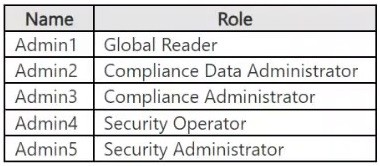
Contoso has a Microsoft 365 E5 tenant. The tenant contains the administrative user accounts shown in the following table.
Users store data in the following locations:
● SharePoint sites
● OneDrive accounts
● Exchange mailboxes
● Exchange public folders
● Teams chats
● Teams channel messages
When users in the research department create documents, they must add a 10-digit project code to each document. Project codes that start with the digits 999 are confidential.
Contoso is not using Optical character recognition (OCR) in Microsoft 365.
SharePoint Online Environment
Contoso has four Microsoft SharePoint Online sites named Site1, Site2, Site3, and Site4.
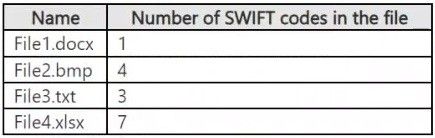
Site2 contains the files shown in the following table.
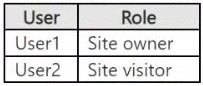
Two users named User1 and User2 are assigned roles for Site2 as shown in the following table.
Site3 stores documents related to the company's projects. The documents are organized in a folder hierarchy based on the project.
Site4 has the following two retention policies applied:
● Name: Site4RetentionPolicy1
- Locations to apply the policy: Site4
- Delete items older than: 2 years
- Delete content based on: When items were created
● Name: Site4RetentionPolicy2
- Locations to apply the policy: Site4
- Retain items for a specific period: 4 years
- Start the retention period based on: When items were created
- At the end of the retention period: Do nothing
Problem Statements
Management at Contoso is concerned about data leaks. On several occasions, confidential research department documents were leaked.
Requirements
Planned Changes
Contoso plans to create the following data loss prevention (DLP) policy:
● Name: DLPpolicy1
● Locations to apply the policy: Site2
● Conditions:
- Content contains any of these sensitive info types: SWIFT Code
- Instance count: 2 to any
● Actions: Restrict access to the content
Technical Requirements
Contoso must meet the following technical requirements:
● All administrative users must be able to review DLP reports.
● Whenever possible, the principle of least privilege must be used.
● For all users, all Microsoft 365 data must be retained for at least one year.
● Confidential documents must be detected and protected by using Microsoft 365.
● Site1 documents that include credit card numbers must be labeled automatically.
● All administrative users must be able to create Microsoft 365 sensitivity labels.
● After a project is complete, the documents in Site3 that relate to the project must be retained for 10 years.

You have a Microsoft 365 E5 subscription that uses Microsoft Defender for Cloud Apps.
You need to ensure that you receive an alert when a user uploads a document to a third-party cloud storage service.
What should you use?

  1. an insider risk policy
  2. a file policy
  3. a sensitivity label
  4. an activity policy

Answer(s): B

Explanation:

The following are examples of file policies that can be created:
* Publicly shared files - Receive an alert about any file in your cloud that is publicly shared by selecting all files whose sharing level is public.
* Etc.
Note 1, example: Detect and protect GDPR related data across file storage apps.
Detect files that are shared in cloud storage apps and contain personally identifying information and other sensitive data that are bound by a GDPR compliance policy. Then, automatically apply sensitivity labels to limit access only to authorized personnel.
1. In the Microsoft 365 Defender portal, under Cloud Apps, go to Policies -> Policy management. Create a new
File policy.
2. Under Inspection method, select Data Classification Service (DCS), and under Select type select one or more information types that comply with the GDPR compliance, for example: EU debit card number, EU drivers license number, EU national/regional identification number, EU passport number, EU SSN, SU tax identification number.
3. Set the Governance actions to be taken on files when a violation is detected, by selecting Apply sensitivity label for each supported app.
4. Create the file policy.
Note 2: File policies in Microsoft Defender for Cloud Apps
File Policies allow you to enforce a wide range of automated processes using the cloud provider's APIs.
Policies can be set to provide continuous compliance scans, legal eDiscovery tasks, DLP for sensitive content shared publicly, and many more use cases. Defender for Cloud Apps can monitor any file type based on more than 20 metadata filters (for example, access level, file type).


Reference:

https://learn.microsoft.com/en-us/defender-cloud-apps/data-protection-policies https://learn.microsoft.com/en-us/defender-cloud-apps/policies-information-protection


Case Study
Instructions
This is a case study. Case studies are not timed separately from other exam sections. You can use as much exam time as you would like to complete each case study. However, there might be additional case studies or other exam sections. Manage your time to ensure that you can complete all the exam sections in the time provided. Pay attention to the Exam Progress at the top of the screen so you have sufficient time to complete any exam sections that follow this case study.
To answer the case study questions, you will need to reference information that is provided in the case. Case studies and associated questions might contain exhibits or other resources that provide more information about the scenario described in the case. Information provided in an individual question does not apply to the other questions in the case study.
A Review Screen will appear at the end of this case study. From the Review Screen, you can review and change your answers before you move to the next exam section. After you leave this case study, you will NOT
be able to return to it.
To start the case study
To display the first question in this case study, select the "Next" button. To the left of the question, a menu provides links to information such as business requirements, the existing environment, and problem statements. Please read through all this information before answering any questions.
When you are ready to answer a question, select the "Question" button to return to the question.
Overview
Contoso, Ltd. is a consulting company that has a main office in Montreal and three branch offices in Seattle,
Boston, and Johannesburg.
Existing Environment
Microsoft 365 Environment
Contoso has a Microsoft 365 E5 tenant. The tenant contains the administrative user accounts shown in the following table.

Users store data in the following locations:
● SharePoint sites
● OneDrive accounts
● Exchange mailboxes
● Exchange public folders
● Teams chats
● Teams channel messages
When users in the research department create documents, they must add a 10-digit project code to each document. Project codes that start with the digits 999 are confidential.
Contoso is not using Optical character recognition (OCR) in Microsoft 365.
SharePoint Online Environment
Contoso has four Microsoft SharePoint Online sites named Site1, Site2, Site3, and Site4.
Site2 contains the files shown in the following table.

Two users named User1 and User2 are assigned roles for Site2 as shown in the following table.

Site3 stores documents related to the company's projects. The documents are organized in a folder hierarchy based on the project.
Site4 has the following two retention policies applied:
● Name: Site4RetentionPolicy1
- Locations to apply the policy: Site4
- Delete items older than: 2 years
- Delete content based on: When items were created
● Name: Site4RetentionPolicy2
- Locations to apply the policy: Site4
- Retain items for a specific period: 4 years
- Start the retention period based on: When items were created
- At the end of the retention period: Do nothing
Problem Statements
Management at Contoso is concerned about data leaks. On several occasions, confidential research department documents were leaked.
Requirements
Planned Changes
Contoso plans to create the following data loss prevention (DLP) policy:
● Name: DLPpolicy1
● Locations to apply the policy: Site2
● Conditions:
- Content contains any of these sensitive info types: SWIFT Code
- Instance count: 2 to any
● Actions: Restrict access to the content
Technical Requirements
Contoso must meet the following technical requirements:
● All administrative users must be able to review DLP reports.
● Whenever possible, the principle of least privilege must be used.
● For all users, all Microsoft 365 data must be retained for at least one year.
● Confidential documents must be detected and protected by using Microsoft 365.
● Site1 documents that include credit card numbers must be labeled automatically.
● All administrative users must be able to create Microsoft 365 sensitivity labels.
● After a project is complete, the documents in Site3 that relate to the project must be retained for 10 years.

You receive an email that contains a list of words that will be used for a sensitive information type.
You need to create a file that can be used as the source of a keyword dictionary.
In which format should you save the list?

  1. an ACCDB database file that contains a table named Dictionary
  2. a TSV file that contains words separated by tabs
  3. a CSV file that contains words separated by commas
  4. an XLSX file that contains one word in each cell of the first row

Answer(s): C

Explanation:

Correct:
* a CSV file that contains words separated by commas
* a text file that has one word on each line
Incorrect:
* an ACCDB database file that contains a table named Dictionary
* a DOCX file that has one word on each line
* a JSON file that has an element for each word
* a TSV file that contains words separated by tabs
* an XML file that contains a keyword tag for each word
* an XLSX file that contains one word in each cell of the first row
Note:
To create a keyword dictionary for a sensitive information type in Microsoft Purview Data Loss Prevention
(DLP), you must use a plain text (.txt) file (or a .CSV file) where each keyword is on a separate line.
Format Example (TXT file):
confidential sensitive classified top secret
This format is simple, efficient, and directly compatible with Microsoft 365 DLP policies for keyword dictionaries.
How to use the keyword dictionary?
Create a text file with one keyword per line.
Upload it to Microsoft Purview under Data Classification > Sensitive Info Types.
Use the dictionary in a DLP policy to identify and protect sensitive information.
In steps:
Create a keyword dictionary using the Microsoft Purview portal
Use these steps to create or import keywords for a custom dictionary:
1. Sign in to the Microsoft Purview portal Information Protection > Classifiers > Sensitive info types.
2. Select + Create sensitive info type and then enter a Name and Description for your sensitive info type.
Choose Next.
3. On the Define patterns for this sensitive info type page, choose + Create pattern.
4. In the New pattern window, select a Confidence level.
5. Choose Add a Primary element and select Keyword dictionary.
*-> 6. On the Add a keyword dictionary flyout, you can:
6a.Upload a dictionary file in TXT or CSV format.
6b. Choose from existing dictionaries.
or create a new dictionary by entering keywords manually and giving it a name.


Reference:

https://learn.microsoft.com/en-us/purview/sit-create-a-keyword-dictionary


Case Study
Instructions
This is a case study. Case studies are not timed separately from other exam sections. You can use as much exam time as you would like to complete each case study. However, there might be additional case studies or other exam sections. Manage your time to ensure that you can complete all the exam sections in the time provided. Pay attention to the Exam Progress at the top of the screen so you have sufficient time to complete any exam sections that follow this case study.
To answer the case study questions, you will need to reference information that is provided in the case. Case studies and associated questions might contain exhibits or other resources that provide more information about the scenario described in the case. Information provided in an individual question does not apply to the other questions in the case study.
A Review Screen will appear at the end of this case study. From the Review Screen, you can review and change your answers before you move to the next exam section. After you leave this case study, you will NOT
be able to return to it.
To start the case study
To display the first question in this case study, select the "Next" button. To the left of the question, a menu provides links to information such as business requirements, the existing environment, and problem statements. Please read through all this information before answering any questions.
When you are ready to answer a question, select the "Question" button to return to the question.
Overview
Contoso, Ltd. is a consulting company that has a main office in Montreal and three branch offices in Seattle,
Boston, and Johannesburg.
Existing Environment
Microsoft 365 Environment
Contoso has a Microsoft 365 E5 tenant. The tenant contains the administrative user accounts shown in the following table.

Users store data in the following locations:
● SharePoint sites
● OneDrive accounts
● Exchange mailboxes
● Exchange public folders
● Teams chats
● Teams channel messages
When users in the research department create documents, they must add a 10-digit project code to each document. Project codes that start with the digits 999 are confidential.
Contoso is not using Optical character recognition (OCR) in Microsoft 365.
SharePoint Online Environment
Contoso has four Microsoft SharePoint Online sites named Site1, Site2, Site3, and Site4.
Site2 contains the files shown in the following table.

Two users named User1 and User2 are assigned roles for Site2 as shown in the following table.

Site3 stores documents related to the company's projects. The documents are organized in a folder hierarchy based on the project.
Site4 has the following two retention policies applied:
● Name: Site4RetentionPolicy1
- Locations to apply the policy: Site4
- Delete items older than: 2 years
- Delete content based on: When items were created
● Name: Site4RetentionPolicy2
- Locations to apply the policy: Site4
- Retain items for a specific period: 4 years
- Start the retention period based on: When items were created
- At the end of the retention period: Do nothing
Problem Statements
Management at Contoso is concerned about data leaks. On several occasions, confidential research department documents were leaked.
Requirements
Planned Changes
Contoso plans to create the following data loss prevention (DLP) policy:
● Name: DLPpolicy1
● Locations to apply the policy: Site2
● Conditions:
- Content contains any of these sensitive info types: SWIFT Code
- Instance count: 2 to any
● Actions: Restrict access to the content
Technical Requirements
Contoso must meet the following technical requirements:
● All administrative users must be able to review DLP reports.
● Whenever possible, the principle of least privilege must be used.
● For all users, all Microsoft 365 data must be retained for at least one year.
● Confidential documents must be detected and protected by using Microsoft 365.
● Site1 documents that include credit card numbers must be labeled automatically.
● All administrative users must be able to create Microsoft 365 sensitivity labels.
● After a project is complete, the documents in Site3 that relate to the project must be retained for 10 years.

Note: This question is part of a series of questions that present the same scenario. Each question in the series contains a unique solution that might meet the stated goals. Some question sets might have more than one correct solution, while others might not have a correct solution.
After you answer a question in this section, you will NOT be able to return to it. As a result, these questions will not appear in the review screen.
You recently discovered that the developers at your company emailed Azure Storage Account keys in plain text to third parties.
You need to ensure that when Azure Storage Account keys are emailed, the emails are encrypted.
Solution: You create a data loss prevention (DLP) policy that has Exchange email, SharePoint sites, OneDrive accounts, and Teams chat and channel messages selected.
Does this meet the goal?

  1. Yes
  2. No

Answer(s): A

Explanation:

Correct:
* You create a data loss prevention (DLP) policy that has only the Exchange email location selected.
To ensure Azure Storage Account keys are encrypted when sent via email, you need a Data Loss Prevention
(DLP) policy that detects Azure Storage Account keys using a sensitive information type and automatically encrypts emails containing these keys.
A DLP policy with Exchange email as the only location meets this requirement because it identifies sensitive data in email messages and it applies protection actions, such as encryption, blocking, or alerts.
* You create a data loss prevention (DLP) policy that has Exchange email, SharePoint sites, OneDrive accounts, and Teams chat and channel messages selected.OneDrive accounts, and Teams chat and channel messages selected.
Creating a Data Loss Prevention (DLP) policy that includes Exchange email as a location can help detect and prevent the sharing of sensitive information, like Azure Storage keys, in plain text. By setting up a DLP policy with conditions to identify Azure Storage keys and enforce encryption or blocking actions for Exchange email,
the policy will ensure that any emails containing such sensitive information are either encrypted or prevented from being sent.
Incorrect:
* You configure a mail flow rule that matches a sensitive info type.
* You configure a mail flow rule that matches the text patterns.
To ensure Azure Storage Account keys are encrypted when sent via email, you need a Data Loss Prevention
(DLP) policy that detects Azure Storage Account keys using a sensitive information type and automatically encrypts emails containing these keys.
Text patterns in mail flow rules are not as reliable as sensitive information types in DLP.
Mail flow rules lack advanced content detection and machine learning-based classification, making them less effective than DLP.
* You create a data loss prevention (DLP) policy that has all locations selected.


Reference:

https://docs.microsoft.com/en-us/exchange/policy-and-compliance/mail-flow-rules/conditions-and-exceptions


Case Study
Instructions
This is a case study. Case studies are not timed separately from other exam sections. You can use as much exam time as you would like to complete each case study. However, there might be additional case studies or other exam sections. Manage your time to ensure that you can complete all the exam sections in the time provided. Pay attention to the Exam Progress at the top of the screen so you have sufficient time to complete any exam sections that follow this case study.
To answer the case study questions, you will need to reference information that is provided in the case. Case studies and associated questions might contain exhibits or other resources that provide more information about the scenario described in the case. Information provided in an individual question does not apply to the other questions in the case study.
A Review Screen will appear at the end of this case study. From the Review Screen, you can review and change your answers before you move to the next exam section. After you leave this case study, you will NOT
be able to return to it.
To start the case study
To display the first question in this case study, select the "Next" button. To the left of the question, a menu provides links to information such as business requirements, the existing environment, and problem statements. Please read through all this information before answering any questions.
When you are ready to answer a question, select the "Question" button to return to the question.
Overview
Contoso, Ltd. is a consulting company that has a main office in Montreal and three branch offices in Seattle,
Boston, and Johannesburg.
Existing Environment
Microsoft 365 Environment
Contoso has a Microsoft 365 E5 tenant. The tenant contains the administrative user accounts shown in the following table.

Users store data in the following locations:
● SharePoint sites
● OneDrive accounts
● Exchange mailboxes
● Exchange public folders
● Teams chats
● Teams channel messages
When users in the research department create documents, they must add a 10-digit project code to each document. Project codes that start with the digits 999 are confidential.
Contoso is not using Optical character recognition (OCR) in Microsoft 365.
SharePoint Online Environment
Contoso has four Microsoft SharePoint Online sites named Site1, Site2, Site3, and Site4.
Site2 contains the files shown in the following table.

Two users named User1 and User2 are assigned roles for Site2 as shown in the following table.

Site3 stores documents related to the company's projects. The documents are organized in a folder hierarchy based on the project.
Site4 has the following two retention policies applied:
● Name: Site4RetentionPolicy1
- Locations to apply the policy: Site4
- Delete items older than: 2 years
- Delete content based on: When items were created
● Name: Site4RetentionPolicy2
- Locations to apply the policy: Site4
- Retain items for a specific period: 4 years
- Start the retention period based on: When items were created
- At the end of the retention period: Do nothing
Problem Statements
Management at Contoso is concerned about data leaks. On several occasions, confidential research department documents were leaked.
Requirements
Planned Changes
Contoso plans to create the following data loss prevention (DLP) policy:
● Name: DLPpolicy1
● Locations to apply the policy: Site2
● Conditions:
- Content contains any of these sensitive info types: SWIFT Code
- Instance count: 2 to any
● Actions: Restrict access to the content
Technical Requirements
Contoso must meet the following technical requirements:
● All administrative users must be able to review DLP reports.
● Whenever possible, the principle of least privilege must be used.
● For all users, all Microsoft 365 data must be retained for at least one year.
● Confidential documents must be detected and protected by using Microsoft 365.
● Site1 documents that include credit card numbers must be labeled automatically.
● All administrative users must be able to create Microsoft 365 sensitivity labels.
● After a project is complete, the documents in Site3 that relate to the project must be retained for 10 years.

You have a Microsoft 365 E5 subscription.
You need to enable support for sensitivity labels in Microsoft SharePoint Online.
What should you use?

  1. the Microsoft Purview portal
  2. the Microsoft Entra admin center
  3. the SharePoint admin center
  4. the Microsoft 365 admin center

Answer(s): C

Explanation:

To enable support for sensitivity labels in Microsoft SharePoint Online, you must configure the setting in the
SharePoint admin center.
Sensitivity labels in SharePoint Online allow labeling and protection of files stored in SharePoint and OneDrive.
This feature must be enabled in the SharePoint admin center → Settings → Information protection to allow sensitivity labels to apply encryption and protection to stored documents.


Case Study
Instructions
This is a case study. Case studies are not timed separately from other exam sections. You can use as much exam time as you would like to complete each case study. However, there might be additional case studies or other exam sections. Manage your time to ensure that you can complete all the exam sections in the time provided. Pay attention to the Exam Progress at the top of the screen so you have sufficient time to complete any exam sections that follow this case study.
To answer the case study questions, you will need to reference information that is provided in the case. Case studies and associated questions might contain exhibits or other resources that provide more information about the scenario described in the case. Information provided in an individual question does not apply to the other questions in the case study.
A Review Screen will appear at the end of this case study. From the Review Screen, you can review and change your answers before you move to the next exam section. After you leave this case study, you will NOT
be able to return to it.
To start the case study
To display the first question in this case study, select the "Next" button. To the left of the question, a menu provides links to information such as business requirements, the existing environment, and problem statements. Please read through all this information before answering any questions.
When you are ready to answer a question, select the "Question" button to return to the question.
Overview
Contoso, Ltd. is a consulting company that has a main office in Montreal and three branch offices in Seattle,
Boston, and Johannesburg.
Existing Environment
Microsoft 365 Environment
Contoso has a Microsoft 365 E5 tenant. The tenant contains the administrative user accounts shown in the following table.

Users store data in the following locations:
● SharePoint sites
● OneDrive accounts
● Exchange mailboxes
● Exchange public folders
● Teams chats
● Teams channel messages
When users in the research department create documents, they must add a 10-digit project code to each document. Project codes that start with the digits 999 are confidential.
Contoso is not using Optical character recognition (OCR) in Microsoft 365.
SharePoint Online Environment
Contoso has four Microsoft SharePoint Online sites named Site1, Site2, Site3, and Site4.
Site2 contains the files shown in the following table.

Two users named User1 and User2 are assigned roles for Site2 as shown in the following table.

Site3 stores documents related to the company's projects. The documents are organized in a folder hierarchy based on the project.
Site4 has the following two retention policies applied:
● Name: Site4RetentionPolicy1
- Locations to apply the policy: Site4
- Delete items older than: 2 years
- Delete content based on: When items were created
● Name: Site4RetentionPolicy2
- Locations to apply the policy: Site4
- Retain items for a specific period: 4 years
- Start the retention period based on: When items were created
- At the end of the retention period: Do nothing
Problem Statements
Management at Contoso is concerned about data leaks. On several occasions, confidential research department documents were leaked.
Requirements
Planned Changes
Contoso plans to create the following data loss prevention (DLP) policy:
● Name: DLPpolicy1
● Locations to apply the policy: Site2
● Conditions:
- Content contains any of these sensitive info types: SWIFT Code
- Instance count: 2 to any
● Actions: Restrict access to the content
Technical Requirements
Contoso must meet the following technical requirements:
● All administrative users must be able to review DLP reports.
● Whenever possible, the principle of least privilege must be used.
● For all users, all Microsoft 365 data must be retained for at least one year.
● Confidential documents must be detected and protected by using Microsoft 365.
● Site1 documents that include credit card numbers must be labeled automatically.
● All administrative users must be able to create Microsoft 365 sensitivity labels.
● After a project is complete, the documents in Site3 that relate to the project must be retained for 10 years.

HOTSPOT (Drag and Drop is not supported)
You have Microsoft 365 subscription that is enabled to support trainable classifiers.
You plan to create a custom trainable classifier based on an organizational form template.
You need to identify which role-based access control (RBAC) role is required to create the trainable classifier and where to store the seed content for the trainable classifier. The solution must use the principle of least privilege.
What should you identify? To answer, select the appropriate options in the answer area.
Note: Each correct selection is worth one point.
Hot Area:

  1. See Explanation section for answer.

Answer(s): A

Explanation:


Reference:

https://docs.microsoft.com/en-us/microsoft-365/compliance/classifier-get-started-with?view=o365-worldwide#p repare-for-a-custom-trainable-classifier


Case Study
Instructions
This is a case study. Case studies are not timed separately from other exam sections. You can use as much exam time as you would like to complete each case study. However, there might be additional case studies or other exam sections. Manage your time to ensure that you can complete all the exam sections in the time provided. Pay attention to the Exam Progress at the top of the screen so you have sufficient time to complete any exam sections that follow this case study.
To answer the case study questions, you will need to reference information that is provided in the case. Case studies and associated questions might contain exhibits or other resources that provide more information about the scenario described in the case. Information provided in an individual question does not apply to the other questions in the case study.
A Review Screen will appear at the end of this case study. From the Review Screen, you can review and change your answers before you move to the next exam section. After you leave this case study, you will NOT
be able to return to it.
To start the case study
To display the first question in this case study, select the "Next" button. To the left of the question, a menu provides links to information such as business requirements, the existing environment, and problem statements. Please read through all this information before answering any questions.
When you are ready to answer a question, select the "Question" button to return to the question.
Overview
Contoso, Ltd. is a consulting company that has a main office in Montreal and three branch offices in Seattle,
Boston, and Johannesburg.
Existing Environment
Microsoft 365 Environment
Contoso has a Microsoft 365 E5 tenant. The tenant contains the administrative user accounts shown in the following table.

Users store data in the following locations:
● SharePoint sites
● OneDrive accounts
● Exchange mailboxes
● Exchange public folders
● Teams chats
● Teams channel messages
When users in the research department create documents, they must add a 10-digit project code to each document. Project codes that start with the digits 999 are confidential.
Contoso is not using Optical character recognition (OCR) in Microsoft 365.
SharePoint Online Environment
Contoso has four Microsoft SharePoint Online sites named Site1, Site2, Site3, and Site4.
Site2 contains the files shown in the following table.

Two users named User1 and User2 are assigned roles for Site2 as shown in the following table.

Site3 stores documents related to the company's projects. The documents are organized in a folder hierarchy based on the project.
Site4 has the following two retention policies applied:
● Name: Site4RetentionPolicy1
- Locations to apply the policy: Site4
- Delete items older than: 2 years
- Delete content based on: When items were created
● Name: Site4RetentionPolicy2
- Locations to apply the policy: Site4
- Retain items for a specific period: 4 years
- Start the retention period based on: When items were created
- At the end of the retention period: Do nothing
Problem Statements
Management at Contoso is concerned about data leaks. On several occasions, confidential research department documents were leaked.
Requirements
Planned Changes
Contoso plans to create the following data loss prevention (DLP) policy:
● Name: DLPpolicy1
● Locations to apply the policy: Site2
● Conditions:
- Content contains any of these sensitive info types: SWIFT Code
- Instance count: 2 to any
● Actions: Restrict access to the content
Technical Requirements
Contoso must meet the following technical requirements:
● All administrative users must be able to review DLP reports.
● Whenever possible, the principle of least privilege must be used.
● For all users, all Microsoft 365 data must be retained for at least one year.
● Confidential documents must be detected and protected by using Microsoft 365.
● Site1 documents that include credit card numbers must be labeled automatically.
● All administrative users must be able to create Microsoft 365 sensitivity labels.
● After a project is complete, the documents in Site3 that relate to the project must be retained for 10 years.

HOTSPOT (Drag and Drop is not supported)
You have a Microsoft 365 subscription that contains a team in Microsoft Teams and a connected Microsoft
SharePoint Online site for a product research project.
Project documents are stored in SharePoint and are emailed to internal reviewers. Access to the project workspace must be restricted to approved internal users.
You need to create a sensitivity label for the project. The solution must meet the following requirements:
● All labeled documents and emails must be encrypted and display a visible marking.
● Teams and SharePoint workspaces must be private and block guest access.
What should you configure? To answer, select the appropriate options in the answer area.
Note: Each correct selection is worth one point.
Hot Area:

  1. See Explanation section for answer.

Answer(s): A

Explanation:


Explanation
Box 1: Encryption and content markings
To meet the requirement that all labeled documents and emails are encrypted and display a visible marking,
you should select encryption and content markings.
Select Encryption and content markings to encrypt file/email contents and apply visual indicators like headers,
footers, or watermarks.
Select Privacy and external user access settings separately when configuring the scope for Teams and
SharePoint container protection.
Box 2: Privacy and external user access
To configure the sensitivity label for the Teams and SharePoint workspaces, you should select privacy and external user access.
Privacy and external user access: This setting controls the privacy state (public or private) of the container
(Microsoft Teams and SharePoint/Microsoft 365 groups) and manages whether guest users are allowed access, which directly satisfies the second requirement.


Reference:

https://www.valprovia.com/en/blog/sensitivity-labels-in-microsoft-365
https://learn.microsoft.com/en-us/purview/sensitivity-labels-teams-groups-sites


Case Study
Instructions
This is a case study. Case studies are not timed separately from other exam sections. You can use as much exam time as you would like to complete each case study. However, there might be additional case studies or other exam sections. Manage your time to ensure that you can complete all the exam sections in the time provided. Pay attention to the Exam Progress at the top of the screen so you have sufficient time to complete any exam sections that follow this case study.
To answer the case study questions, you will need to reference information that is provided in the case. Case studies and associated questions might contain exhibits or other resources that provide more information about the scenario described in the case. Information provided in an individual question does not apply to the other questions in the case study.
A Review Screen will appear at the end of this case study. From the Review Screen, you can review and change your answers before you move to the next exam section. After you leave this case study, you will NOT
be able to return to it.
To start the case study
To display the first question in this case study, select the "Next" button. To the left of the question, a menu provides links to information such as business requirements, the existing environment, and problem statements. Please read through all this information before answering any questions.
When you are ready to answer a question, select the "Question" button to return to the question.
Overview
Contoso, Ltd. is a consulting company that has a main office in Montreal and three branch offices in Seattle,
Boston, and Johannesburg.
Existing Environment
Microsoft 365 Environment
Contoso has a Microsoft 365 E5 tenant. The tenant contains the administrative user accounts shown in the following table.

Users store data in the following locations:
● SharePoint sites
● OneDrive accounts
● Exchange mailboxes
● Exchange public folders
● Teams chats
● Teams channel messages
When users in the research department create documents, they must add a 10-digit project code to each document. Project codes that start with the digits 999 are confidential.
Contoso is not using Optical character recognition (OCR) in Microsoft 365.
SharePoint Online Environment
Contoso has four Microsoft SharePoint Online sites named Site1, Site2, Site3, and Site4.
Site2 contains the files shown in the following table.

Two users named User1 and User2 are assigned roles for Site2 as shown in the following table.

Site3 stores documents related to the company's projects. The documents are organized in a folder hierarchy based on the project.
Site4 has the following two retention policies applied:
● Name: Site4RetentionPolicy1
- Locations to apply the policy: Site4
- Delete items older than: 2 years
- Delete content based on: When items were created
● Name: Site4RetentionPolicy2
- Locations to apply the policy: Site4
- Retain items for a specific period: 4 years
- Start the retention period based on: When items were created
- At the end of the retention period: Do nothing
Problem Statements
Management at Contoso is concerned about data leaks. On several occasions, confidential research department documents were leaked.
Requirements
Planned Changes
Contoso plans to create the following data loss prevention (DLP) policy:
● Name: DLPpolicy1
● Locations to apply the policy: Site2
● Conditions:
- Content contains any of these sensitive info types: SWIFT Code
- Instance count: 2 to any
● Actions: Restrict access to the content
Technical Requirements
Contoso must meet the following technical requirements:
● All administrative users must be able to review DLP reports.
● Whenever possible, the principle of least privilege must be used.
● For all users, all Microsoft 365 data must be retained for at least one year.
● Confidential documents must be detected and protected by using Microsoft 365.
● Site1 documents that include credit card numbers must be labeled automatically.
● All administrative users must be able to create Microsoft 365 sensitivity labels.
● After a project is complete, the documents in Site3 that relate to the project must be retained for 10 years.

You have a Microsoft 365 E5 subscription. The subscription contains a user named User1 and the sensitivity labels shown in the following table.

You publish the labels to User1.
The subscription contains the files shown in the following table.

Which files can Microsoft 365 Copilot summarize for User1?

  1. File2 only
  2. File3 only
  3. File2 and File3 only
  4. File1, File2, and File3

Answer(s): A

Explanation:

For Microsoft 365 Copilot to summarize data within a file, the user must have both the EXTRACT and VIEW
usage rights on the sensitivity label applied to that file, according to Microsoft Learn. This ensures that Copilot can access and process the file's content for summarization purposes. If a file is encrypted using Azure Rights
Management without a sensitivity label, the same permissions (EXTRACT and VIEW) are still required for
Copilot to function.


Reference:

https://learn.microsoft.com/en-us/copilot/microsoft-365/microsoft-365-copilot-architecture-data-protection-auditi ng


Case Study
Instructions
This is a case study. Case studies are not timed separately from other exam sections. You can use as much exam time as you would like to complete each case study. However, there might be additional case studies or other exam sections. Manage your time to ensure that you can complete all the exam sections in the time provided. Pay attention to the Exam Progress at the top of the screen so you have sufficient time to complete any exam sections that follow this case study.
To answer the case study questions, you will need to reference information that is provided in the case. Case studies and associated questions might contain exhibits or other resources that provide more information about the scenario described in the case. Information provided in an individual question does not apply to the other questions in the case study.
A Review Screen will appear at the end of this case study. From the Review Screen, you can review and change your answers before you move to the next exam section. After you leave this case study, you will NOT
be able to return to it.
To start the case study
To display the first question in this case study, select the "Next" button. To the left of the question, a menu provides links to information such as business requirements, the existing environment, and problem statements. Please read through all this information before answering any questions.
When you are ready to answer a question, select the "Question" button to return to the question.
Overview
Contoso, Ltd. is a consulting company that has a main office in Montreal and three branch offices in Seattle,
Boston, and Johannesburg.
Existing Environment
Microsoft 365 Environment
Contoso has a Microsoft 365 E5 tenant. The tenant contains the administrative user accounts shown in the following table.

Users store data in the following locations:
● SharePoint sites
● OneDrive accounts
● Exchange mailboxes
● Exchange public folders
● Teams chats
● Teams channel messages
When users in the research department create documents, they must add a 10-digit project code to each document. Project codes that start with the digits 999 are confidential.
Contoso is not using Optical character recognition (OCR) in Microsoft 365.
SharePoint Online Environment
Contoso has four Microsoft SharePoint Online sites named Site1, Site2, Site3, and Site4.
Site2 contains the files shown in the following table.

Two users named User1 and User2 are assigned roles for Site2 as shown in the following table.

Site3 stores documents related to the company's projects. The documents are organized in a folder hierarchy based on the project.
Site4 has the following two retention policies applied:
● Name: Site4RetentionPolicy1
- Locations to apply the policy: Site4
- Delete items older than: 2 years
- Delete content based on: When items were created
● Name: Site4RetentionPolicy2
- Locations to apply the policy: Site4
- Retain items for a specific period: 4 years
- Start the retention period based on: When items were created
- At the end of the retention period: Do nothing
Problem Statements
Management at Contoso is concerned about data leaks. On several occasions, confidential research department documents were leaked.
Requirements
Planned Changes
Contoso plans to create the following data loss prevention (DLP) policy:
● Name: DLPpolicy1
● Locations to apply the policy: Site2
● Conditions:
- Content contains any of these sensitive info types: SWIFT Code
- Instance count: 2 to any
● Actions: Restrict access to the content
Technical Requirements
Contoso must meet the following technical requirements:
● All administrative users must be able to review DLP reports.
● Whenever possible, the principle of least privilege must be used.
● For all users, all Microsoft 365 data must be retained for at least one year.
● Confidential documents must be detected and protected by using Microsoft 365.
● Site1 documents that include credit card numbers must be labeled automatically.
● All administrative users must be able to create Microsoft 365 sensitivity labels.
● After a project is complete, the documents in Site3 that relate to the project must be retained for 10 years.

HOTSPOT (Drag and Drop is not supported)
You have a Microsoft 365 E5 subscription.
You have a file named Customer.csv that contains a list of 1,000 customer names.
You plan to use Customer.csv to classify documents stored in a Microsoft SharePoint Online library.
What should you create in the Microsoft Purview portal, and which type of element should you select? To answer, select the appropriate options in the answer area.
Note: Each correct selection is worth one point.
Hot Area:

  1. See Explanation section for answer.

Answer(s): A

Explanation:


To classify documents in SharePoint Online using Customer.csv, you need to create a trainable classifier. A
trainable classifier is best suited for identifying patterns in unstructured data (e.g., customer names in documents). A sensitive info type is more suitable for structured data (e.g., credit card numbers, SSNs). An adaptive scope is used to apply policies dynamically based on attributes, not for classifying content.
Since Customer.csv contains a list of names, the best element to use is a keyword dictionary. A keyword dictionary allows you to upload a list of predefined terms (such as customer names) to classify documents based on their presence. Regular expressions are used for pattern-based detection (e.g., credit card numbers,
serial numbers), which is not needed here. Functions are used for predefined sensitive data detection (e.g.,
checksum validation for credit card numbers), which does not apply in this case.


Share your comments for Microsoft SC-401 exam with other users:

A
Anon
4/6/2026 5:22:54 PM

Are these the same questions you have to pay for in ExamTopics?

AI Tutor 👋 I’m here to help!